What is NLP?
CAP-6640: Computational Understanding of Natural Language
Spencer Lyon
Prerequisites
Basic Python knowledge
Curiosity about language and AI
Outcomes
Set up a Python environment with uv for NLP development
Define NLP and articulate why natural language is challenging for computers
Identify the key types of ambiguity that make language hard for machines
Understand the levels of linguistic analysis (phonology through discourse)
Use SpaCy to perform basic NLP tasks and see the “magic” in action
References
Jurafsky & Martin, Speech and Language Processing (3rd ed. Draft), Chapters 1 and 2 (download here)
Environment Setup
Before we dive into the fascinating world of NLP, we need to set up our tools. We’ll use uv, a modern Python package manager that’s fast, reliable, and designed for reproducible workflows.
Why uv?
You may have used pip, conda, or other Python package managers before. So why learn another one?
Speed: uv is written in Rust and is 10-100x faster than pip
Reproducibility: Project-based workflow with lockfiles ensures everyone gets the same environment
Simplicity: One tool replaces pip, virtualenv, and pip-tools
Think of uv as “one command to rule them all.”
Setting Up Your NLP Environment
Let’s get SpaCy installed and ready to go. Open your terminal and follow along.
# Install uv (if you haven't already)
curl -LsSf https://astral.sh/uv/install.sh | sh

# Create a new project
uv init nlp-course
cd nlp-course

# Add SpaCy as a dependency
uv add spacy

# Download the English language model
uv add "en-core-web-sm @ https://github.com/explosion/spacy-models/releases/download/en_core_web_sm-3.8.0/en_core_web_sm-3.8.0-py3-none-any.whl"

# Verify everything works
uv run python -c "import spacy; print(spacy.load('en_core_web_sm')('Hello world'))"
You should see output like Hello world — this is a SpaCy Doc object representing your processed text.
Adding Jupyter Lab
For interactive development throughout this course, we’ll use Jupyter Lab. Install it and launch the interface:
# Add Jupyter Lab to your project
uv add jupyterlab

# Launch Jupyter Lab
uv run jupyter lab
This will open Jupyter Lab in your browser. You can create new notebooks, run code interactively, and follow along with the course materials.
Using VS Code for Notebooks
If you prefer VS Code, you can run Jupyter notebooks there using the virtual environment that uv creates:
Open VS Code in your project folder (
code .from the terminal)Install the Python and Jupyter extensions if you haven’t already
Open or create a
.ipynbfileSelect the Python interpreter: Click “Select Kernel” in the top-right of the notebook, then choose “Python Environments” →
.venv/bin/python(the virtual environment uv created in your project)
VS Code will now use all the packages you installed with uv add, including SpaCy and the language model.
The Magic Demo
Before we explain what NLP is or why it’s hard, let’s see it in action. Sometimes the best way to understand something is to experience the magic first.
import spacy
from spacy import displacy

# Load a pre-trained English model
nlp = spacy.load("en_core_web_sm")

# Process some text
doc = nlp("Apple is looking at buying U.K. startup for $1 billion")

# Visualize named entities
displacy.render(doc, style="ent", jupyter=True)# Visualize the grammatical structure
displacy.render(doc, style="dep", jupyter=True)Run this code. What do you see?
The entity visualization highlights words like “Apple” (organization), “U.K.” (location), and “$1 billion” (money). The dependency parse shows grammatical relationships — which words modify which, what’s the subject, what’s the object.
What is Natural Language?
Now that we’ve seen NLP in action, let’s step back and understand what we’re actually dealing with.
Structured vs Unstructured Data
In the world of data, we often distinguish between two types:
Structured data lives in databases, spreadsheets, and tables. It has a clear schema — columns with defined types, relationships between tables, predictable formats.
| company_name | revenue_millions | founded_year |
|--------------|------------------|--------------|
| Apple        | 394,328          | 1976         |
| Google       | 282,836          | 1998         |
Querying structured data is straightforward:
SELECT company_name FROM companies WHERE revenue_millions > 100000Unstructured data is everything else: text, images, audio, video. It doesn’t fit neatly into rows and columns.
“Apple reported record quarterly revenue of $123.9 billion, up 11% year over year, driven by strong iPhone sales in emerging markets...”
How do you query that? How do you ask “which companies had revenue over $100 billion”?
This is the fundamental challenge of NLP: taking the messy, ambiguous, context-dependent nature of human language and making it computable.
Here’s the thing — over 80% of enterprise data is unstructured. All those emails, documents, support tickets, social media posts, contracts, medical records, legal filings... that’s where the real information lives.
Why Language is Hard for Computers
You might think: “Language follows rules. We have grammar books. Just program the rules!”
It’s not that simple. Human language is extraordinarily complex in ways that are easy for us but treacherous for machines.
Ambiguity
Consider this sentence:
“I saw the man with the telescope.”
Who has the telescope? Did I use a telescope to see the man? Or did I see a man who was holding a telescope?
Both interpretations are grammatically valid. Humans resolve this instantly based on context. Computers struggle.
Context Dependence
“The bank was steep.”
“The bank was closed.”
The word “bank” means completely different things in these sentences. We call these homonyms — same spelling, different meanings. English has thousands of them.
Implicit Knowledge
Here’s a famous example called the Winograd Schema Challenge:
“The trophy wouldn’t fit in the suitcase because it was too big.”
What does “it” refer to? The trophy, obviously — trophies are the things that are “too big” to fit.
Now consider:
“The trophy wouldn’t fit in the suitcase because it was too small.”
Now “it” refers to the suitcase. Same sentence structure, but the meaning of “too small” vs “too big” flips the reference.
Humans do this instantly. We have common-sense knowledge about the relative sizes of trophies and suitcases. For decades, this was essentially impossible for computers.
Scale and Creativity
English has roughly 170,000 words in current use. But the number of possible sentences is effectively infinite. New words are coined constantly (“selfie,” “cryptocurrency,” “doomscroll”). Humans use metaphor, sarcasm, understatement, and cultural references that require vast world knowledge to interpret.
Levels of Linguistic Analysis
Linguists break down language understanding into several levels:
| Level | What It Studies | Example |
|---|---|---|
| Phonology | Sound patterns | How “cats” is pronounced /kæts/ |
| Morphology | Word structure | “unhappiness” = un + happy + ness |
| Syntax | Sentence structure | Subject-Verb-Object ordering |
| Semantics | Meaning | “bank” = financial institution OR river edge |
| Pragmatics | Context & intent | “Can you pass the salt?” = request, not question |
| Discourse | Multi-sentence coherence | How “she” in sentence 2 refers to “Mary” in sentence 1 |
Each level builds on the previous, and errors compound. Get the syntax wrong, and semantics fails. Miss the pragmatics, and you might answer “yes” when someone asks “Can you pass the salt?”
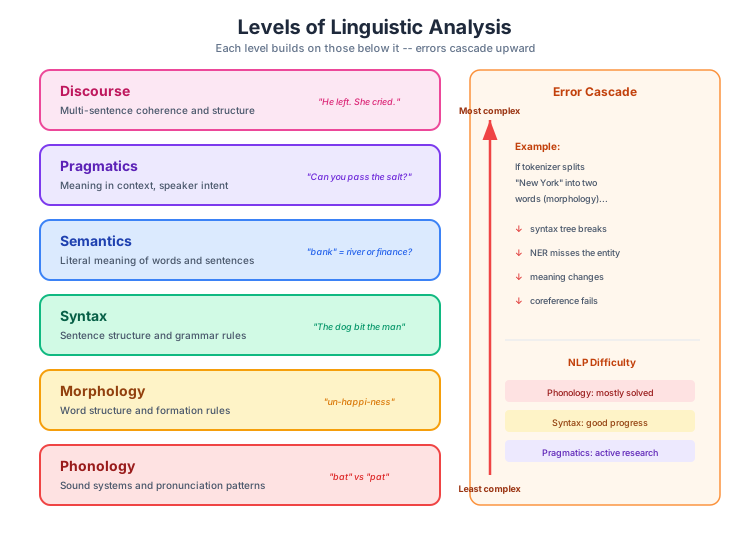
Figure 1:The six levels of linguistic analysis form a hierarchy — each level builds on the ones below it, and errors at lower levels cascade upward.
Wrap-Up
What We Covered Today
Environment setup with uv — your toolkit for the semester
The magic demo — seeing NLP in action before understanding it
What makes NLP hard — ambiguity, context, implicit knowledge
Levels of linguistic analysis — from sounds to discourse
What’s Next
In the next lecture, we’ll explore the history of NLP — how we got from rule-based dreams to modern language models. Understanding this evolution helps explain why current approaches work. Then we’ll dive deeper into SpaCy to start building our own NLP tools.