SpaCy Pipelines: From Text to Annotations
CAP-6640: Computational Understanding of Natural Language
Spencer Lyon
Prerequisites
Week 1: What is NLP (Doc, token, Span objects)
Outcomes
Understand what happens under the hood when you call
nlp(text)Identify built-in pipeline components and the annotations they produce
Inspect and modify pipeline components (add, remove, disable)
Create custom pipeline components using
@Language.componentUse extension attributes to attach custom metadata to documents and tokens
Optimize processing speed with
nlp.pipe()and selective component disabling
References
J&M Chapter 2: Words and Tokens
What Actually Happens When You Call nlp()?
We’ve been using SpaCy throughout this course, casually writing doc = nlp(text) and then accessing attributes like token.pos_, token.lemma_, and doc.ents. But have you stopped to wonder — where do all these annotations come from?
import spacy

nlp = spacy.load("en_core_web_sm")
doc = nlp("Apple is looking at buying a U.K. startup for $1 billion.")

# All of these "just work" - but how?
for token in doc[:5]:
    print(f"{token.text:10} | POS: {token.pos_:6} | Lemma: {token.lemma_:10} | Dep: {token.dep_}")
Apple | POS: PROPN | Lemma: Apple | Dep: nsubj
is | POS: AUX | Lemma: be | Dep: aux
looking | POS: VERB | Lemma: look | Dep: ROOT
at | POS: ADP | Lemma: at | Dep: prep
buying | POS: VERB | Lemma: buy | Dep: pcomp
The answer is the processing pipeline — a sequence of components that transform raw text into richly annotated documents. Understanding this pipeline is key to using SpaCy effectively and customizing it for your specific needs.
The Pipeline Mental Model
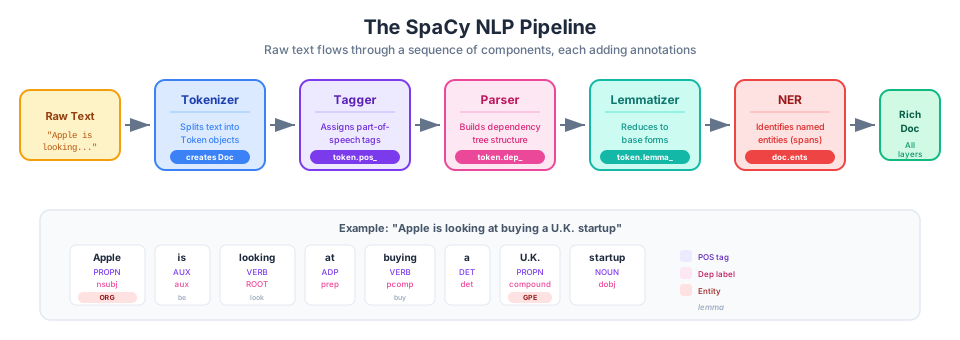
Figure 1:The SpaCy NLP pipeline — raw text flows through a sequence of components, each adding a new layer of linguistic annotation to the Doc object.
When you call nlp(text), SpaCy doesn’t do everything at once. Instead, it follows a two-stage process:
Tokenization: The text string becomes a
Docobject (a sequence ofTokenobjects)Pipeline Components: The
Docpasses through each component in order, with each one adding annotations
Think of it like an assembly line. The tokenizer creates the basic product (tokens), and each subsequent station (component) adds more features: part-of-speech tags, dependency labels, named entities, and so on.
# Let's see what's in our pipeline
print("Pipeline components:", nlp.pipe_names)
Pipeline components: ['tok2vec', 'tagger', 'parser', 'attribute_ruler', 'lemmatizer', 'ner']
# We can also see the component objects themselves
for name, component in nlp.pipeline:
    print(f"{name:20} -> {type(component).__name__}")
tok2vec -> Tok2Vec
tagger -> Tagger
parser -> DependencyParser
attribute_ruler -> AttributeRuler
lemmatizer -> EnglishLemmatizer
ner -> EntityRecognizer
The order matters! Some components depend on others. For example, the lemmatizer needs POS tags to distinguish “meeting” (noun) from “meeting” (verb).
Built-in Pipeline Components
SpaCy’s trained pipelines include several standard components. Here’s what each one does:
| Component | Description | Creates |
|---|---|---|
tok2vec | Shared token-to-vector embeddings | Internal vectors for other components |
tagger | Part-of-speech tagging | Token.pos_, Token.tag_ |
parser | Dependency parsing | Token.dep_, Token.head, Doc.sents |
attribute_ruler | Rule-based attribute assignment | Various token attributes |
lemmatizer | Base form assignment | Token.lemma_ |
ner | Named entity recognition | Doc.ents, Token.ent_type_ |
Let’s see these in action:
doc = nlp("Microsoft announced quarterly earnings in Seattle.")

print("=== Token Annotations ===")
print(f"{'Token':<12} {'POS':<6} {'Tag':<6} {'Dep':<10} {'Head':<12} {'Lemma':<12}")
print("-" * 60)
for token in doc:
    print(f"{token.text:<12} {token.pos_:<6} {token.tag_:<6} {token.dep_:<10} {token.head.text:<12} {token.lemma_:<12}")
=== Token Annotations ===
Token POS Tag Dep Head Lemma
------------------------------------------------------------
Microsoft PROPN NNP nsubj announced Microsoft
announced VERB VBD ROOT announced announce
quarterly ADJ JJ amod earnings quarterly
earnings NOUN NNS dobj announced earning
in ADP IN prep earnings in
Seattle PROPN NNP pobj in Seattle
. PUNCT . punct announced .
print("\n=== Named Entities ===")
for ent in doc.ents:
    print(f"{ent.text:<20} -> {ent.label_:<10} ({spacy.explain(ent.label_)})")
=== Named Entities ===
Microsoft            -> ORG        (Companies, agencies, institutions, etc.)
quarterly            -> DATE       (Absolute or relative dates or periods)
Seattle              -> GPE        (Countries, cities, states)
print("\n=== Sentences ===")
for i, sent in enumerate(doc.sents):
    print(f"Sentence {i}: {sent.text}")
=== Sentences ===
Sentence 0: Microsoft announced quarterly earnings in Seattle.
Which Component Produces What?
A common source of confusion: if you get an error about missing attributes, it usually means a required component isn’t in your pipeline.
# Let's trace which component produces which attribute
# by checking what a blank pipeline gives us

nlp_blank = spacy.blank("en")
doc_blank = nlp_blank("Apple is a company.")

print("Blank pipeline - no components:")
print(f"  pipe_names: {nlp_blank.pipe_names}")
print(f"  Token POS available: {doc_blank[0].pos_}")  # Empty string - no tagger!
print(f"  Entities: {list(doc_blank.ents)}")  # Empty - no NER!
Blank pipeline - no components:
pipe_names: []
Token POS available:
Entities: []
Inspecting and Modifying the Pipeline
SpaCy gives you full control over your pipeline. You can inspect it, disable components, or remove them entirely.
Inspecting Components
# Detailed pipeline info
print(f"Pipeline names: {nlp.pipe_names}")
print(f"Number of components: {len(nlp.pipe_names)}")

# Check if a specific component exists
print(f"\nHas 'ner': {'ner' in nlp.pipe_names}")
print(f"Has 'textcat': {'textcat' in nlp.pipe_names}")
Pipeline names: ['tok2vec', 'tagger', 'parser', 'attribute_ruler', 'lemmatizer', 'ner']
Number of components: 6
Has 'ner': True
Has 'textcat': False
Disabling Components Temporarily
Sometimes you only need certain annotations. Running the full pipeline wastes time. Use nlp.select_pipes() to temporarily disable components:
import time

text = "Apple Inc. reported strong earnings. The CEO Tim Cook announced new products."

# Full pipeline
start = time.perf_counter()
for _ in range(100):
    doc = nlp(text)
full_time = time.perf_counter() - start

# Only tokenization and NER
start = time.perf_counter()
with nlp.select_pipes(enable=["ner"]):
    for _ in range(100):
        doc = nlp(text)
partial_time = time.perf_counter() - start

print(f"Full pipeline: {full_time:.3f}s")
print(f"NER only:      {partial_time:.3f}s")
print(f"Speedup:       {full_time/partial_time:.1f}x faster")
Full pipeline: 0.476s
NER only: 0.203s
Speedup: 2.3x faster
# You can also disable specific components
with nlp.select_pipes(disable=["parser", "attribute_ruler"]):
    doc = nlp("Testing with fewer components.")
    print(f"Active components: {nlp.pipe_names}")
    # Note: lemmatizer may still work but with reduced accuracy
Active components: ['tok2vec', 'tagger', 'lemmatizer', 'ner']
/home/runner/work/ucf-cap-6640-book/ucf-cap-6640-book/.venv/lib/python3.12/site-packages/spacy/pipeline/lemmatizer.py:188: UserWarning: [W108] The rule-based lemmatizer did not find POS annotation for one or more tokens. Check that your pipeline includes components that assign token.pos, typically 'tagger'+'attribute_ruler' or 'morphologizer'.
  warnings.warn(Warnings.W108)
When to Disable Components
| Scenario | Recommended Approach |
|---|---|
| Only need tokenization | Use nlp.make_doc(text) instead |
| Only need NER | enable=["ner"] |
| Only need POS tags | enable=["tagger"] |
| Processing millions of docs | Disable everything you don’t need |
Creating Custom Pipeline Components
The real power of SpaCy’s pipeline architecture is that you can add your own components. Custom components let you:
Run custom logic automatically when processing text
Add metadata to documents and tokens
Integrate external tools into the SpaCy workflow
Basic Component Structure
A pipeline component is a function that takes a Doc and returns a Doc:
from spacy.language import Language

# Register the component with a name
@Language.component("doc_length_logger")
def doc_length_logger(doc):
    """Log the document length."""
    print(f"Processing document with {len(doc)} tokens")
    return doc  # Always return the doc!

# Add to pipeline
nlp_custom = spacy.load("en_core_web_sm")
nlp_custom.add_pipe("doc_length_logger", first=True)  # Add at the beginning

print("Pipeline:", nlp_custom.pipe_names)
Pipeline: ['doc_length_logger', 'tok2vec', 'tagger', 'parser', 'attribute_ruler', 'lemmatizer', 'ner']
# Now it runs automatically
doc = nlp_custom("This is a test sentence.")
Processing document with 6 tokens
Controlling Component Position
Where you add a component matters:
# Different positioning options
nlp_demo = spacy.load("en_core_web_sm")

@Language.component("position_demo")
def position_demo(doc):
    return doc

# Add at specific positions
# nlp_demo.add_pipe("position_demo", first=True)      # At the beginning
# nlp_demo.add_pipe("position_demo", last=True)       # At the end (default)
# nlp_demo.add_pipe("position_demo", before="ner")    # Before NER
# nlp_demo.add_pipe("position_demo", after="tagger")  # After tagger

nlp_demo.add_pipe("position_demo", after="ner")
print("Pipeline order:", nlp_demo.pipe_names)
Pipeline order: ['tok2vec', 'tagger', 'parser', 'attribute_ruler', 'lemmatizer', 'ner', 'position_demo']
A Practical Component: Loaded Language Detector
Let’s build something useful — a component that detects loaded language in news articles. Loaded language uses words that carry strong emotional connotations or implicit judgments, potentially revealing bias in reporting.
Consider the difference between:
“The senator said...” (neutral)
“The senator claimed...” (implies doubt)
“The senator admitted...” (implies guilt)
@Language.component("loaded_language_detector")
def loaded_language_detector(doc):
    """Detect loaded/biased language in text."""
    # Words that imply doubt or skepticism (use LEMMA forms!)
    doubt_markers = {"claim", "allege", "purport", "supposedly"}  # "claimed" -> "claim"

    # Words that imply guilt or wrongdoing (LEMMA forms)
    guilt_markers = {"admit", "confess", "concede"}  # "admitted" -> "admit"

    # Emotionally charged descriptors (LEMMA forms)
    charged_words = {"radical", "extremist", "regime", "slam", "blast",
                     "destroy", "crush", "controversial", "embattled"}  # "slammed" -> "slam"

    # Some words need TEXT matching (hyphenated, don't lemmatize well)
    text_markers = {"so-called"}

    loaded_tokens = []
    for token in doc:
        lemma = token.lemma_.lower()
        text = token.text.lower()

        # Check lemma-based markers
        if lemma in doubt_markers:
            loaded_tokens.append((token.text, token.i, "DOUBT"))
        elif lemma in guilt_markers:
            loaded_tokens.append((token.text, token.i, "GUILT"))
        elif lemma in charged_words:
            loaded_tokens.append((token.text, token.i, "CHARGED"))
        # Check text-based markers (for hyphenated words, etc.)
        elif text in text_markers:
            loaded_tokens.append((token.text, token.i, "DOUBT"))

    if loaded_tokens:
        print(f"⚠️  Loaded language detected: {[(t[0], t[2]) for t in loaded_tokens]}")
    return doc

nlp_bias = spacy.load("en_core_web_sm")
nlp_bias.add_pipe("loaded_language_detector", last=True)

# Test with different phrasings of similar content
examples = [
    "The CEO announced the quarterly results.",
    "The CEO claimed the company was profitable.",
    "The embattled CEO admitted to the accounting errors.",
    "Critics slammed the controversial policy as radical.",
]

for text in examples:
    print(f"\n'{text}'")
    doc = nlp_bias(text)
'The CEO announced the quarterly results.'

'The CEO claimed the company was profitable.'
⚠️  Loaded language detected: [('claimed', 'DOUBT')]

'The embattled CEO admitted to the accounting errors.'
⚠️  Loaded language detected: [('embattled', 'CHARGED'), ('admitted', 'GUILT')]

'Critics slammed the controversial policy as radical.'
⚠️  Loaded language detected: [('slammed', 'CHARGED'), ('controversial', 'CHARGED'), ('radical', 'CHARGED')]
A Complex Example: Source Attribution Analyzer
In journalism, who is cited and how they’re introduced matters enormously. Let’s build a sophisticated component that extracts source attributions — phrases like “According to experts”, “Officials said”, or “Sources familiar with the matter claim”.
This component will use SpaCy’s Matcher to find patterns that indicate attribution, then analyze the language used.
from spacy.matcher import Matcher
from spacy.tokens import Span

# Attribution patterns we want to detect
# These capture common ways journalists attribute information

@Language.factory("source_attribution_analyzer")
def create_attribution_analyzer(nlp, name):
    """Factory that creates an attribution analyzer with pattern matching."""
    matcher = Matcher(nlp.vocab)

    # Pattern: "According to [ENTITY/noun phrase]"
    matcher.add("ACCORDING_TO", [
        [{"LOWER": "according"}, {"LOWER": "to"}, {"POS": {"IN": ["PROPN", "NOUN"]}, "OP": "+"}]
    ])

    # Pattern: "[Someone] said/stated/claimed/argued"
    matcher.add("SPEECH_VERB", [
        [{"POS": "PROPN", "OP": "+"}, {"LEMMA": {"IN": ["say", "state", "claim", "argue", "assert", "contend", "insist"]}}],
        [{"POS": "NOUN", "OP": "+"}, {"LEMMA": {"IN": ["say", "state", "claim", "argue", "assert", "contend", "insist"]}}]
    ])

    # Pattern: "Sources [familiar with / close to] ... said"
    matcher.add("ANONYMOUS_SOURCE", [
        [{"LOWER": "sources"}, {"OP": "*", "IS_ALPHA": True}, {"LEMMA": {"IN": ["say", "claim", "report", "indicate"]}}]
    ])

    # Pattern: "[officials/experts/analysts] [verb]"
    matcher.add("EXPERT_CITE", [
        [{"LOWER": {"IN": ["officials", "experts", "analysts", "researchers", "scientists", "observers"]}},
         {"LEMMA": {"IN": ["say", "believe", "warn", "suggest", "note", "argue"]}}]
    ])

    def attribution_analyzer(doc):
        matches = matcher(doc)
        attributions = []

        for match_id, start, end in matches:
            pattern_name = nlp.vocab.strings[match_id]
            span = doc[start:end]
            attributions.append({
                "text": span.text,
                "type": pattern_name,
                "start": start,
                "end": end
            })

        # Store for later use (we'll add proper extensions soon)
        if attributions:
            print(f"📰 Found {len(attributions)} attribution(s):")
            for attr in attributions:
                print(f"   [{attr['type']}] \"{attr['text']}\"")

        return doc

    return attribution_analyzer

# Create the pipeline
nlp_news = spacy.load("en_core_web_sm")
nlp_news.add_pipe("source_attribution_analyzer", last=True)
print("Pipeline:", nlp_news.pipe_names)
Pipeline: ['tok2vec', 'tagger', 'parser', 'attribute_ruler', 'lemmatizer', 'ner', 'source_attribution_analyzer']
# Test with real news-style sentences
news_examples = [
    "According to White House officials, the policy will take effect immediately.",
    "Critics claimed the proposal was too aggressive.",
    "Sources familiar with the matter said negotiations had stalled.",
    "Dr. Smith stated that the results were preliminary.",
    "Experts warn that climate change poses significant risks.",
    "The company announced record profits yesterday.",  # No attribution - direct statement
]

print("=" * 60)
for text in news_examples:
    print(f"\n\"{text}\"")
    doc = nlp_news(text)
============================================================
"According to White House officials, the policy will take effect immediately."
📰 Found 3 attribution(s):
[ACCORDING_TO] "According to White"
[ACCORDING_TO] "According to White House"
[ACCORDING_TO] "According to White House officials"
"Critics claimed the proposal was too aggressive."
📰 Found 1 attribution(s):
[SPEECH_VERB] "Critics claimed"
"Sources familiar with the matter said negotiations had stalled."
📰 Found 2 attribution(s):
[SPEECH_VERB] "matter said"
[ANONYMOUS_SOURCE] "Sources familiar with the matter said"
"Dr. Smith stated that the results were preliminary."
📰 Found 2 attribution(s):
[SPEECH_VERB] "Smith stated"
[SPEECH_VERB] "Dr. Smith stated"
"Experts warn that climate change poses significant risks."
📰 Found 1 attribution(s):
[EXPERT_CITE] "Experts warn"
"The company announced record profits yesterday."
Notice how the last example has no attribution — it’s presented as direct fact. In media analysis, the absence of attribution can be just as significant as its presence.
Extension Attributes: Custom Metadata
Sometimes you need to store custom data on documents, tokens, or spans. SpaCy’s extension attributes let you attach arbitrary metadata using the ._ namespace.
Setting Up Extensions
There are three types of extensions. The most commonly used is property extensions with getter functions:
from spacy.tokens import Doc, Token, Span

# Property extension with a getter function
def get_is_hedge_word(token):
    """Check if a token is a hedge word (indicates uncertainty)."""
    hedge_words = {"may", "might", "could", "possibly", "potentially",
                   "perhaps", "likely", "unlikely", "appears", "seems",
                   "suggests", "reportedly", "allegedly", "purportedly"}
    return token.lemma_.lower() in hedge_words

# Register the extension
Token.set_extension("is_hedge", getter=get_is_hedge_word, force=True)

doc = nlp("The policy may potentially affect millions, experts suggest.")
print("Hedge words found:")
for token in doc:
    if token._.is_hedge:
        print(f"  '{token.text}' at position {token.i}")
Hedge words found:
'may' at position 2
'potentially' at position 3
# Property extension on Span - check hedging in a sentence
def span_hedge_count(span):
    return sum(1 for token in span if token._.is_hedge)

Span.set_extension("hedge_count", getter=span_hedge_count, force=True)

doc = nlp("The results are conclusive. However, they may possibly change. Time will tell.")
for sent in doc.sents:
    hedges = sent._.hedge_count
    certainty = "uncertain" if hedges > 0 else "direct"
    print(f"[{certainty}] ({hedges} hedges) '{sent.text}'")
[direct] (0 hedges) 'The results are conclusive.'
[uncertain] (2 hedges) 'However, they may possibly change.'
[direct] (0 hedges) 'Time will tell.'
Other Extension Types
While property extensions (with getters) are most common, SpaCy also supports:
Attribute extensions — simple default values you can overwrite:
# Attribute extension - stores a value directly
Doc.set_extension("news_source", default=None, force=True)
Doc.set_extension("publish_date", default=None, force=True)
Doc.set_extension("bias_rating", default=None, force=True)

doc = nlp("The controversial bill passed despite opposition.")
doc._.news_source = "Reuters"
doc._.publish_date = "2025-01-20"
doc._.bias_rating = "center"

print(f"Source: {doc._.news_source}")
print(f"Date: {doc._.publish_date}")
print(f"Bias: {doc._.bias_rating}")
Source: Reuters
Date: 2025-01-20
Bias: center
Method extensions — callable functions with arguments:
# Method extension - can take arguments
def count_word_category(doc, category):
    """Count words from a specific category."""
    categories = {
        "attribution": {"said", "stated", "claimed", "argued", "noted"},
        "hedging": {"may", "might", "could", "possibly", "perhaps"},
        "intensifiers": {"very", "extremely", "absolutely", "totally"}
    }
    words = categories.get(category, set())
    return sum(1 for token in doc if token.lemma_.lower() in words)

Doc.set_extension("count_category", method=count_word_category, force=True)

doc = nlp("Officials said the very controversial policy may possibly be revised.")
print(f"Attribution words: {doc._.count_category('attribution')}")
print(f"Hedging words: {doc._.count_category('hedging')}")
print(f"Intensifiers: {doc._.count_category('intensifiers')}")
Attribution words: 0
Hedging words: 2
Intensifiers: 1
Combining Components with Extensions
The real power comes from using extensions inside custom components. Let’s build an objectivity analyzer that scores how “objective” or “opinionated” a piece of text appears:
# Register extensions for our objectivity analyzer
Doc.set_extension("loaded_words", default=[], force=True)
Doc.set_extension("hedge_words_found", default=[], force=True)
Doc.set_extension("objectivity_score", getter=lambda doc:
    max(0, 100 - (len(doc._.loaded_words) * 15) - (len(doc._.hedge_words_found) * 5)),
    force=True
)

@Language.component("objectivity_analyzer")
def objectivity_analyzer(doc):
    """Analyze text for markers of bias and hedging."""
    # Loaded/biased language - use LEMMA forms! (reduces objectivity significantly)
    loaded = {"claim", "admit", "radical", "extremist", "slam",
              "blast", "controversial", "embattled", "regime"}  # lemmas

    # Hedge words - use LEMMA forms! (slightly reduces objectivity)
    hedges = {"may", "might", "could", "possibly", "perhaps", "allegedly",
              "reportedly", "appear", "seem", "suggest"}  # "appears" -> "appear"

    found_loaded = []
    found_hedges = []

    for token in doc:
        lemma = token.lemma_.lower()
        if lemma in loaded:
            found_loaded.append(token.text)
        elif lemma in hedges:
            found_hedges.append(token.text)

    doc._.loaded_words = found_loaded
    doc._.hedge_words_found = found_hedges
    return doc

nlp_obj = spacy.load("en_core_web_sm")
nlp_obj.add_pipe("objectivity_analyzer", last=True)

# Test with articles of varying objectivity
articles = [
    # Relatively objective
    "The company reported quarterly earnings of $2.5 billion, exceeding analyst expectations.",
    # Some hedging
    "The policy may possibly affect healthcare costs, according to preliminary estimates.",
    # Loaded language
    "The radical proposal was slammed by critics as controversial and extreme.",
    # Very loaded
    "The embattled CEO admitted the so-called innovation was a failure after critics blasted the controversial decision.",
]

print("Objectivity Analysis")
print("=" * 70)
for text in articles:
    doc = nlp_obj(text)
    print(f"\nText: {text[:60]}...")
    print(f"  Loaded words: {doc._.loaded_words}")
    print(f"  Hedge words: {doc._.hedge_words_found}")
    print(f"  Objectivity score: {doc._.objectivity_score}/100")
Objectivity Analysis
======================================================================
Text: The company reported quarterly earnings of $2.5 billion, exc...
Loaded words: []
Hedge words: []
Objectivity score: 100/100
Text: The policy may possibly affect healthcare costs, according t...
Loaded words: []
Hedge words: ['may', 'possibly']
Objectivity score: 90/100
Text: The radical proposal was slammed by critics as controversial...
Loaded words: ['radical', 'slammed', 'controversial']
Hedge words: []
Objectivity score: 55/100
Text: The embattled CEO admitted the so-called innovation was a fa...
Loaded words: ['embattled', 'admitted', 'blasted', 'controversial']
Hedge words: []
Objectivity score: 40/100
Scaling Up: Processing Large Volumes
When processing thousands or millions of documents, efficiency matters. SpaCy’s nlp.pipe() method processes texts in batches, which is much faster than calling nlp() on each text individually.
The Wrong Way vs. The Right Way
texts = [
    "Apple announced new products.",
    "Google released an AI update.",
    "Microsoft acquired a startup.",
    "Amazon expanded cloud services.",
    "Meta launched new features."
] * 100  # 500 texts

# SLOW: Processing one at a time
start = time.perf_counter()
docs_slow = [nlp(text) for text in texts]
slow_time = time.perf_counter() - start

# FAST: Using nlp.pipe()
start = time.perf_counter()
docs_fast = list(nlp.pipe(texts))
fast_time = time.perf_counter() - start

print(f"One at a time: {slow_time:.3f}s")
print(f"Using pipe():  {fast_time:.3f}s")
print(f"Speedup:       {slow_time/fast_time:.1f}x faster")
One at a time: 1.690s
Using pipe(): 0.421s
Speedup: 4.0x faster
Passing Context with as_tuples
Often you need to track metadata alongside your documents:
# Documents with metadata
data = [
    ("Apple stock rose 5% today.", {"source": "Reuters", "date": "2025-01-20"}),
    ("New iPhone features announced.", {"source": "TechCrunch", "date": "2025-01-19"}),
    ("Tim Cook speaks at conference.", {"source": "Bloomberg", "date": "2025-01-18"}),
]

# Process while keeping context
Doc.set_extension("source", default=None, force=True)
Doc.set_extension("date", default=None, force=True)

for doc, context in nlp.pipe(data, as_tuples=True):
    doc._.source = context["source"]
    doc._.date = context["date"]

    entities = [ent.text for ent in doc.ents]
    print(f"[{doc._.source}] {doc._.date}: {entities}")
[Reuters] 2025-01-20: ['Apple', '5%', 'today']
[TechCrunch] 2025-01-19: []
[Bloomberg] 2025-01-18: ['Tim Cook']
Combining Optimizations
For maximum speed, combine nlp.pipe() with disabled components:
large_texts = ["Sample text about technology companies."] * 1000

# Maximum optimization: batch processing + minimal pipeline
start = time.perf_counter()
with nlp.select_pipes(enable=["ner"]):
    docs = list(nlp.pipe(large_texts, batch_size=50))
optimized_time = time.perf_counter() - start

print(f"Processed {len(docs)} documents in {optimized_time:.3f}s")
print(f"Rate: {len(docs)/optimized_time:.0f} docs/second")
Processed 1000 documents in 0.474s
Rate: 2109 docs/second
Putting It All Together
Let’s combine everything we’ve learned into a complete Media Bias Analyzer — a custom pipeline that processes news articles and provides a comprehensive bias analysis.
from spacy.matcher import Matcher

# Complete custom pipeline for media bias analysis

# 1. Set up all extensions
Doc.set_extension("bias_indicators", default=[], force=True)
Doc.set_extension("attribution_count", default=0, force=True)
Doc.set_extension("anonymous_sources", default=0, force=True)
Doc.set_extension("bias_score", getter=lambda doc:
    min(100, len(doc._.bias_indicators) * 20 + doc._.anonymous_sources * 10),
    force=True
)
Doc.set_extension("analysis_summary", getter=lambda doc:
    f"Bias score: {doc._.bias_score}/100 | "
    f"{len(doc._.bias_indicators)} loaded terms | "
    f"{doc._.attribution_count} attributions ({doc._.anonymous_sources} anonymous)",
    force=True
)

# 2. Create comprehensive analyzer component
@Language.factory("media_bias_analyzer")
def create_media_bias_analyzer(nlp, name):
    """Complete media bias analysis component."""

    # Loaded language categories - use LEMMA forms!
    bias_lexicon = {
        "doubt": {"claim", "allege", "purport"},  # "claimed" -> "claim"
        "guilt": {"admit", "confess", "concede"},  # "admitted" -> "admit"
        "charged": {"radical", "extremist", "regime", "slam", "blast",
                   "controversial", "embattled", "disgrace"},  # "slammed" -> "slam"
        "praise": {"praise", "hail", "celebrate", "laud", "acclaim"}  # "praised" -> "praise"
    }

    # Set up matcher for attribution patterns
    matcher = Matcher(nlp.vocab)
    matcher.add("ANONYMOUS", [
        [{"LOWER": "sources"}, {"OP": "*"}, {"LEMMA": {"IN": ["say", "claim", "indicate"]}}],
        [{"LOWER": "according"}, {"LOWER": "to"}, {"LOWER": {"IN": ["sources", "officials"]}}]
    ])
    matcher.add("ATTRIBUTION", [
        [{"POS": "PROPN", "OP": "+"}, {"LEMMA": {"IN": ["say", "state", "claim", "argue"]}}],
        [{"LOWER": "according"}, {"LOWER": "to"}, {"POS": "PROPN", "OP": "+"}]
    ])

    def media_bias_analyzer(doc):
        # Find loaded language
        indicators = []
        for token in doc:
            lemma = token.lemma_.lower()
            for category, words in bias_lexicon.items():
                if lemma in words:
                    indicators.append({
                        "word": token.text,
                        "category": category,
                        "position": token.i
                    })

        # Find attribution patterns
        matches = matcher(doc)
        attribution_count = 0
        anonymous_count = 0

        for match_id, start, end in matches:
            pattern_name = nlp.vocab.strings[match_id]
            attribution_count += 1
            if pattern_name == "ANONYMOUS":
                anonymous_count += 1

        # Store results
        doc._.bias_indicators = indicators
        doc._.attribution_count = attribution_count
        doc._.anonymous_sources = anonymous_count

        return doc

    return media_bias_analyzer

# 3. Build the complete pipeline
nlp_analyzer = spacy.load("en_core_web_sm")
nlp_analyzer.add_pipe("media_bias_analyzer", last=True)
print("Media Bias Pipeline:", nlp_analyzer.pipe_names)
Media Bias Pipeline: ['tok2vec', 'tagger', 'parser', 'attribute_ruler', 'lemmatizer', 'ner', 'media_bias_analyzer']
# 4. Analyze a collection of news articles
news_corpus = [
    # Relatively neutral reporting
    ("The Federal Reserve announced a 0.25% interest rate increase on Wednesday. "
     "Fed Chair Powell stated that inflation remains a concern.",
     {"source": "Reuters", "topic": "Economy"}),

    # Some bias markers
    ("Critics claimed the controversial policy would harm small businesses. "
     "Sources familiar with the negotiations said talks had stalled.",
     {"source": "Unknown", "topic": "Policy"}),

    # Heavy bias
    ("The embattled senator admitted to the so-called ethics violations after "
     "opponents slammed the radical proposal. Sources say more revelations are coming.",
     {"source": "Partisan News", "topic": "Politics"}),

    # Positive bias
    ("The acclaimed CEO was praised for the groundbreaking innovation. "
     "Industry experts hailed the announcement as transformative.",
     {"source": "Industry Mag", "topic": "Business"}),
]

print("=" * 70)
print("MEDIA BIAS ANALYSIS REPORT")
print("=" * 70)

for doc, meta in nlp_analyzer.pipe(news_corpus, as_tuples=True):
    print(f"\n📰 Source: {meta['source']} | Topic: {meta['topic']}")
    print(f"   Text: \"{doc.text[:70]}...\"")
    print(f"   {doc._.analysis_summary}")

    if doc._.bias_indicators:
        print(f"   Loaded terms: {[(i['word'], i['category']) for i in doc._.bias_indicators]}")

    # Rating based on score
    score = doc._.bias_score
    if score < 20:
        rating = "✅ Low bias"
    elif score < 50:
        rating = "⚠️  Moderate bias"
    else:
        rating = "🚨 High bias"
    print(f"   Rating: {rating}")
    print("-" * 70)
======================================================================
MEDIA BIAS ANALYSIS REPORT
======================================================================
📰 Source: Reuters | Topic: Economy
Text: "The Federal Reserve announced a 0.25% interest rate increase on Wednes..."
Bias score: 0/100 | 0 loaded terms | 3 attributions (0 anonymous)
Rating: ✅ Low bias
----------------------------------------------------------------------
📰 Source: Unknown | Topic: Policy
Text: "Critics claimed the controversial policy would harm small businesses. ..."
Bias score: 50/100 | 2 loaded terms | 1 attributions (1 anonymous)
Loaded terms: [('claimed', 'doubt'), ('controversial', 'charged')]
Rating: 🚨 High bias
----------------------------------------------------------------------
📰 Source: Partisan News | Topic: Politics
Text: "The embattled senator admitted to the so-called ethics violations afte..."
Bias score: 70/100 | 3 loaded terms | 1 attributions (1 anonymous)
Loaded terms: [('admitted', 'guilt'), ('slammed', 'charged'), ('radical', 'charged')]
Rating: 🚨 High bias
----------------------------------------------------------------------
📰 Source: Industry Mag | Topic: Business
Text: "The acclaimed CEO was praised for the groundbreaking innovation. Indus..."
Bias score: 40/100 | 2 loaded terms | 0 attributions (0 anonymous)
Loaded terms: [('praised', 'praise'), ('hailed', 'praise')]
Rating: ⚠️ Moderate bias
----------------------------------------------------------------------
This pipeline demonstrates the full power of SpaCy’s architecture:
Multiple detection methods: lexicon matching + pattern matching
Quantified output: numeric scores for comparison
Rich metadata: detailed breakdown of bias indicators
Batch processing: efficient analysis of document collections
Wrap-Up
Key Takeaways
Pipeline Design Checklist
When building custom pipelines, consider:
What annotations do I actually need?
Can I disable any built-in components?
Where should my custom component go in the pipeline?
What data should I store using extensions?
Am I processing in batches for efficiency?
What’s Next
In Week 3, we’ll move from processing individual tokens to representing entire documents as vectors. We’ll explore text representation: bag of words and TF-IDF, and word embeddings — the foundation for machine learning on text.