Sequence Labeling: From Documents to Tokens
CAP-6640: Computational Understanding of Natural Language
Spencer Lyon
Prerequisites
L04.01: Text Classification (classification setup, evaluation metrics, Scikit-learn pipelines)
Week 2: SpaCy pipelines, tokenization
Week 1: SpaCy basics (Doc, Token, Span objects)
Outcomes
Distinguish sequence labeling from document classification and explain when each is appropriate
Explain the BIO tagging scheme for encoding entity boundaries
Use SpaCy’s built-in NER and POS tagging models to annotate text
Evaluate sequence labeling models using entity-level precision, recall, and F1 score
Train a custom NER model using SpaCy’s CLI on a real dataset
References
J&M Chapter 17: Sequence Labeling for Parts of Speech and Named Entities (download)
From Documents to Tokens
In the last lecture, we built classifiers that assign a single label to an entire document — positive or negative, spam or not spam. That’s powerful, but many NLP tasks require something more fine-grained.
Consider this sentence:
Apple is looking to buy a startup in San Francisco for $1 billion this March.
A document classifier might tell us this sentence is about “technology” or “business.” But what if we need to know which company, which city, how much money, and when? We need to label individual words — or spans of words — not the whole document.
This is sequence labeling: given a sequence of tokens, assign a label to each one. Where text classification produces one label per document, sequence labeling produces one label per token.
The two most important sequence labeling tasks in NLP are:
Part-of-speech tagging — labeling each word with its grammatical role (noun, verb, adjective, ...)
Named entity recognition — identifying and classifying named entities (people, organizations, locations, dates, ...)
Both are fundamental building blocks for downstream tasks. POS tags help parsers understand sentence structure. Named entities are essential for information extraction, question answering, and knowledge graph construction. Let’s explore each one.
Part-of-Speech Tagging
What Are Parts of Speech?
Every word in a sentence plays a grammatical role. “Dog” is a noun. “Runs” is a verb. “Quickly” is an adverb. These grammatical categories are called parts of speech, and the task of automatically assigning them is POS tagging.
Why does this matter? POS tags reveal the structure of language:
Word sense disambiguation: “bank” as a noun (financial institution) vs. “bank” as a verb (to bank on something)
Information extraction: knowing that a word is a proper noun helps identify named entities
Syntactic parsing: POS tags are a key input to dependency parsing algorithms
Tagsets
The most widely used tagset is the Penn Treebank tagset, with about 45 tags. SpaCy provides two levels of POS tags:
Coarse-grained (
token.pos_): Universal POS tags (NOUN, VERB, ADJ, ...) — about 17 tagsFine-grained (
token.tag_): Penn Treebank tags (NN, NNS, NNP, VB, VBD, ...) — about 45 tags
POS Tagging with SpaCy
Let’s see it in action:
import spacy

nlp = spacy.load("en_core_web_sm")

doc = nlp("Apple is looking to buy a startup in San Francisco.")

print(f"{'Token':<15} {'POS':<8} {'Tag':<6} {'Explanation'}")
print("-" * 55)
for token in doc:
    print(f"{token.text:<15} {token.pos_:<8} {token.tag_:<6} {spacy.explain(token.tag_)}")
Token POS Tag Explanation
-------------------------------------------------------
Apple PROPN NNP noun, proper singular
is AUX VBZ verb, 3rd person singular present
looking VERB VBG verb, gerund or present participle
to PART TO infinitival "to"
buy VERB VB verb, base form
a DET DT determiner
startup NOUN NN noun, singular or mass
in ADP IN conjunction, subordinating or preposition
San PROPN NNP noun, proper singular
Francisco PROPN NNP noun, proper singular
. PUNCT . punctuation mark, sentence closer
Notice how SpaCy correctly identifies “Apple” as a proper noun (PROPN/NNP) and “looking” as a verb (VERB/VBG — verb, gerund). The fine-grained tags carry more information — VBG tells us it’s specifically a gerund form, while the coarse VERB tag doesn’t distinguish verb forms.
POS Patterns
POS tags become even more useful when we look at patterns. For example, adjective-noun pairs often form meaningful phrases:
doc = nlp("The quick brown fox jumped over the lazy dog near the old stone bridge.")

# Find adjective-noun pairs
print("Adjective-Noun pairs:")
for i in range(len(doc) - 1):
    if doc[i].pos_ == "ADJ" and doc[i + 1].pos_ == "NOUN":
        print(f"  {doc[i].text} {doc[i + 1].text}")
Adjective-Noun pairs:
brown fox
lazy dog
old stone
This kind of pattern matching over POS tags is a building block for more sophisticated information extraction — it’s rule-based NLP powered by statistical predictions.
Named Entity Recognition
What Are Named Entities?
A named entity is a real-world object with a proper name — a person, organization, location, date, monetary amount, and so on. NER is the task of finding these entities in text and classifying them by type.
SpaCy’s NER model recognizes these entity types (among others):
| Label | Description | Example |
|---|---|---|
| PERSON | People, including fictional | Marie Curie |
| ORG | Companies, agencies, institutions | Google, United Nations |
| GPE | Countries, cities, states | France, New York |
| LOC | Non-GPE locations | the Alps, Pacific Ocean |
| DATE | Dates or periods | June 2024, last week |
| MONEY | Monetary values | $1 billion, €500 |
| PRODUCT | Objects, vehicles, foods | iPhone, Boeing 747 |
NER with SpaCy
doc = nlp("Apple CEO Tim Cook announced a $3 billion investment in Germany on Tuesday.")

print(f"{'Entity':<30} {'Label':<10} {'Description'}")
print("-" * 65)
for ent in doc.ents:
    print(f"{ent.text:<30} {ent.label_:<10} {spacy.explain(ent.label_)}")
Entity Label Description
-----------------------------------------------------------------
Apple ORG Companies, agencies, institutions, etc.
Tim Cook PERSON People, including fictional
$3 billion MONEY Monetary values, including unit
Germany GPE Countries, cities, states
Tuesday DATE Absolute or relative dates or periods
Each entity is a Span object — it knows its start and end token positions, its text, and its label. We already used Span objects in Week 2 when working with SpaCy pipelines.
Visualizing Entities
SpaCy includes a built-in visualizer called displacy that renders entities in context:
from spacy import displacy

doc = nlp(
    "Barack Obama was born in Honolulu, Hawaii. "
    "He served as the 44th President of the United States from 2009 to 2017."
)

displacy.render(doc, style="ent", jupyter=True)The colored highlights make it easy to spot what the model found — and what it might have missed.
The BIO Tagging Scheme
Under the hood, how does NER actually work at the token level? The model doesn’t directly output spans — it labels each token using the BIO tagging scheme:
B-TYPE: the Beginning of an entity of the given type
I-TYPE: Inside (continuation of) an entity
O: Outside any entity
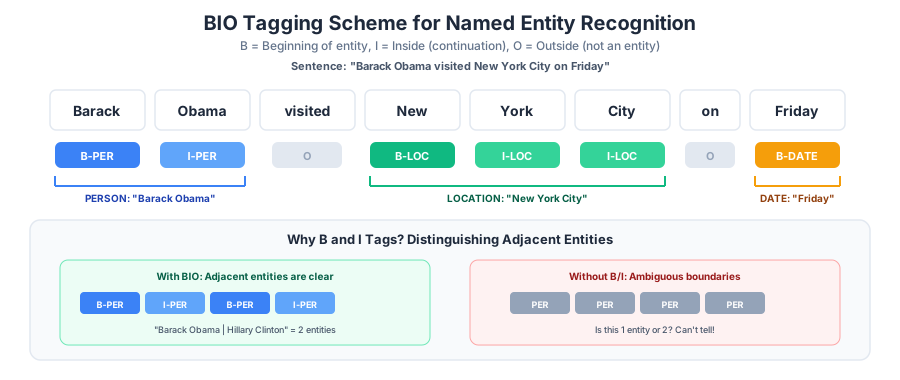
Figure 1:BIO tagging assigns each token a label: B (beginning of entity), I (inside/continuation), or O (outside). The B/I distinction is critical for separating adjacent entities of the same type.
For example:
| Token | BIO Tag |
|---|---|
| Barack | B-PER |
| Obama | I-PER |
| was | O |
| born | O |
| in | O |
| Honolulu | B-GPE |
| , | O |
| Hawaii | B-GPE |
The B/I distinction is crucial for multi-word entities. Without it, we couldn’t tell whether “Barack Obama” is one PERSON entity or two separate ones.
Exploring NER Across Domains
NER models trained on news text work well on... news text. But what about other domains?
texts = {
    "News": "President Biden met with Chancellor Scholz in Berlin to discuss NATO expansion.",
    "Medical": "The patient was prescribed Lisinopril 10mg for hypertension at Mayo Clinic.",
    "Social media": "just saw @elonmusk at the Tesla factory lol #tech",
    "Legal": "The defendant, John Smith, violated Section 230 of the Communications Decency Act.",
}

for domain, text in texts.items():
    doc = nlp(text)
    ents = [(ent.text, ent.label_) for ent in doc.ents]
    print(f"{domain}:")
    print(f"  Entities: {ents}")
    print()
News:
Entities: [('Biden', 'PERSON'), ('Berlin', 'GPE'), ('NATO', 'ORG')]
Medical:
Entities: [('Lisinopril', 'PERSON'), ('10', 'CARDINAL'), ('Mayo Clinic', 'ORG')]
Social media:
Entities: [('Tesla', 'NORP'), ('tech', 'PERSON')]
Legal:
Entities: [('John Smith', 'PERSON'), ('Section 230', 'LAW')]
Notice how the model handles formal news text better than informal or domain-specific text. Medical entities (drug names, conditions) and social media conventions (at-mentions, hashtags) are often missed or mislabeled — the model wasn’t trained on those domains. This is exactly why we sometimes need to train custom NER models.
Classical Approaches: A Brief History
Before neural models dominated, sequence labeling relied on statistical methods with hand-engineered features.
Hidden Markov Models (HMMs)
The earliest statistical POS taggers used Hidden Markov Models. The idea: the sequence of POS tags follows a probabilistic pattern (nouns tend to follow determiners, verbs tend to follow nouns), and we can model these transition probabilities. HMMs were the workhorse of POS tagging through the 1990s.
Conditional Random Fields (CRFs)
Conditional Random Fields improved on HMMs by modeling the conditional probability of the entire tag sequence given the input, rather than using a generative model. The key insight: a CRF can consider features of the entire input sequence when labeling each token, and it models dependencies between adjacent labels.
Think of it this way: when deciding whether “Washington” is a person or a location, a CRF can look at the surrounding words and consider what label it gave the previous token — if the previous word was labeled B-PER, then “Washington” is more likely I-PER than B-LOC.
CRFs dominated NER from the mid-2000s until about 2015.
Why Neural Models Won
Modern SpaCy models use neural networks for both POS tagging and NER. Why did neural approaches replace CRFs?
No feature engineering: CRFs require manually designed features (capitalization patterns, word prefixes, gazetteers of known names). Neural models learn features automatically from data.
Better representations: word embeddings capture semantic similarity that hand-crafted features miss.
Transfer learning: a model pretrained on large text corpora carries useful knowledge to sequence labeling tasks.
The bottom line: SpaCy’s models are neural under the hood, but the concepts we’ve discussed — BIO tagging, entity types, evaluation metrics — remain the same regardless of the algorithm.
Evaluating Sequence Labeling
Token-Level vs. Entity-Level
In text classification, evaluation is straightforward — each document gets one prediction, and it’s either right or wrong. Sequence labeling is trickier because we care about spans, not individual tokens.
Consider this prediction:
| Token | Gold | Predicted |
|---|---|---|
| New | B-ORG | B-ORG |
| York | I-ORG | I-ORG |
| Times | I-ORG | O |
Is this correct? At the token level, we got 2 out of 3 tokens right (67% accuracy). But at the entity level, we got the entity wrong — we predicted “New York” instead of “New York Times.” For NER, entity-level evaluation is the standard: an entity is correct only if both its boundaries (start and end) and its type match the gold label exactly.
Entity-Level Precision, Recall, and F1
The metrics are the same as in text classification, but applied to entities rather than documents:
Precision: Of all entity spans the model predicted, how many exactly match the gold standard?
Recall: Of all entity spans in the gold standard, how many did the model find exactly?
F1 score: Harmonic mean of precision and recall
Evaluating NER in Practice
Let’s evaluate SpaCy’s built-in NER model against some hand-labeled examples. We’ll compare predicted entities against gold annotations using the (text, label) pairs:
# Hand-labeled test data: (text, list of (entity_text, entity_label) tuples)
test_data = [
    (
        "Apple CEO Tim Cook announced a $3 billion investment in Germany on Tuesday.",
        [("Apple", "ORG"), ("Tim Cook", "PERSON"), ("$3 billion", "MONEY"), ("Germany", "GPE"), ("Tuesday", "DATE")],
    ),
    (
        "The United Nations held a summit in Geneva last Friday.",
        [("The United Nations", "ORG"), ("Geneva", "GPE"), ("last Friday", "DATE")],
    ),
    (
        "Elon Musk said Tesla would build a new factory in Austin, Texas.",
        [("Elon Musk", "PERSON"), ("Tesla", "ORG"), ("Austin", "GPE"), ("Texas", "GPE")],
    ),
    (
        "Dr. Sarah Chen published her paper in Nature on January 15th.",
        [("Sarah Chen", "PERSON"), ("Nature", "ORG"), ("January 15th", "DATE")],
    ),
]

# Evaluate SpaCy's predictions against our annotations
tp, fp, fn = 0, 0, 0

for text, gold_entities in test_data:
    doc = nlp(text)
    gold = set(gold_entities)
    pred = {(ent.text, ent.label_) for ent in doc.ents}

    correct = gold & pred
    missed = gold - pred
    extra = pred - gold

    tp += len(correct)
    fp += len(extra)
    fn += len(missed)

precision = tp / (tp + fp) if (tp + fp) > 0 else 0
recall = tp / (tp + fn) if (tp + fn) > 0 else 0
f1 = 2 * precision * recall / (precision + recall) if (precision + recall) > 0 else 0

print("Entity-level evaluation (text + label must match exactly):")
print(f"  Precision: {precision:.2f}")
print(f"  Recall:    {recall:.2f}")
print(f"  F1:        {f1:.2f}")
print(f"  ({tp} correct, {fp} spurious, {fn} missed)")
Entity-level evaluation (text + label must match exactly):
Precision: 0.93
Recall: 0.93
F1: 0.93
(14 correct, 1 spurious, 1 missed)
Common Error Patterns
Let’s look more closely at where the model makes mistakes:
for text, gold_entities in test_data:
    doc = nlp(text)
    gold = set(gold_entities)
    pred = {(ent.text, ent.label_) for ent in doc.ents}

    missed = gold - pred
    extra = pred - gold

    if missed or extra:
        print(f'Text: "{text}"')
        for ent_text, ent_label in missed:
            print(f"  MISSED: \"{ent_text}\" ({ent_label})")
        for ent_text, ent_label in extra:
            print(f"  EXTRA:  \"{ent_text}\" ({ent_label})")
        print()
Text: "Dr. Sarah Chen published her paper in Nature on January 15th."
MISSED: "Nature" (ORG)
EXTRA: "Nature" (WORK_OF_ART)
Common NER errors fall into a few categories:
Boundary errors: predicting “New York” instead of “New York Times”
Type confusion: labeling a person as an organization (e.g., “Washington”)
Missed entities: failing to recognize less common names or domain-specific terms
Spurious entities: labeling common nouns or phrases as entities
Training Custom NER with SpaCy
SpaCy’s built-in NER model works well on standard entity types in news-style text. But what if you need to recognize:
Drug names and medical conditions in clinical notes?
Product names and feature descriptions in tech reviews?
Legal citations and case numbers in court documents?
For domain-specific entities, you need to train a custom NER model. SpaCy provides a streamlined CLI workflow for this.
The Training Data: WikiANN
We’ll use the WikiANN dataset — a multilingual NER benchmark derived from Wikipedia. The English split contains text annotated with three entity types: PER (person), ORG (organization), and LOC (location).
from datasets import load_dataset  # uv add datasets

# Load WikiANN English split
wikiann = load_dataset("wikiann", "en")

print(f"Training examples:   {len(wikiann['train']):,}")
print(f"Validation examples: {len(wikiann['validation']):,}")
print(f"Test examples:       {len(wikiann['test']):,}")

# Look at one example
example = wikiann["train"][0]
print(f"\nTokens:   {example['tokens']}")
print(f"NER tags: {example['ner_tags']}")
print(f"Spans:    {example['spans']}")

# Get tag names
tag_names = wikiann["train"].features["ner_tags"].feature.names
print(f"\nTag mapping: {list(enumerate(tag_names))}")Warning: You are sending unauthenticated requests to the HF Hub. Please set a HF_TOKEN to enable higher rate limits and faster downloads.
Training examples:   20,000
Validation examples: 10,000
Test examples:       10,000

Tokens:   ['R.H.', 'Saunders', '(', 'St.', 'Lawrence', 'River', ')', '(', '968', 'MW', ')']
NER tags: [3, 4, 0, 3, 4, 4, 0, 0, 0, 0, 0]
Spans:    ['ORG: R.H. Saunders', 'ORG: St. Lawrence River']

Tag mapping: [(0, 'O'), (1, 'B-PER'), (2, 'I-PER'), (3, 'B-ORG'), (4, 'I-ORG'), (5, 'B-LOC'), (6, 'I-LOC')]
Notice the tag mapping: 0 = O, 1 = B-PER, 2 = I-PER, and so on. This is exactly the BIO scheme we discussed earlier — now we see it in a real dataset.
Converting to SpaCy Format
SpaCy’s training CLI expects data in its binary .spacy format. We need to convert the WikiANN examples into SpaCy Doc objects and save them as a DocBin:
import spacy
from spacy.tokens import Doc, DocBin, Span
import tempfile
import os

nlp_blank = spacy.blank("en")

def bio_tags_to_spans(doc, tag_ids, tag_names):
    """Convert a BIO tag sequence into SpaCy entity Spans."""
    ents = []
    start = None
    label = None

    for i, tag_id in enumerate(tag_ids):
        tag = tag_names[tag_id]
        if tag.startswith("B-"):
            # Close previous entity if open
            if start is not None:
                ents.append(Span(doc, start, i, label=label))
            start = i
            label = tag[2:]  # e.g., "B-PER" → "PER"
        elif tag.startswith("I-") and start is not None:
            pass  # Continue current entity
        else:  # "O" tag or I- without a preceding B-
            if start is not None:
                ents.append(Span(doc, start, i, label=label))
                start = None
                label = None

    # Close final entity if open
    if start is not None:
        ents.append(Span(doc, start, len(tag_ids), label=label))

    return ents


def convert_to_docbin(dataset_split, nlp, tag_names, max_examples=None):
    """Convert a HuggingFace NER dataset split to SpaCy DocBin."""
    db = DocBin()
    n = min(max_examples, len(dataset_split)) if max_examples else len(dataset_split)

    for i in range(n):
        ex = dataset_split[i]
        tokens = ex["tokens"]
        if not tokens:
            continue

        # Create Doc from pre-tokenized words
        spaces = [True] * len(tokens)
        spaces[-1] = False
        doc = Doc(nlp.vocab, words=tokens, spaces=spaces)

        # Set entities from BIO tags
        doc.ents = bio_tags_to_spans(doc, ex["ner_tags"], tag_names)
        db.add(doc)

    return db


# Convert train and dev splits (using subsets for speed)
tag_names = wikiann["train"].features["ner_tags"].feature.names

train_db = convert_to_docbin(wikiann["train"], nlp_blank, tag_names, max_examples=2000)
dev_db = convert_to_docbin(wikiann["validation"], nlp_blank, tag_names, max_examples=500)

# Save to a temporary directory
work_dir = tempfile.mkdtemp(prefix="spacy_ner_")
train_db.to_disk(os.path.join(work_dir, "train.spacy"))
dev_db.to_disk(os.path.join(work_dir, "dev.spacy"))

print(f"Saved {len(train_db)} training docs and {len(dev_db)} dev docs")
print(f"Working directory: {work_dir}")
Saved 2000 training docs and 500 dev docs
Working directory: /tmp/spacy_ner_e5t1q27i
Generating a Config File
SpaCy’s training is driven by a configuration file that specifies the model architecture, optimizer settings, and training schedule. We can generate a starter config with the CLI:
config_path = os.path.join(work_dir, "config.cfg")

!python -m spacy init config {config_path} --lang en --pipeline ner --optimize efficiency
⚠ To generate a more effective transformer-based config (GPU-only),
install the spacy-transformers package and re-run this command. The config
generated now does not use transformers.
ℹ Generated config template specific for your use case
- Language: en
- Pipeline: ner
- Optimize for: efficiency
- Hardware: CPU
- Transformer: None
✔ Auto-filled config with all values
✔ Saved config
/tmp/spacy_ner_e5t1q27i/config.cfg
You can now add your data and train your pipeline:
python -m spacy train config.cfg --paths.train ./train.spacy --paths.dev ./dev.spacy
The --optimize efficiency flag selects a smaller, faster architecture — good for learning and quick experiments. For production models, you’d use --optimize accuracy instead.
Training the Model
Now we run the training. SpaCy trains for multiple epochs, evaluating on the dev set after each, and saves the best model (highest F1 on dev):
train_path = os.path.join(work_dir, "train.spacy")
dev_path = os.path.join(work_dir, "dev.spacy")
output_path = os.path.join(work_dir, "output")

!python -m spacy train {config_path} --output {output_path} --paths.train {train_path} --paths.dev {dev_path}
✔ Created output directory: /tmp/spacy_ner_e5t1q27i/output
ℹ Saving to output directory: /tmp/spacy_ner_e5t1q27i/output
ℹ Using CPU
=========================== Initializing pipeline ===========================
✔ Initialized pipeline

============================= Training pipeline =============================
ℹ Pipeline: ['tok2vec', 'ner']
ℹ Initial learn rate: 0.001
E    #       LOSS TOK2VEC  LOSS NER  ENTS_F  ENTS_P  ENTS_R  SCORE
---  ------  ------------  --------  ------  ------  ------  ------
0 0 0.00 66.50 2.21 1.55 3.88 0.02
1 200 1714.55 6350.34 33.88 32.25 35.67 0.34
2 400 849.97 5804.43 43.38 45.09 41.79 0.43
4 600 1377.29 5235.72 46.23 48.29 44.33 0.46
6 800 1410.80 4124.99 49.50 50.54 48.51 0.50
9 1000 1462.38 3269.48 51.50 51.81 51.19 0.52
12 1200 1856.74 3081.29 53.12 53.57 52.69 0.53
17 1400 2116.08 2277.21 52.84 55.11 50.75 0.53
22 1600 1769.78 1457.49 53.82 54.52 53.13 0.54
28 1800 1805.63 1103.51 53.80 54.80 52.84 0.54
35 2000 1763.10 889.43 52.13 53.27 51.04 0.52
45 2200 1484.38 659.36 52.34 52.15 52.54 0.52
56 2400 2164.81 677.73 53.56 54.29 52.84 0.54
67 2600 1262.96 337.35 54.66 55.94 53.43 0.55
78 2800 1176.10 341.38 53.82 54.52 53.13 0.54
89 3000 881.53 200.44 53.24 54.45 52.09 0.53
100 3200 1101.62 200.87 54.36 55.82 52.99 0.54
111 3400 1453.39 258.52 53.99 55.04 52.99 0.54
122 3600 868.06 135.64 53.19 54.83 51.64 0.53
133 3800 790.44 116.42 53.28 53.89 52.69 0.53
144 4000 1073.31 119.92 52.88 53.69 52.09 0.53
156 4200 794.01 119.80 53.65 54.64 52.69 0.54
✔ Saved pipeline to output directory
/tmp/spacy_ner_e5t1q27i/output/model-last
Using the Trained Model
Let’s load our trained model and test it:
# Load the best model
nlp_custom = spacy.load(os.path.join(output_path, "model-best"))
print(f"Pipeline: {nlp_custom.pipe_names}")
print(f"Entity labels: {nlp_custom.get_pipe('ner').labels}")
print()

# Test on new sentences
test_sentences = [
    "Microsoft CEO Satya Nadella visited the European Parliament in Brussels.",
    "The New York Times reported that Goldman Sachs will open offices in Tokyo.",
    "Dr. Sarah Chen presented her findings at MIT last Thursday.",
]

for text in test_sentences:
    doc = nlp_custom(text)
    ents = [(ent.text, ent.label_) for ent in doc.ents]
    print(f'  "{text}"')
    print(f"  Entities: {ents}")
    print()
Pipeline: ['tok2vec', 'ner']
Entity labels: ('LOC', 'ORG', 'PER')
"Microsoft CEO Satya Nadella visited the European Parliament in Brussels."
Entities: [('Microsoft CEO Satya Nadella', 'ORG'), ('European Parliament', 'ORG'), ('Brussels', 'ORG')]
"The New York Times reported that Goldman Sachs will open offices in Tokyo."
Entities: [('The New York Times reported', 'ORG'), ('Goldman Sachs', 'ORG'), ('Tokyo', 'LOC')]
"Dr. Sarah Chen presented her findings at MIT last Thursday."
Entities: [('Dr. Sarah Chen', 'LOC'), ('MIT last Thursday', 'ORG')]
Notice the model uses PER, ORG, and LOC labels (from WikiANN), rather than SpaCy’s built-in PERSON, ORG, and GPE labels. The label set is determined by the training data.
With only 2,000 training examples, the model has learned the basics — it recognizes many person names, organizations, and locations — but it still makes mistakes, especially on boundary detection and ambiguous entities. More training data would improve performance significantly.
Catastrophic Forgetting
One important caveat: if you start from an existing model and update it with new entity types, the model may forget what it previously knew. This is called catastrophic forgetting.
For example, if you train a model to recognize DRUG entities using only medical text, it may lose its ability to recognize PERSON and ORG entities. The solution: always include examples of all entity types in your training data, not just the new ones. SpaCy’s documentation recommends mixing new training data with examples generated from the base model to preserve existing knowledge.
Wrap-Up
Key Takeaways
What’s Next
In the next session, we’ll bring together everything from this week in a hands-on lab. You’ll build a complete sentiment classifier end-to-end, compare multiple algorithms on the same dataset, and train a custom NER model for a domain-specific corpus. We’ll also explore text clustering with K-means and topic modeling — moving from supervised to unsupervised approaches to understanding text.