Working with LLM APIs
CAP-6640: Computational Understanding of Natural Language
Spencer Lyon
Prerequisites
L08.01: Foundation models, open vs. closed models
L08.02: Fine-tuning and alignment (RLHF, DPO), the post-training pipeline
Outcomes
Explain the role of an API gateway in unifying access to multiple LLM providers
Use PydanticAI to make API calls to LLMs through a shared proxy
Compare model responses across providers and understand token usage and pricing trade-offs
Extract structured data from LLM responses using Pydantic output types
References
Why APIs?
In Part 02, we explored how foundation models are customized through fine-tuning and alignment. But here’s a practical question: how do you actually use these models?
You can’t download GPT-5.4 — it’s a closed model with hundreds of billions of parameters running on OpenAI’s infrastructure. Same for Claude Opus 4.6 and Gemini 3.1 Pro. The only way to interact with these frontier models is through an API (Application Programming Interface): you send a request over the internet, the provider runs inference on their hardware, and you get a response back.
This turns out to be incredibly powerful. Instead of needing a GPU cluster to run a model, you need a few lines of Python and an API key. The trade-off is clear: you give up control over the model in exchange for instant access to the most capable systems in the world.
But there’s a catch — every provider has its own SDK, its own authentication scheme, its own request format. OpenAI uses one library, Anthropic another, Google yet another. In this lecture, we’ll solve that problem with two tools: LiteLLM as a unified API gateway and PydanticAI as our type-safe Python framework for talking to any model through a single interface.
The API Gateway Pattern
The Problem: SDK Sprawl
If you wanted to compare responses from GPT-5.4, Claude Sonnet 4.6, and Claude Haiku 4.5, you’d normally need to:
Install three different Python packages (
openai,anthropic,google-genai)Manage three different API keys
Learn three different request/response formats
Handle three different error types
That’s a lot of friction just to ask a question.
The Solution: LiteLLM Proxy
LiteLLM is an API gateway that sits between your code and the LLM providers. It exposes a single, OpenAI-compatible endpoint — meaning any tool that can talk to OpenAI can automatically talk to Claude, Gemini, or dozens of other providers. The proxy handles the translation.
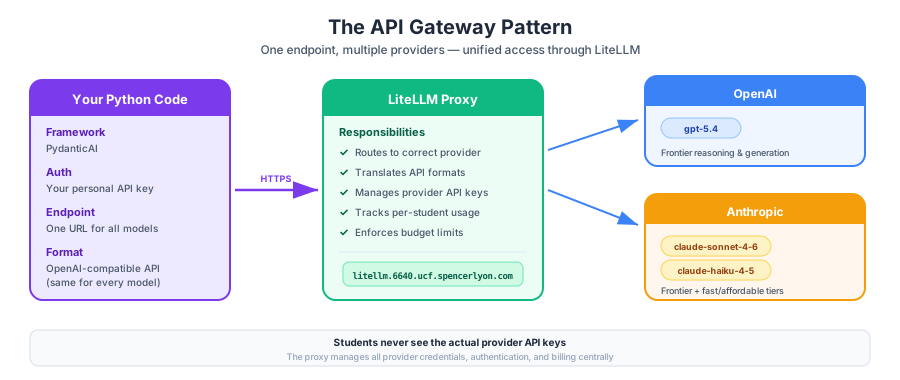
Figure 1:The API gateway pattern: your code talks to one endpoint, and the gateway routes requests to the appropriate provider. Students authenticate with personal API keys; the gateway manages the actual provider credentials.
For this course, we’ve set up a shared LiteLLM proxy with three models available:
| Model Name | Provider | Capability Tier |
|---|---|---|
gpt-5.4 | OpenAI | Frontier |
claude-sonnet-4-6 | Anthropic | Frontier |
claude-haiku-4-5 | Anthropic | Fast & affordable |
Each of you has a personal API key that gives you access to all three models through a single URL. The proxy tracks your usage and enforces per-student budgets — so experiment freely, but be mindful of cost.
PydanticAI: Your LLM Framework
What Is PydanticAI?
PydanticAI is a Python framework for building LLM-powered applications, created by the team behind Pydantic (the data validation library you may know from FastAPI). Its key selling points:
Model-agnostic: works with OpenAI, Anthropic, Google, and any OpenAI-compatible endpoint
Type-safe: leverages Pydantic models for structured inputs and outputs
Simple API: the core abstraction is an
Agent— configure it once, then call it
Think of it as the “FastAPI of LLM development” — it handles the boilerplate so you can focus on what matters.
Connecting to Our Proxy
Let’s set up our connection. You’ll need your API key — create a file called .env in the project root (or the same directory as your notebook) with:
CAP6640_API_KEY="sk-your-personal-key-here"The setup code below uses python-dotenv to load this file automatically, so you don’t need to set environment variables manually.
import os
from dotenv import load_dotenv
from pydantic_ai import Agent
from pydantic_ai.models.openai import OpenAIChatModel
from pydantic_ai.providers.openai import OpenAIProvider

# Load API key from .env file
load_dotenv()

# Course LiteLLM proxy — one URL for all models
PROXY_URL = "https://litellm.6640.ucf.spencerlyon.com"

def get_model(model_name: str) -> OpenAIChatModel:
    """Create a model connection through our LiteLLM proxy."""
    return OpenAIChatModel(
        model_name,
        provider=OpenAIProvider(
            base_url=PROXY_URL,
            api_key=os.environ["CAP6640_API_KEY"],
        ),
    )
That’s the entire setup. The get_model function creates a connection to any model available on our proxy. Let’s use it.
Your First API Call
# Create an agent with GPT-5.4
agent = Agent(
    get_model("gpt-5.4"),
    instructions="You are a concise NLP tutor. Answer in 2-3 sentences.",
)

result = await agent.run("What is tokenization in NLP?")
print(result.output)
Tokenization is the process of splitting text into smaller units called tokens, such as words, subwords, or characters. It helps NLP models turn raw text into pieces they can analyze, count, or convert into numerical representations.
Let’s unpack what happened:
Agentis the core PydanticAI abstraction — it wraps a model with configuration (like a system prompt)instructionsprovides directives that shape the model’s behavior (PydanticAI’s recommended alternative tosystem_prompt—instructionsare excluded from message history between runs, whilesystem_promptis preserved)await agent.run(...)sends the user message to the model and waits for a response. We useawaitbecause PydanticAI’s API is asynchronous (see note below).result.outputcontains the model’s text response
Understanding Token Usage
Every API call consumes tokens — and tokens cost money. Let’s inspect the usage:
print(f"Input tokens:  {result.usage().input_tokens}")
print(f"Output tokens: {result.usage().output_tokens}")
print(f"Total tokens:  {result.usage().total_tokens}")
Input tokens: 32
Output tokens: 49
Total tokens: 81
Why does this matter? LLM providers charge per token, with output tokens typically costing 3-5x more than input tokens. A rough mental model:
~1 token ≈ ¾ of a word (in English)
A typical prompt + response might use 500–2,000 tokens
Frontier models (GPT-5.4, Claude Sonnet 4.6): ~$3–15 per million input tokens
Fast models (Claude Haiku 4.5): ~$0.25–1 per million input tokens
The cost difference between model tiers is significant — which is why choosing the right model for your task matters.
Comparing Models
One of the most valuable things you can do with API access is compare models side by side. Different models have different strengths: some are more concise, some more creative, some faster, some cheaper.
Let’s ask all three models the same question and compare:
models = {
    "GPT-5.4": get_model("gpt-5.4"),
    "Claude Sonnet 4.6": get_model("claude-sonnet-4-6"),
    "Claude Haiku 4.5": get_model("claude-haiku-4-5"),
}

prompt = "Explain the difference between stemming and lemmatization in exactly 3 sentences."

for name, model in models.items():
    agent = Agent(model, instructions="You are a concise NLP instructor.")
    result = await agent.run(prompt)
    usage = result.usage()
    print(f"--- {name} ---")
    print(result.output)
    print(f"  [tokens: {usage.input_tokens} in / {usage.output_tokens} out]\n")
--- GPT-5.4 ---
Stemming reduces words to a crude base form by chopping off prefixes or suffixes, often without ensuring the result is a real word.
Lemmatization reduces words to their dictionary base form, using vocabulary and often part-of-speech information to return valid words.
For example, stemming might turn “studies” into “studi,” while lemmatization turns it into “study.”
[tokens: 32 in / 84 out]
--- Claude Sonnet 4.6 ---
Stemming is a rule-based process that strips suffixes from words to reduce them to a root form, often producing non-real words (e.g., "running" → "runn"). Lemmatization, by contrast, uses vocabulary and morphological analysis to return a word to its true dictionary base form, called a lemma (e.g., "running" → "run"). While stemming is faster and simpler, lemmatization is more accurate and linguistically meaningful, making it preferable when precision matters.
  [tokens: 35 in / 114 out]
--- Claude Haiku 4.5 ---
**Stemming** removes suffixes from words using rule-based algorithms to reduce them to a root form, which may not be a valid word (e.g., "running" → "runn"). **Lemmatization** uses linguistic knowledge and vocabulary to convert words to their canonical dictionary form, ensuring the result is a real word (e.g., "running" → "run"). Lemmatization is more accurate but computationally expensive, while stemming is faster but produces less precise results.
  [tokens: 34 in / 109 out]
What to Look For
When comparing models, pay attention to:
Instruction adherence: Did it follow the “exactly 3 sentences” constraint?
Accuracy: Are the definitions correct?
Style: Which response is clearest for a student audience?
Token efficiency: Which model used fewer output tokens?
Latency: Which responded fastest? (harder to measure here, but noticeable in practice)
Choosing the Right Model
There’s no single “best” model — it depends on your task:
| Use Case | Recommended Model | Why |
|---|---|---|
| Complex reasoning, analysis | GPT-5.4 or Claude Sonnet 4.6 | Maximum capability |
| Simple classification, extraction | Claude Haiku 4.5 | Fast and cheap |
| Creative writing | Experiment! | Style varies by model |
| High-volume processing | Claude Haiku 4.5 | Cost-effective at scale |
The general principle: use the cheapest model that meets your quality bar. Start with a fast model, evaluate its output, and only upgrade if needed.
A Taste of Structured Output
So far, our models have returned free-form text. That’s fine for conversation, but what if you need the output in a specific format — say, a Python dictionary or a JSON object?
Parsing free text is fragile. What if the model adds extra words? What if the format changes slightly between calls? This is where PydanticAI’s structured output shines.
The Idea
Instead of getting a string back, you define a Pydantic model describing the shape of the output you want. PydanticAI sends the schema to the LLM, validates the response, and returns a proper Python object — with type checking and all.
from pydantic import BaseModel, Field


class SentimentResult(BaseModel):
    """Structured output for sentiment analysis."""
    text: str = Field(description="The original text that was analyzed")
    sentiment: str = Field(description="positive, negative, or neutral")
    confidence: float = Field(ge=0, le=1, description="Confidence score between 0 and 1")
    reasoning: str = Field(description="Brief explanation of the sentiment judgment")


agent = Agent(
    get_model("claude-sonnet-4-6"),
    output_type=SentimentResult,
    instructions="Analyze the sentiment of the given text.",
)

result = await agent.run("The new spaCy update is incredibly fast but the documentation is lacking.")
print(f"Sentiment:  {result.output.sentiment}")
print(f"Confidence: {result.output.confidence}")
print(f"Reasoning:  {result.output.reasoning}")
Sentiment: neutral
Confidence: 0.85
Reasoning: The text contains both a strong positive sentiment ("incredibly fast") and a negative sentiment ("documentation is lacking"). These opposing sentiments balance each other out, resulting in an overall neutral sentiment. The use of "but" explicitly signals a contrast between the praise and the criticism.
Notice what happened: result.output is not a string — it’s a SentimentResult object with typed fields. PydanticAI handled the schema conversion, the API call, the response parsing, and the validation automatically.
This is a preview of what we’ll explore much more deeply in Week 9, where we’ll cover structured output extraction, function calling, and building full data pipelines with LLMs.
Wrap-Up
Key Takeaways
What’s Next
In Week 9, we’ll go much deeper into the art and science of working with LLMs. Part 01 covers prompt engineering — techniques like zero-shot and few-shot prompting, chain-of-thought reasoning, and system prompt design. Part 02 explores structured outputs and function calling in depth, building full data extraction pipelines. And in the lab, you’ll put it all together in an API power workshop.