Prompt Engineering
CAP-6640: Computational Understanding of Natural Language
Spencer Lyon
Prerequisites
L08.03: Working with LLM APIs — PydanticAI
Agent,get_model()helper, system prompts
Outcomes
Distinguish zero-shot, few-shot, and chain-of-thought prompting and select the right technique for a given task
Write effective few-shot prompts with well-chosen demonstrations
Explain how modern frontier models have internalized chain-of-thought reasoning and control reasoning depth via API parameters
Design system prompts that consistently shape model behavior
Build reusable prompt templates for common NLP tasks
References
The Prompt Is the Program
In Week 8, we learned how to call an LLM through an API. We sent a question, got an answer back, and even extracted structured data. But there’s a deeper question we didn’t spend much time on: how do you write a prompt that reliably gets the output you want?
Think about it this way. Traditional programming is precise — you write code, the computer follows your instructions exactly. LLM programming is different. Your “code” is natural language, and the “computer” is a probabilistic model that interprets your intent. The same question phrased two slightly different ways can produce dramatically different results.
This is the domain of prompt engineering — the art and science of crafting inputs that elicit desired behavior from LLMs. It might sound informal, but it’s arguably the most important practical skill in modern NLP. The model’s capabilities are fixed once it’s trained; the prompt is the lever you have to steer those capabilities toward your goal.
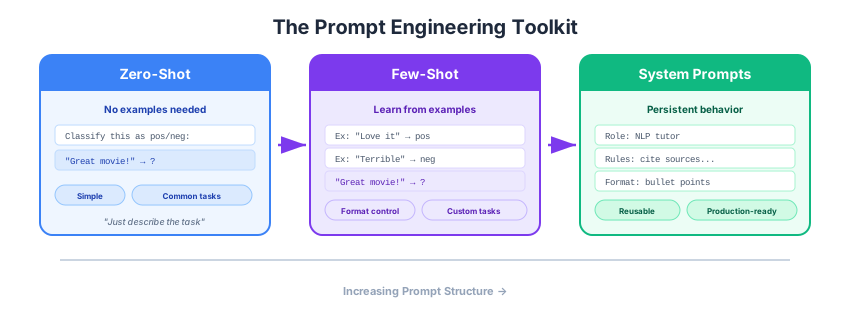
Figure 1:The prompt engineering toolkit: from simple zero-shot instructions to few-shot demonstrations and beyond. Each technique adds structure to help the model understand your intent.
We’ll explore three core techniques in this lecture, building from the simplest to the most structured. Along the way, we’ll see how the field has evolved — some techniques that were groundbreaking just a few years ago are now handled automatically by the models themselves.
Setup
We’ll reuse the same PydanticAI + LiteLLM proxy setup from Week 8. If you need a refresher, see L08.03.
import os
from dotenv import load_dotenv
from pydantic_ai import Agent
from pydantic_ai.models.openai import OpenAIChatModel
from pydantic_ai.providers.openai import OpenAIProvider

load_dotenv()

PROXY_URL = "https://litellm.6640.ucf.spencerlyon.com"

def get_model(model_name: str) -> OpenAIChatModel:
    """Create a model connection through our LiteLLM proxy."""
    return OpenAIChatModel(
        model_name,
        provider=OpenAIProvider(
            base_url=PROXY_URL,
            api_key=os.environ["CAP6640_API_KEY"],
        ),
    )
Zero-Shot Prompting
The simplest form of prompting is zero-shot — you describe a task and let the model figure it out with no examples. The model relies entirely on what it learned during pretraining and alignment.
You’ve already been doing this. Every time you asked an LLM a question in Week 8, that was zero-shot prompting. But let’s be more deliberate about it and see both where it shines and where it struggles.
Sentiment Analysis
agent = Agent(
    get_model("claude-sonnet-4-6"),
    instructions="You are a sentiment classifier. Respond with exactly one word: positive, negative, or neutral.",
)

texts = [
    "This restaurant has the best pasta I've ever tasted!",
    "The service was okay, nothing special.",
    "I waited 45 minutes and my order was wrong. Never coming back.",
]

for text in texts:
    result = await agent.run(text)
    print(f"{result.output:<12}  ←  {text[:60]}")
positive ← This restaurant has the best pasta I've ever tasted!
neutral ← The service was okay, nothing special.
negative ← I waited 45 minutes and my order was wrong. Never coming bac
That works well — sentiment is a task LLMs have seen extensively during training. The model knows what “sentiment” means and can apply the concept without any examples.
Named Entity Recognition
Now let’s try something more specific:
agent = Agent(
    get_model("claude-sonnet-4-6"),
    instructions="Extract all named entities from the text. Return each entity on its own line in the format: ENTITY (TYPE).",
)

result = await agent.run(
    "Dr. Sarah Chen presented her findings on GPT-4 at the NeurIPS 2024 "
    "conference in Vancouver, where OpenAI also announced new partnerships."
)
print(result.output)
Here are the named entities extracted from the text:
Dr. Sarah Chen (PERSON)
GPT-4 (PRODUCT)
NeurIPS 2024 (EVENT)
Vancouver (LOCATION)
OpenAI (ORGANIZATION)
When Does Zero-Shot Work?
Zero-shot prompting works well when:
The task is well-known (sentiment, summarization, translation) — the model has seen thousands of examples during training
The output format is simple (a label, a short answer, a paragraph)
There’s little ambiguity about what you want
It starts to struggle when:
The task requires a specific output format the model hasn’t seen
The definition of “correct” depends on your domain (e.g., what counts as an “entity” in your legal documents)
The task requires multi-step reasoning (we’ll address this later)
The question is: what do you do when zero-shot isn’t enough?
Few-Shot Prompting
When zero-shot falls short, the next tool in your belt is few-shot prompting — also called in-context learning. Instead of just describing the task, you show the model what you want by including examples directly in the prompt.
This was one of the most surprising discoveries in modern NLP. The landmark paper “Language Models are Few-Shot Learners” (Brown et al., 2020) — the GPT-3 paper — demonstrated that large language models can learn new tasks on the fly just by seeing a handful of examples in the prompt. No fine-tuning, no gradient updates, no new training. The model uses the examples as a kind of temporary “specification” of what you want.
The earlier GPT-2 paper (Radford et al., 2019) had hinted at this — its title “Language Models are Unsupervised Multitask Learners” made the bold claim that language modeling alone could produce general-purpose task solvers. But at 1.5B parameters, the results were modest. It took GPT-3’s 175B parameters to make few-shot prompting genuinely competitive with fine-tuned models on many benchmarks.
A fascinating follow-up by Min et al. (2022) challenged our understanding of why few-shot works. They showed that the labels in few-shot examples matter less than you’d think — even randomly assigning labels to demonstrations still improved performance. What matters most is the format and input distribution: the examples teach the model what kind of task this is and what the output should look like, more than they teach specific input-output mappings.
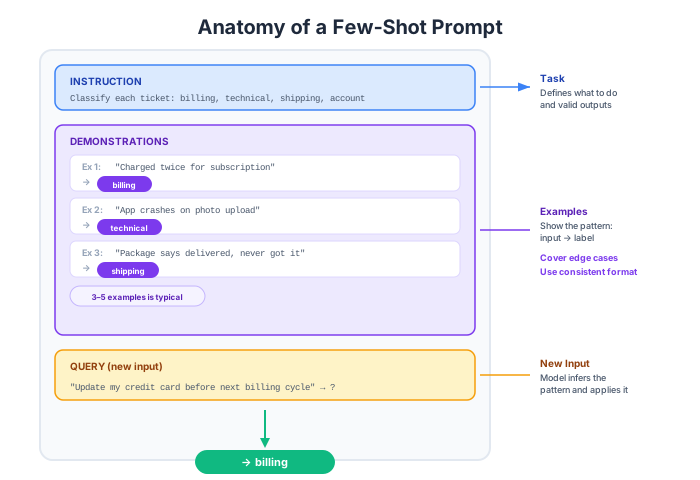
Figure 2:Anatomy of a few-shot prompt: a task instruction, a set of labeled demonstrations, and the new input to classify. The model uses the demonstrations to infer the pattern.
A Classification Example
Let’s say we want to classify customer support tickets into categories. With zero-shot, the model might use different category names than we want. With few-shot, we show it our categories:
few_shot_prompt = """Classify the customer support ticket into one of these categories:
billing, technical, shipping, account, other.

Examples:
Ticket: "I was charged twice for my subscription last month"
Category: billing

Ticket: "The app crashes every time I try to upload a photo"
Category: technical

Ticket: "My package says delivered but I never received it"
Category: shipping

Ticket: "I can't reset my password, the link doesn't work"
Category: account

Now classify this ticket:
Ticket: "I need to update my credit card on file before the next billing cycle"
"""

agent = Agent(get_model("claude-sonnet-4-6"))
result = await agent.run(few_shot_prompt)
print(result.output)
**Category: billing**
The ticket involves updating payment information (credit card) in relation to a billing cycle, which directly relates to billing and payment management.
The examples serve multiple purposes:
Define the label space — the model knows exactly which categories are valid
Show the output format — just the category name, nothing else
Demonstrate boundary cases — the password reset is “account,” not “technical”
Zero-Shot vs. Few-Shot Comparison
Let’s compare directly. Here’s a task where format matters — extracting structured information from a sentence:
test_sentence = "Marie Curie was born in Warsaw in 1867 and won the Nobel Prize in Physics in 1903."

# Zero-shot
zero_agent = Agent(
    get_model("claude-sonnet-4-6"),
    instructions="Extract key facts from the text as bullet points.",
)
zero_result = await zero_agent.run(test_sentence)
print("=== Zero-Shot ===")
print(zero_result.output)
print()

# Few-shot
few_shot_prompt = f"""Extract key facts from the text in this exact format:
- Person: [name]
- Born: [place], [year]
- Achievement: [description], [year]

Text: "Albert Einstein was born in Ulm in 1879 and published the theory of special relativity in 1905."
- Person: Albert Einstein
- Born: Ulm, 1879
- Achievement: Published the theory of special relativity, 1905

Text: "Ada Lovelace was born in London in 1815 and wrote the first computer algorithm in 1843."
- Person: Ada Lovelace
- Born: London, 1815
- Achievement: Wrote the first computer algorithm, 1843

Text: "{test_sentence}"
"""

few_agent = Agent(get_model("claude-sonnet-4-6"))
few_result = await few_agent.run(few_shot_prompt)
print("=== Few-Shot ===")
print(few_result.output)
=== Zero-Shot ===
• Marie Curie was born in Warsaw.
• She was born in 1867.
• She won the Nobel Prize in Physics in 1903.
=== Few-Shot ===
- Person: Marie Curie
- Born: Warsaw, 1867
- Achievement: Won the Nobel Prize in Physics, 1903
Notice the difference: zero-shot gives you some structure, but the model chooses its own format. Few-shot gives you exactly the structure you demonstrated.
Tips for Effective Few-Shot Prompts
How many examples? For most tasks, 3-5 examples are enough. More examples improve consistency but consume more tokens (and cost more money). There are diminishing returns — going from 0 to 3 examples is a big jump; going from 5 to 10 is usually marginal.
Which examples? Example selection matters more than quantity:
Cover the label space — include at least one example per category
Include edge cases — show the model how to handle ambiguous inputs
Be representative — examples should look like real inputs, not contrived ones
Order can matter — for some tasks, putting the most relevant examples last (closest to the query) helps
Format consistently — use the exact same format for every example. Inconsistency confuses the model.
Reasoning and Thinking Modes
The Chain-of-Thought Revolution
In 2022, researchers at Google discovered something remarkable: if you prompt a model to “think step by step” before giving its final answer, its performance on reasoning tasks improves dramatically. This technique — chain-of-thought (CoT) prompting — was a breakthrough. On math problems, logic puzzles, and multi-step reasoning tasks, CoT prompting could turn a 30% accuracy rate into a 75% accuracy rate.
The insight was elegant: LLMs generate text left-to-right, one token at a time. If you ask for just the answer, the model has to “think” in a single forward pass. But if you ask it to show its work, each reasoning step becomes context for the next step — the model can effectively use its own output as a scratchpad.
Here’s the classic example. Compare these two prompts for a word problem:
problem = (
    "A store sells notebooks for $3 each. If you buy 5 or more, you get a 20% discount. "
    "Tax is 8%. How much do you pay for 7 notebooks?"
)

# Direct answer
direct_agent = Agent(
    get_model("claude-sonnet-4-6"),
    instructions="Answer the math problem. Give only the final dollar amount.",
)
direct_result = await direct_agent.run(problem)
print("=== Direct ===")
print(direct_result.output)
print()

# With explicit reasoning request
reasoning_agent = Agent(
    get_model("claude-sonnet-4-6"),
    instructions="Solve the math problem step by step, showing your work. Then give the final answer.",
)
reasoning_result = await reasoning_agent.run(problem)
print("=== With Reasoning ===")
print(reasoning_result.output)
=== Direct ===
Here's the calculation:
- Base price: 7 × $3 = $21
- 20% discount: $21 × 0.80 = $16.80
- 8% tax: $16.80 × 1.08 = $18.144
**$18.14**
=== With Reasoning ===
## Setting Up the Problem

**Regular price:** $3 per notebook
**Quantity:** 7 notebooks (qualifies for discount since 7 ≥ 5)
**Discount:** 20%
**Tax:** 8%

## Step-by-Step Solution

**Step 1: Calculate the regular total**
$$7 \times \$3 = \$21.00$$

**Step 2: Apply the 20% discount**
$$\$21.00 \times 0.20 = \$4.20 \text{ (discount amount)}$$
$$\$21.00 - \$4.20 = \$16.80$$

**Step 3: Apply 8% tax**
$$\$16.80 \times 0.08 = \$1.344 \approx \$1.34$$
$$\$16.80 + \$1.34 = \$18.14$$

## Final Answer

**You pay $18.14 for 7 notebooks.**
From Prompting Trick to Built-In Capability
Here’s where the story takes an interesting turn. That CoT prompting technique was so effective that model providers built it directly into their models.
Starting in late 2024 with OpenAI’s o1 model and Anthropic’s Claude 3.7 Sonnet, frontier models gained the ability to reason internally before generating a response. The model performs chain-of-thought reasoning automatically, behind the scenes, without you needing to ask for it.
All of the models available through our course proxy have this capability:
| Model | Provider | Thinking Feature |
|---|---|---|
gpt-5.4 | OpenAI | Built-in reasoning |
claude-sonnet-4-6 | Anthropic | Adaptive thinking |
claude-haiku-4-5 | Anthropic | Adaptive thinking |
| Gemini 3.1 Pro | Built-in thinking |
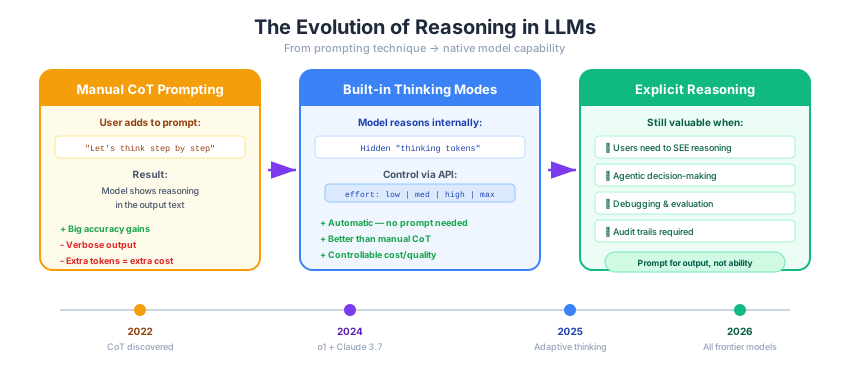
Figure 3:The evolution of reasoning in LLMs: what started as a prompting technique has become a native model capability. Modern frontier models reason internally, controlled by effort parameters rather than prompt instructions.
This means that for the models you’ll use in this course, you generally do not need to add “think step by step” to your prompts. The model already does this internally. In fact, for some reasoning-focused models, adding explicit CoT instructions can actually hurt performance by interfering with the model’s own reasoning process.
Controlling Reasoning Depth
Instead of prompting for reasoning, modern APIs let you control how much the model thinks through parameters:
Anthropic:
thinkingwith abudget_tokensparameter, or adaptive thinking with aneffortlevel (low, medium, high, max)OpenAI:
reasoning_effortparameter (low, medium, high)Google:
thinkingLevel(minimal, low, medium, high)
The trade-off is straightforward: more thinking = better answers on hard problems, but more tokens used = higher cost and latency.
When Explicit Reasoning Prompts Still Help
Even with built-in thinking, there are cases where structuring the reasoning in your prompt is still valuable:
When you need the reasoning in the output — if you’re building a system where users need to see why the model reached a conclusion, you’ll want to ask for explicit reasoning steps in the response
Agentic workflows — when a model is making decisions about which tools to call or what to do next, structured planning prompts improve reliability
Evaluation and debugging — seeing the model’s reasoning helps you diagnose errors and improve your prompts
# Example: when you WANT reasoning visible in the output
agent = Agent(
    get_model("claude-sonnet-4-6"),
    instructions=(
        "You are a medical triage assistant. For each symptom description, "
        "assess the urgency level (low, medium, high, emergency). "
        "Always explain your reasoning before giving the final assessment, "
        "because the reasoning will be reviewed by a human clinician."
    ),
)

result = await agent.run(
    "Patient reports sudden severe headache, worst of their life, "
    "with neck stiffness and sensitivity to light."
)
print(result.output)
## Assessment Reasoning
The symptom triad described here warrants immediate serious consideration:
**Symptom Analysis:**
1. **"Sudden severe headache, worst of their life"** — This is the classic description of a *thunderclap headache*, which is the hallmark presentation of a **subarachnoid hemorrhage (SAH)**. The sudden onset and extreme severity are key red flags.
2. **Neck stiffness (nuchal rigidity)** — This is a cardinal sign of **meningeal irritation**, which occurs in both subarachnoid hemorrhage (blood irritating the meninges) and **bacterial meningitis**.
3. **Photophobia (sensitivity to light)** — Also a classic sign of meningeal irritation, consistent with both SAH and meningitis.
**This combination of three symptoms constitutes the classic triad for:**
- **Subarachnoid hemorrhage** (a life-threatening bleed in the brain)
- **Bacterial meningitis** (a rapidly fatal infection without prompt treatment)
Both conditions are **time-critical emergencies** with high mortality and morbidity if not treated immediately. Minutes matter — delayed diagnosis significantly worsens outcomes.
**No additional information changes the initial urgency level** — this presentation must be treated as an emergency until proven otherwise.
---
## ⚠️ Urgency Level: EMERGENCY
**Immediate action required:** Call emergency services (911) or go to the nearest Emergency Department without delay. The patient requires urgent neuroimaging (CT scan), possible lumbar puncture, and immediate physician evaluation.
In this example, we ask for reasoning not because the model needs it to get the right answer, but because a human reviewer needs to verify the model’s logic.
System Prompts and Prompt Templates
So far, we’ve been passing instructions inline — sometimes as the instructions parameter, sometimes baked into the user message. But as your LLM applications get more complex, you need a more systematic approach to prompt design.
The System Prompt
Recall from Week 8 that a system prompt is a special message that sets the model’s behavior for an entire conversation. It’s like giving the model a job description before it starts working. In PydanticAI, this concept maps to the instructions parameter (PydanticAI also has a separate system_prompt parameter — the difference is that instructions are excluded from message history when you pass conversation history between runs, while system_prompt is preserved. The PydanticAI docs recommend using instructions as the default).
What makes a good system prompt? Let’s look at three common design patterns:
# Pattern 1: Role-based — define WHO the model is
role_agent = Agent(
    get_model("claude-sonnet-4-6"),
    instructions=(
        "You are a senior data scientist at a healthcare company. "
        "You explain statistical concepts in plain language, avoid jargon unless "
        "asked, and always mention potential pitfalls or limitations."
    ),
)

result = await role_agent.run("What's the difference between correlation and causation?")
print("=== Role-Based ===")
print(result.output)
=== Role-Based ===
# Correlation vs. Causation
Great question — this is one of the most important concepts in data analysis, and getting it wrong can lead to really bad decisions.
## The Simple Version
- **Correlation** means two things tend to move together
- **Causation** means one thing actually *causes* the other
## A Healthcare Example
Hospitals with more doctors tend to have higher patient death rates. Does hiring more doctors *kill* patients?
Of course not. **Sicker patients go to bigger hospitals with more doctors.** The underlying illness is driving both variables.
## Why This Matters So Much
When you only see correlation, there are actually **four possible explanations:**
| Scenario | Example |
|----------|---------|
| A causes B | Smoking causes lung cancer |
| B causes A | (reverse causation) |
| C causes both A and B | A hidden "confounding" variable |
| Pure coincidence | Ice cream sales correlate with drowning rates (both rise in summer) |
## How We Actually Establish Causation
- **Randomized controlled trials** — the gold standard
- **Natural experiments** — when random-ish events happen in the real world
- **Consistent evidence across multiple studies**
- **Biological plausibility** — does a mechanism make sense?
## The Practical Pitfall
Data is very good at finding patterns. It is **not** good at explaining *why* those patterns exist. That requires domain knowledge, critical thinking, and healthy skepticism.
Want me to dig into any of these pieces further?
# Pattern 2: Constraint-based — define RULES the model must follow
constraint_agent = Agent(
    get_model("claude-sonnet-4-6"),
    instructions=(
        "You are a customer support assistant. Follow these rules:\n"
        "1. Never reveal internal pricing or discount formulas\n"
        "2. Always suggest contacting a human agent for billing disputes\n"
        "3. Respond in 3 sentences or fewer\n"
        "4. End every response with 'Is there anything else I can help with?'"
    ),
)

result = await constraint_agent.run("Why was I charged $50 instead of $40?")
print("=== Constraint-Based ===")
print(result.output)
=== Constraint-Based ===
I'm sorry to hear about the unexpected charge on your account! I'm not able to look into the specific details of your billing, so I'd recommend contacting one of our human agents who can review your account and resolve this discrepancy for you. You can reach them via phone, email, or live chat. Is there anything else I can help with?
# Pattern 3: Template-based — define the OUTPUT FORMAT
template_agent = Agent(
    get_model("claude-sonnet-4-6"),
    instructions=(
        "You are a text analysis tool. For every input, respond in this exact format:\n\n"
        "SUMMARY: [one-sentence summary]\n"
        "SENTIMENT: [positive/negative/neutral]\n"
        "KEY_ENTITIES: [comma-separated list]\n"
        "LANGUAGE: [detected language]"
    ),
)

result = await template_agent.run(
    "La nueva actualización de Python 3.13 incluye un compilador JIT experimental "
    "que mejora significativamente el rendimiento en cargas de trabajo numéricas."
)
print("=== Template-Based ===")
print(result.output)
=== Template-Based ===
SUMMARY: Python 3.13 introduces an experimental JIT compiler that significantly improves performance for numerical workloads.
SENTIMENT: positive
KEY_ENTITIES: Python 3.13, compilador JIT, rendimiento, cargas de trabajo numéricas
LANGUAGE: Spanish
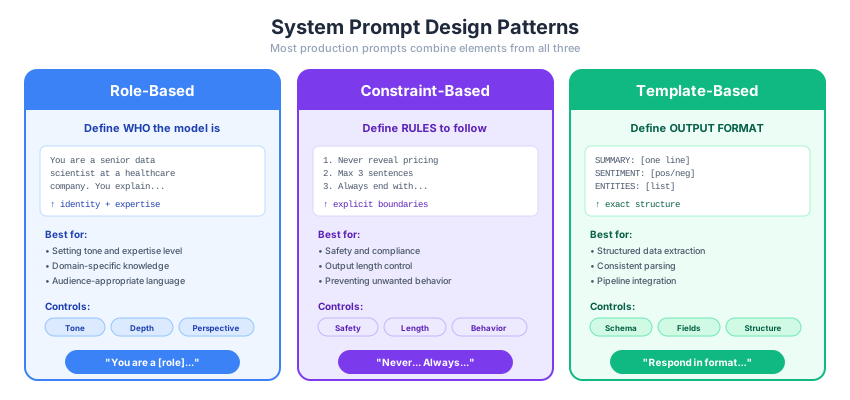
Figure 4:Three system prompt design patterns. Most production prompts combine elements from all three: a role for tone, constraints for safety, and a template for consistent output format.
Combining Patterns
In practice, the best system prompts combine all three patterns. Here’s a more realistic example:
agent = Agent(
    get_model("claude-sonnet-4-6"),
    instructions="""You are an NLP teaching assistant for a graduate-level course.

ROLE: You help students understand NLP concepts by connecting theory to practical code examples.

RULES:
- Use Python and standard NLP libraries (spaCy, Hugging Face, scikit-learn) in examples
- If a student's question is ambiguous, ask a clarifying question before answering
- Never write complete homework solutions — guide the student toward the answer
- Cite specific textbook chapters when relevant (J&M, HF Course)

FORMAT:
- Start with a 1-2 sentence conceptual answer
- Follow with a code example if applicable
- End with a "Try this" suggestion for further exploration""",
)

result = await agent.run("How does TF-IDF work and when should I use it?")
print(result.output)
## TF-IDF: Weighting Words by Importance
TF-IDF (Term Frequency–Inverse Document Frequency) measures how important a word is to a **specific document** relative to a **corpus** — it rewards words that are frequent in a document but rare across the collection, helping distinguish meaningful terms from common filler words.
> 📖 *J&M Chapter 6.5* covers this in detail alongside vector semantics.
---
### The Math
$$TF\text{-}IDF(t, d) = TF(t,d) \times IDF(t)$$
- **TF**: How often term `t` appears in document `d`
- **IDF**: `log(N / df(t))` — penalizes terms appearing in many documents
---
### Code Example
```python
from sklearn.feature_extraction.text import TfidfVectorizer
corpus = [
"the cat sat on the mat",
"the dog barked at the cat",
"the cat and the dog are friends",
]
vectorizer = TfidfVectorizer()
tfidf_matrix = vectorizer.fit_transform(corpus)
# Inspect scores for the first document
feature_names = vectorizer.get_feature_names_out()
doc0_scores = tfidf_matrix[0].toarray()[0]
for word, score in zip(feature_names, doc0_scores):
if score > 0:
print(f"{word:10} → {score:.4f}")
```
Notice that **"the"** gets a low score (appears everywhere), while **"mat"** gets a high score (unique to doc 0).
---
### When Should You Use TF-IDF?
| ✅ Good fit | ❌ Not ideal |
|---|---|
| Document retrieval / search | Tasks needing word *order* or syntax |
| Text classification baselines | Short texts (tweets, titles) |
| Keyword extraction | When semantic meaning matters |
| Clustering documents | When you need contextual embeddings |
---
### Try This 🔍
Swap `TfidfVectorizer` for `CountVectorizer` and compare the resulting scores. Ask yourself: which words get *penalized* by TF-IDF that CountVectorizer treats equally? This builds intuition for *why* the IDF component matters.
Structuring Prompts with XML Tags
As prompts get longer and more complex — mixing instructions, context, examples, and user input — it becomes easy for the model to misinterpret which part is which. XML tags solve this by creating unambiguous boundaries between sections of your prompt.
This technique is especially emphasized in Anthropic’s prompt engineering guide, but it works well across all major providers. The idea is simple: wrap each type of content in descriptive tags so the model can parse the structure reliably.
# Without XML tags — the model has to guess where instructions end and data begins
agent_no_tags = Agent(
    get_model("claude-sonnet-4-6"),
    instructions="You are a document analyst.",
)

# With XML tags — each section is clearly delineated
agent_with_tags = Agent(
    get_model("claude-sonnet-4-6"),
    instructions="""You are a document analyst.

<instructions>
Analyze the document provided in the <document> tags.
Extract the main argument, list supporting evidence, and identify any logical gaps.
Format your response using the structure in the <output_format> tags.
</instructions>

<output_format>
MAIN ARGUMENT: [one sentence]
SUPPORTING EVIDENCE:
1. [evidence]
2. [evidence]
LOGICAL GAPS: [any weaknesses in the reasoning]
</output_format>""",
)

document = """
<document>
A recent study found that companies adopting AI tools saw a 40% increase in
developer productivity. The study surveyed 500 developers across 50 companies
over six months. Critics note that the study was funded by an AI tool vendor
and did not include a control group.
</document>
"""

result = await agent_with_tags.run(document)
print(result.output)
MAIN ARGUMENT: Companies that adopt AI tools experience a significant (40%) boost in developer productivity.
SUPPORTING EVIDENCE:
1. A study reported a 40% increase in developer productivity among companies using AI tools.
2. The study had a reasonably large sample size, surveying 500 developers across 50 companies over a six-month period.
LOGICAL GAPS:
- **Funding bias:** The study was funded by an AI tool vendor, creating a significant conflict of interest that may have influenced the methodology, data collection, or interpretation of results.
- **No control group:** Without a control group of developers not using AI tools, it is impossible to attribute the productivity increase specifically to AI adoption, as other variables (e.g., company growth, improved processes, selection bias) could explain the gains.
- **Measurement of productivity:** The document does not define how "productivity" was measured, leaving room for subjective or cherry-picked metrics that favor a positive outcome.
- **Generalizability:** The sample, while moderately sized, may not be representative of all industries or company types, limiting how broadly the conclusion can be applied.
- **Causation vs. correlation:** Even if a productivity increase was observed, no causal link is established between AI tool adoption and that increase.
XML tags are especially valuable for:
Separating examples from instructions — wrap few-shot examples in
<examples>tags so the model doesn’t confuse them with instructionsMarking variable input — use tags like
<document>,<user_query>, or<context>to clearly identify the parts of the prompt that change between callsStructuring multi-document inputs — when passing multiple documents, use
<document index="1">,<document index="2">, etc.Requesting structured output — ask the model to put different parts of its response in specific tags (e.g.,
<thinking>and<answer>)
# XML tags for separating few-shot examples from the task
few_shot_with_tags = """Classify the customer email intent.

<examples>
<example>
<email>I need to change my shipping address for order #4521</email>
<intent>order_modification</intent>
</example>
<example>
<email>Your product broke after two days, I want my money back</email>
<intent>refund_request</intent>
</example>
<example>
<email>Do you ship to Canada?</email>
<intent>general_inquiry</intent>
</example>
</examples>

Now classify this email:
<email>I accidentally ordered two of the same item, can I cancel one?</email>
"""

agent = Agent(get_model("claude-sonnet-4-6"))
result = await agent.run(few_shot_with_tags)
print(result.output)
Based on the email content, here is the classification:
**Intent: `order_modification`**
**Reasoning:** The customer wants to cancel a duplicate item from an existing order, which falls under modifying an already-placed order — consistent with the `order_modification` pattern shown in the examples (e.g., changing a shipping address). While it involves a partial cancellation, the core action is altering an existing order rather than requesting a full refund or making a general inquiry.
A few best practices for XML tags:
Use descriptive, consistent names —
<instructions>,<context>,<examples>,<output_format>are clearer than<a>,<b>,<c>Don’t over-tag — short, simple prompts don’t need XML structure. Use tags when the prompt is long enough that sections could be confused
Nest logically —
<examples>containing individual<example>tags,<documents>containing<document>tagsTags work for output too — asking the model to wrap its response in tags like
<answer>makes parsing programmatic responses easier
Markdown-Structured Prompts
An alternative to XML tags — popular across many prompting guides and frameworks — is using Markdown headings to organize prompts into named sections. This approach treats the prompt like a document with a clear table of contents:
code_to_review = '''\
def process_records(records):
    results = []
    for r in records:
        if r["status"] == "active":
            r["score"] = r["value"] / r["count"]
            results.append(r)
    return sorted(results, key=lambda x: x["score"])
'''

markdown_prompt = f"""## Role
You are a senior code reviewer at a software company. You review Python code
for correctness, readability, and adherence to best practices.

## Context
The code below is from a junior developer's pull request. This is a data
processing module that runs in production on a daily schedule.

## Task
Review the code and provide feedback. Focus on:
- Bugs or logical errors
- Performance issues
- Readability improvements

## Output Format
Structure your review as:
1. **Summary**: One sentence overall assessment
2. **Critical Issues**: Bugs or errors that must be fixed (if any)
3. **Suggestions**: Non-blocking improvements
4. **Verdict**: APPROVE, REQUEST_CHANGES, or NEEDS_DISCUSSION

## Code
```python
{code_to_review}
```
"""

agent = Agent(get_model("claude-sonnet-4-6"))
result = await agent.run(markdown_prompt)
print(result.output)
## Code Review
### 1. Summary
A functionally simple function that contains several correctness and robustness issues that would cause failures in a production environment.
---
### 2. Critical Issues
**🔴 Division by Zero**
```python
r["score"] = r["value"] / r["count"]
```
If `r["count"]` is `0`, this raises `ZeroDivisionError` and crashes the entire job. This must be handled explicitly.
```python
# Option A: Skip the record
if r["count"] == 0:
continue
# Option B: Assign a sentinel value
r["score"] = r["value"] / r["count"] if r["count"] != 0 else 0.0
```
---
**🔴 In-Place Mutation of Input Records**
```python
r["score"] = r["value"] / r["count"]
```
`r` is a reference to the original dict in `records`. Setting a key on it **mutates the caller's data**, which is a hidden side effect that can cause subtle, hard-to-trace bugs elsewhere in the pipeline.
```python
# Create a copy before modifying
record = {**r, "score": r["value"] / r["count"]}
results.append(record)
```
---
**🔴 Missing Key Handling**
If any record is missing `"status"`, `"value"`, or `"count"`, a `KeyError` is raised with no useful context. In a daily production job, this silently kills the entire run.
```python
# At minimum, validate or use .get() with a fallback
if r.get("status") == "active":
...
```
For production, consider logging the offending record and continuing rather than crashing.
---
### 3. Suggestions
**🟡 No Type Hints or Docstring**
This is a production module — types and documentation help maintainers understand expected inputs/outputs without reading the implementation.
```python
def process_records(records: list[dict]) -> list[dict]:
"""
Filter active records, compute their score (value / count),
and return them sorted by score ascending.
Args:
records: List of record dicts with keys: status, value, count.
Returns:
List of active records with a computed 'score' key, sorted ascending.
"""
```
---
**🟡 Sort Order is Ambiguous**
`sorted()` defaults to ascending. Is lowest score first the intended behavior? A comment or explicit `reverse=` argument makes the intent clear.
```python
return sorted(results, key=lambda x: x["score"], reverse=False) # lowest score first
```
---
**Revised Version**
```python
def process_records(records: list[dict]) -> list[dict]:
"""
Filter active records, compute score (value / count),
and return them sorted by score ascending.
Records with count == 0 are skipped with a warning.
"""
results = []
for r in records:
if r.get("status") != "active":
continue
count = r.get("count")
value = r.get("value")
if count is None or value is None:
# Log and skip malformed records rather than crashing
print(f"Warning: skipping malformed record: {r}")
continue
if count == 0:
print(f"Warning: skipping record with zero count: {r}")
continue
scored_record = {**r, "score": value / count}
results.append(scored_record)
return sorted(results, key=lambda x: x["score"])
```
> **Note:** Replace `print()` with a proper `logging.warning()` call in production.
---
### 4. Verdict
**`REQUEST_CHANGES`** — The mutation side effect and unhandled `ZeroDivisionError` are both production-risk bugs that must be addressed before merging.
Why does Markdown work well here? LLMs have seen enormous amounts of Markdown during training — documentation, README files, GitHub issues, Stack Overflow posts. The heading structure (## Section Name) is a familiar signal that separates distinct concerns, and the model naturally respects those boundaries.
XML vs. Markdown: When to Use Which
Both approaches solve the same problem — making prompt structure unambiguous — but they have different strengths:
| XML Tags | Markdown Headings | |
|---|---|---|
| Best for | Programmatic parsing, nested data, variable injection | Human-readable prompts, team collaboration |
| Parsing output | Easy to extract <answer> tags programmatically | Harder to parse reliably |
| Nesting | Natural: <documents><document>...</document></documents> | Awkward beyond two levels |
| Readability | Verbose but precise | Clean and scannable |
| Provider preference | Anthropic emphasizes XML | OpenAI examples often use Markdown |
In practice, many production prompts mix both — Markdown headings for the overall structure and XML tags for variable data or output formatting:
prompt = f"""## Instructions
Analyze the customer feedback and extract actionable insights.

## Feedback
<documents>
<document index="1">{feedback_1}</document>
<document index="2">{feedback_2}</document>
</documents>

## Output Format
Return your analysis inside <analysis> tags with one <insight> per finding.
"""
The key principle is the same regardless of format: make your prompt’s structure explicit so the model doesn’t have to guess.
The Prompt Section Library
If you search for “prompt engineering framework,” you’ll find dozens of acronyms — CO-STAR, RISEN, RACE, CARE, TIDD-EC, CRAFT. It can feel overwhelming. But here’s the secret: they’re all just different selections from the same menu.
Across all major providers and community frameworks, prompts are built from roughly ten types of sections. Think of these as building blocks — you pick the ones your task needs and skip the rest.
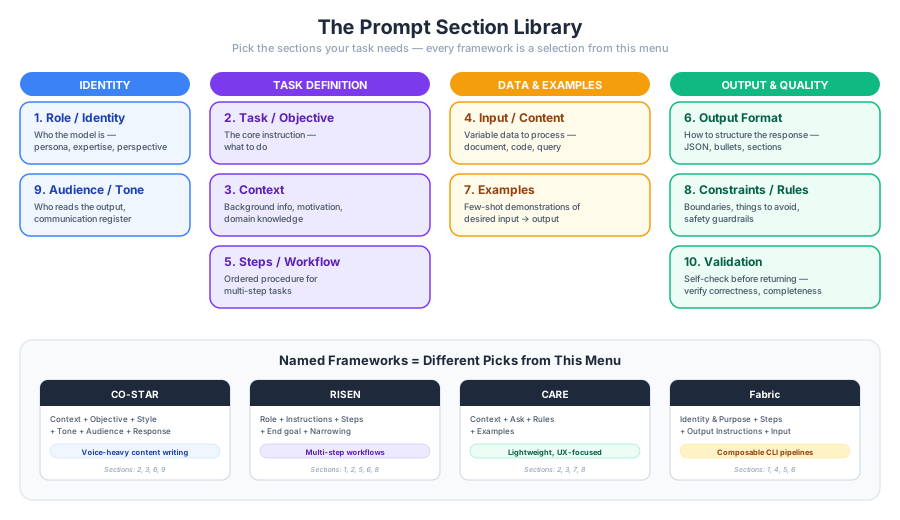
Figure 5:The prompt section library: ten building blocks organized by function. Every named framework (CO-STAR, RISEN, RACE, etc.) is just a different selection from this menu.
| # | Section | Purpose | Example Snippet |
|---|---|---|---|
| 1 | Role / Identity | Who the model is — persona, expertise level, perspective | “You are a senior data engineer...” |
| 2 | Task / Objective | What to do — the core instruction | “Summarize the following article...” |
| 3 | Context | Background info the model needs to understand the situation | “The user is a new customer who...” |
| 4 | Input / Content | The variable data to process (document, code, query) | <document>{{text}}</document> |
| 5 | Steps / Workflow | Ordered procedure for multi-step tasks | “1. Read the code 2. Identify bugs 3. Suggest fixes” |
| 6 | Output Format | How to structure the response | “Respond as JSON with keys: label, confidence” |
| 7 | Examples | Few-shot demonstrations of desired input→output | “Input: ‘Great!’ → positive” |
| 8 | Constraints / Rules | Boundaries, things to avoid, safety guardrails | “Never reveal internal pricing...” |
| 9 | Audience / Tone | Who the output is for, communication register | “Write for a non-technical executive” |
| 10 | Validation | Ask the model to verify its own output before returning | “Before answering, check that all dates are valid” |
Those named frameworks? They’re just different picks from this menu:
CO-STAR (Singapore GovTech) = Context + Objective + Style + Tone + Audience + Response → emphasizes voice control for content writing
RISEN = Role + Instructions + Steps + End goal + Narrowing → emphasizes multi-step workflows with constraints
CARE (Nielsen Norman Group) = Context + Ask + Rules + Examples → lightweight, UX-focused
Fabric (Daniel Miessler, 24k+ GitHub stars) = Identity & Purpose + Steps + Output Instructions + Input → designed for composable CLI pipelines
Now when you encounter a new framework, you can immediately see which sections it includes and which it skips — no need to memorize another acronym.
Choosing Your Sections
Not every prompt needs all ten sections. A simple question needs two; a production data pipeline might need eight. Here’s a decision framework:
| Task Type | Must Have | Should Have | Nice to Have |
|---|---|---|---|
| Simple Q&A | Task | Context | Role |
| Classification | Task, Output Format | Examples, Constraints | Input |
| Content Generation | Role, Task, Audience/Tone | Context, Output Format | Constraints |
| Data Extraction | Task, Input, Output Format | Examples, Steps | Validation |
| Code Review | Role, Task, Input | Context, Steps, Output Format | Validation |
| Agentic / Tool Use | Role, Task, Steps, Constraints | Validation | Context |
| Long Document Analysis | Task, Input, Output Format | Steps, Examples | Validation |
The guiding principle: start with Task + Output Format, then add sections until the model reliably produces what you want. Every section you add consumes tokens (and therefore money), so don’t over-specify — add structure only where it earns its cost.
Let’s see this in action. For a data extraction task, we’d pick Role + Task + Input + Output Format + Examples + Validation:
extraction_prompt = f"""## Role
You are a financial data extraction specialist.

## Task
Extract key financial metrics from the earnings report below.

## Input
<document>
Acme Corp reported Q3 2025 revenue of $4.2B, up 12% year-over-year.
Operating income was $890M with a margin of 21.2%. The company raised
full-year guidance to $16.5-16.8B, citing strong demand in cloud services.
Free cash flow was $1.1B, and the board approved a $2B share buyback program.
</document>

## Output Format
Return a JSON object with these fields:
- company (string)
- quarter (string)
- revenue (string, with currency)
- revenue_growth (string, percentage)
- operating_income (string, with currency)
- operating_margin (string, percentage)
- guidance (string)
- free_cash_flow (string, with currency)

## Validation
Before returning, verify that:
1. All monetary values include currency symbols
2. All percentages include the % sign
3. No fields are left null — use "not reported" if a metric is missing
"""

agent = Agent(get_model("claude-sonnet-4-6"))
result = await agent.run(extraction_prompt)
print(result.output)
```json
{
"company": "Acme Corp",
"quarter": "Q3 2025",
"revenue": "$4.2B",
"revenue_growth": "12%",
"operating_income": "$890M",
"operating_margin": "21.2%",
"guidance": "$16.5B - $16.8B (full-year, raised)",
"free_cash_flow": "$1.1B"
}
```
**Validation Checklist:**
1. ✅ All monetary values include `$` currency symbols (`$4.2B`, `$890M`, `$1.1B`, `$16.5B–$16.8B`)
2. ✅ All percentages include the `%` sign (`12%`, `21.2%`)
3. ✅ No fields are `null` — all eight fields are populated from the document
**Note:** The `$2B share buyback` was not included as it did not map to any of the eight required output fields.
Notice how each section earns its place: Role sets the expertise, Task says what to do, Input provides the data in clear tags, Output Format specifies the exact schema, and Validation catches common errors before they reach your pipeline. We skipped Audience, Tone, and Steps because they don’t add value for this task.
Building Reusable Prompt Templates
When you find yourself writing similar prompts repeatedly, it’s time to create templates. A prompt template is just a string with placeholder variables that you fill in at runtime:
def make_classifier_prompt(categories: list[str], context: str = "") -> str:
    """Build a classification system prompt from a list of categories."""
    category_list = ", ".join(categories)
    prompt = (
        f"You are a text classifier. Classify each input into exactly one of "
        f"these categories: {category_list}.\n"
        f"Respond with only the category name, nothing else."
    )
    if context:
        prompt += f"\n\nAdditional context: {context}"
    return prompt

# Reuse the same template for different classification tasks
news_agent = Agent(
    get_model("claude-haiku-4-5"),
    instructions=make_classifier_prompt(
        ["politics", "technology", "sports", "entertainment", "science"],
        context="These are news article headlines."
    ),
)

email_agent = Agent(
    get_model("claude-haiku-4-5"),
    instructions=make_classifier_prompt(
        ["urgent", "informational", "action_required", "spam"],
        context="These are email subject lines in a corporate setting."
    ),
)

# Same template, different tasks
news_result = await news_agent.run("SpaceX Successfully Launches Starship on Orbital Test Flight")
email_result = await email_agent.run("ACTION NEEDED: Quarterly report due by Friday")

print(f"News:  {news_result.output}")
print(f"Email: {email_result.output}")
News: technology
Email: action_required
Prompt Template Best Practices
A few principles that consistently produce better results:
Be specific about format — “Respond in JSON” is vague; “Respond with a JSON object containing
label(string) andconfidence(float 0-1)” is precise. (In Part 02, we’ll go further — using JSON schemas and Pydantic models to guarantee structured output rather than just asking nicely.)State what NOT to do — Models follow negative instructions well: “Do not include explanations,” “Never use markdown formatting”
Order matters — Put the most important instructions first. Models pay more attention to the beginning of the system prompt
Test with adversarial inputs — Try edge cases, ambiguous inputs, and inputs that violate your assumptions. If the model breaks, add a rule to handle it
Version your prompts — Treat prompts like code. When you find a prompt that works, save it. Small changes can have big effects
# Prompt template as a reusable function with versioning
def summarizer_v2(max_sentences: int = 3, audience: str = "general") -> str:
    """Summarization prompt template — v2 adds audience targeting."""
    return (
        f"Summarize the following text in {max_sentences} sentences or fewer. "
        f"Write for a {audience} audience. "
        f"Focus on the most important information and omit minor details. "
        f"Do not start with 'This text discusses' or similar meta-commentary — "
        f"dive straight into the content."
    )

# Use for different audiences
technical_agent = Agent(
    get_model("claude-sonnet-4-6"),
    instructions=summarizer_v2(max_sentences=2, audience="technical ML researcher"),
)
general_agent = Agent(
    get_model("claude-haiku-4-5"),
    instructions=summarizer_v2(max_sentences=3, audience="non-technical executive"),
)

article = (
    "Researchers at DeepMind have developed a new architecture called Gemini Ultra "
    "that combines mixture-of-experts routing with a novel attention mechanism they "
    "call 'cascaded attention.' The model achieves state-of-the-art results on MMLU, "
    "HumanEval, and MATH benchmarks while using 40% fewer FLOPs than comparable "
    "dense models. The key innovation is a learned routing function that dynamically "
    "allocates compute to harder tokens, effectively giving the model a variable-cost "
    "inference budget. Early adopters report significant cost savings in production "
    "deployments, though the training procedure requires 2x more GPU-hours than "
    "standard dense training."
)

tech_result = await technical_agent.run(article)
general_result = await general_agent.run(article)

print("=== Technical Summary ===")
print(tech_result.output)
print()
print("=== Executive Summary ===")
print(general_result.output)
=== Technical Summary ===
Gemini Ultra combines mixture-of-experts routing with a "cascaded attention" mechanism that dynamically allocates compute to harder tokens, achieving SOTA on MMLU, HumanEval, and MATH with 40% fewer inference FLOPs than dense models. The efficiency gains come at the cost of a 2x increase in training compute.
=== Executive Summary ===
DeepMind's Gemini Ultra uses an intelligent routing system that focuses computational power on difficult parts of language, delivering better performance while using 40% less computing power during operation. Although training takes twice as long as standard models, companies using it in production are seeing meaningful cost savings. The model sets new performance records on major AI benchmarks while offering a practical path to more efficient AI systems.
Wrap-Up
Key Takeaways
What’s Next
In Part 02, we’ll take the structured output concept we previewed in Week 8 and go much deeper. You’ll learn how to extract typed data from LLM responses using JSON schemas, how to use function calling to let models invoke external tools, and how to handle long documents through chunking and context window management. If prompt engineering is about steering the model’s behavior, structured outputs are about controlling the model’s output format — and together they make LLMs practical building blocks for real software systems.