Structured Outputs and Function Calling
CAP-6640: Computational Understanding of Natural Language
Spencer Lyon
Prerequisites
L08.03: Working with LLM APIs — PydanticAI
Agent,get_model()helper, structured output preview (output_type)L09.01: Prompt engineering — system prompts, prompt templates
Outcomes
Define Pydantic models to extract typed, validated data from LLM responses
Use nested models,
Literaltypes, and union types for complex extraction tasksExplain how function calling works and implement tools with PydanticAI
References
From Text to Data
In Part 01, we learned how to steer an LLM’s behavior through prompt engineering. We could ask it to classify text, extract information, and follow specific output formats. But there was always a fragile step at the end: parsing the model’s text response into something your code can actually use.
Consider this scenario. You’ve built a prompt that extracts financial data from earnings reports, and you ask for JSON output. Most of the time, the model returns clean JSON. But sometimes it wraps the JSON in a markdown code fence. Sometimes it adds a sentence before the JSON. Sometimes a field that should be a number comes back as a string like “approximately $4.2 billion.” Your parsing code breaks, your pipeline fails at 3 AM, and you wake up to an angry Slack message.
This is the fundamental tension: LLMs produce text, but software consumes data. Structured output bridges that gap by constraining the model to produce output that conforms to a schema — not by politely asking, but by enforcing it at the API level. No more regex parsing, no more hoping the model formats its tokens the way you expect.
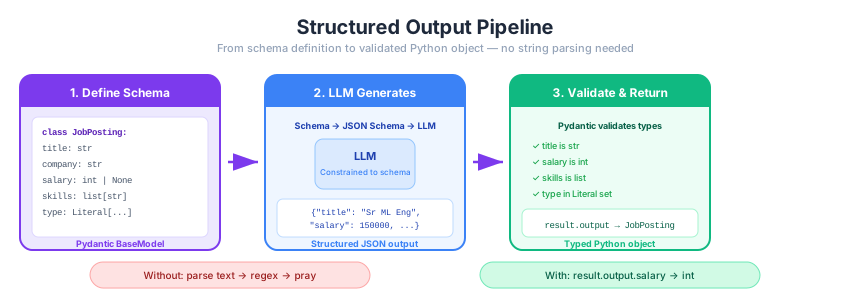
Figure 1:The structured output pipeline: you define a schema (Pydantic model), the framework sends it to the LLM, and the response is validated and returned as a typed Python object — not a string.
We got a taste of this in Week 8 with a simple SentimentResult model. Now we’ll go deeper — nested models, constrained types, union outputs, and building real extraction pipelines.
Setup
Same setup as Part 01 — PydanticAI through our course LiteLLM proxy.
import os
from dotenv import load_dotenv
from pydantic import BaseModel, Field
from pydantic_ai import Agent
from pydantic_ai.models.openai import OpenAIChatModel
from pydantic_ai.providers.openai import OpenAIProvider

load_dotenv()

PROXY_URL = "https://litellm.6640.ucf.spencerlyon.com"

def get_model(model_name: str) -> OpenAIChatModel:
    """Create a model connection through our LiteLLM proxy."""
    return OpenAIChatModel(
        model_name,
        provider=OpenAIProvider(
            base_url=PROXY_URL,
            api_key=os.environ["CAP6640_API_KEY"],
        ),
    )
Structured Outputs with Pydantic
The Basics: Schema as a Contract
The core idea is simple: instead of getting a string back from the LLM, you define a Pydantic BaseModel that describes the shape of the output you want. PydanticAI converts your model into a JSON schema, sends it to the LLM, and validates the response automatically.
Let’s start with a practical example — extracting structured information from a job posting:
from typing import Literal


class JobPosting(BaseModel):
    """Structured extraction of a job posting."""
    title: str = Field(description="The job title")
    company: str = Field(description="The hiring company")
    location: str = Field(description="Job location, or 'Remote' if remote")
    salary_min: int | None = Field(description="Minimum salary in USD, or null if not stated")
    salary_max: int | None = Field(description="Maximum salary in USD, or null if not stated")
    experience_years: int = Field(description="Minimum years of experience required")
    skills: list[str] = Field(description="Required technical skills mentioned")
    job_type: Literal["full-time", "part-time", "contract", "internship"] = Field(
        description="Employment type"
    )


agent = Agent(
    get_model("claude-sonnet-4-6"),
    output_type=JobPosting,
    instructions="Extract job posting details from the provided text.",
)

posting_text = """
We're hiring a Senior Machine Learning Engineer at DataFlow Inc. in Austin, TX.
This is a full-time role offering $150,000-$190,000 plus equity. You'll need at
least 5 years of experience with Python, PyTorch, and cloud platforms (AWS or GCP).
Experience with NLP and transformer models is strongly preferred. Knowledge of
MLOps tools like MLflow and Kubernetes is a plus.
"""

result = await agent.run(posting_text)
job = result.output

print(f"Title:      {job.title}")
print(f"Company:    {job.company}")
print(f"Location:   {job.location}")
print(f"Salary:     ${job.salary_min:,} - ${job.salary_max:,}")
print(f"Experience: {job.experience_years}+ years")
print(f"Type:       {job.job_type}")
print(f"Skills:     {', '.join(job.skills)}")
Title: Senior Machine Learning Engineer
Company: DataFlow Inc.
Location: Austin, TX
Salary: $150,000 - $190,000
Experience: 5+ years
Type: full-time
Skills: Python, PyTorch, AWS, GCP, NLP, Transformer Models, MLflow, Kubernetes
Let’s unpack what makes this powerful:
Field(description=...)— tells the LLM what each field means, improving extraction accuracyint | None— handles missing data gracefully (salary might not be listed)Literal[...]— constrains the model to a fixed set of valid values, like an enumlist[str]— the model returns a proper Python list, not a comma-separated stringType validation — if the model returns
"five"instead of5forexperience_years, Pydantic catches it
The result isn’t text you need to parse — it’s a JobPosting object you can use directly in your code.
Nested Models: Structured Data with Depth
Real-world data is rarely flat. Let’s extract structured information from a research paper abstract, where each entity has its own structure:
class Author(BaseModel):
    """A paper author."""
    name: str = Field(description="Full name of the author")
    affiliation: str | None = Field(description="Institutional affiliation, if mentioned")


class PaperMetadata(BaseModel):
    """Structured extraction of academic paper metadata."""
    title: str = Field(description="Paper title")
    authors: list[Author] = Field(description="List of authors with affiliations")
    year: int | None = Field(description="Publication year, if mentioned")
    task: str = Field(description="The main NLP/ML task addressed")
    method: str = Field(description="The key method or architecture proposed")
    datasets: list[str] = Field(description="Datasets used for evaluation")
    key_result: str = Field(description="The primary quantitative result or claim")


agent = Agent(
    get_model("claude-sonnet-4-6"),
    output_type=PaperMetadata,
    instructions="Extract metadata from the research paper abstract.",
)

abstract = """
"Attention Is All You Need" by Ashish Vaswani, Noam Shazeer, Niki Parmar,
Jakob Uszkoreit, Llion Jones, Aidan N. Gomez, Lukasz Kaiser, and Illia Polosukhin
(Google Brain and University of Toronto, 2017). The dominant sequence transduction
models are based on complex recurrent or convolutional neural networks. We propose
a new simple network architecture, the Transformer, based solely on attention
mechanisms. Experiments on two machine translation tasks show the model achieves
28.4 BLEU on WMT 2014 English-to-German and 41.8 BLEU on English-to-French,
surpassing all existing models. Evaluated on WMT 2014 and WMT 2014 datasets.
"""

result = await agent.run(abstract)
paper = result.output

print(f"Title: {paper.title}")
print(f"Year:  {paper.year}")
print(f"Task:  {paper.task}")
print(f"Method: {paper.method}")
print(f"Key Result: {paper.key_result}")
print(f"\nAuthors:")
for author in paper.authors:
    affil = f" ({author.affiliation})" if author.affiliation else ""
    print(f"  - {author.name}{affil}")
print(f"\nDatasets: {', '.join(paper.datasets)}")
Title: Attention Is All You Need
Year: 2017
Task: Machine Translation (Sequence Transduction)
Method: Transformer architecture based solely on attention mechanisms, replacing recurrent and convolutional neural networks
Key Result: Achieves 28.4 BLEU on WMT 2014 English-to-German and 41.8 BLEU on WMT 2014 English-to-French, surpassing all existing models
Authors:
- Ashish Vaswani (Google Brain)
- Noam Shazeer (Google Brain)
- Niki Parmar (Google Brain)
- Jakob Uszkoreit (Google Brain)
- Llion Jones (Google Brain)
- Aidan N. Gomez (University of Toronto)
- Lukasz Kaiser (Google Brain)
- Illia Polosukhin (Google Brain)
Datasets: WMT 2014 English-to-German, WMT 2014 English-to-French
The nested Author model inside PaperMetadata lets us capture structured data at multiple levels — each author has their own name and affiliation, and the list of authors is itself a field of the paper.
Union Types: When the Output Could Be Different Things
Sometimes the model needs to return different types depending on the input. For example, a content moderation system might flag content or approve it — and each outcome has different fields:
class ContentApproved(BaseModel):
    """Content passed moderation."""
    status: Literal["approved"] = "approved"
    summary: str = Field(description="Brief summary of the content")


class ContentFlagged(BaseModel):
    """Content was flagged for review."""
    status: Literal["flagged"] = "flagged"
    reason: str = Field(description="Why the content was flagged")
    severity: Literal["low", "medium", "high"] = Field(description="Severity level")
    suggested_action: str = Field(description="Recommended next step")


agent = Agent(
    get_model("claude-sonnet-4-6"),
    output_type=ContentApproved | ContentFlagged,  # Union type!
    instructions=(
        "Review the content for policy violations. "
        "If it's fine, return an approved status with a summary. "
        "If it violates policies (hate speech, misinformation, personal attacks), "
        "flag it with a reason and severity."
    ),
)

# Test with clean content
clean_result = await agent.run(
    "The new Python 3.13 release includes experimental JIT compilation "
    "that shows promising performance improvements for numerical workloads."
)
print(f"Status: {clean_result.output.status}")
print(f"Type:   {type(clean_result.output).__name__}")

if isinstance(clean_result.output, ContentApproved):
    print(f"Summary: {clean_result.output.summary}")
Status: approved
Type: ContentApproved
Summary: The content discusses Python 3.13's experimental JIT (Just-In-Time) compilation feature and its potential performance benefits for numerical workloads. This is factual, informative, and technology-focused content with no policy violations.
# Test with problematic content
flagged_result = await agent.run(
    "Everyone from [country] is lazy and stupid. They should all be deported."
)
print(f"Status:   {flagged_result.output.status}")
print(f"Type:     {type(flagged_result.output).__name__}")

if isinstance(flagged_result.output, ContentFlagged):
    print(f"Reason:   {flagged_result.output.reason}")
    print(f"Severity: {flagged_result.output.severity}")
    print(f"Action:   {flagged_result.output.suggested_action}")
Status: flagged
Type: ContentFlagged
Reason: The content contains hate speech and ethnic/national discrimination. It makes sweeping derogatory generalizations about all people from a specific country, calling them "lazy and stupid," and advocates for their mass deportation. This constitutes a personal attack on an entire group based on national origin.
Severity: high
Action: Remove the content immediately and issue a policy violation warning to the user. Repeated violations should result in account suspension.
The union type ContentApproved | ContentFlagged lets PydanticAI return either type depending on the model’s judgment. Your code uses isinstance() to handle each case — fully type-safe, no string parsing required.
Function Calling and Tool Use
Structured outputs solve the “LLM → data” problem. But what about the reverse direction — giving the LLM access to external capabilities it doesn’t have on its own?
LLMs are powerful reasoners, but they have real limitations: they can’t query a database, they can’t run code, they can’t access today’s data, and they’re surprisingly bad at precise computation. Function calling (also called tool use) bridges this gap by letting the LLM request that your code execute a function, then use the result to continue its response.
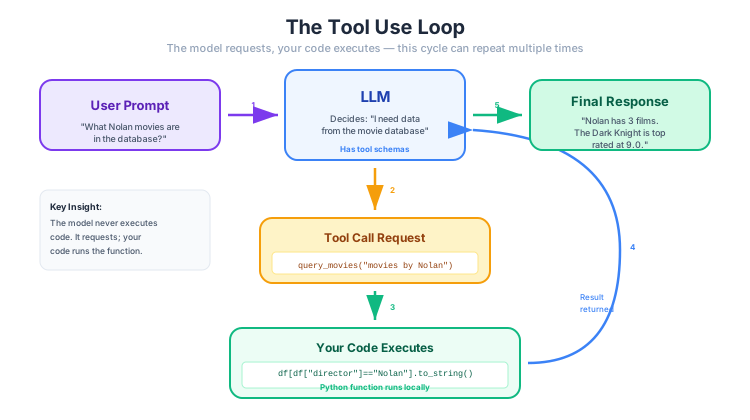
Figure 2:The tool use loop: the model decides it needs information, requests a tool call with arguments, your code executes the function and returns the result, and the model incorporates it into its response. This cycle can repeat multiple times.
How It Works
The flow is:
You define tools — Python functions with type hints and docstrings
PydanticAI sends tool schemas to the LLM alongside your prompt
The LLM decides whether to call a tool and with what arguments
PydanticAI executes the function and sends the result back to the model
The model incorporates the result into its response
Steps 3-5 can repeat — the model might call multiple tools in sequence
The key insight: the model doesn’t execute anything. It generates a structured request (“call function X with arguments Y”), and your code handles the execution. The model never sees your source code or has direct access to your systems.
Tool Example 1: SpaCy NLP Analysis
Here’s a tool that gives an LLM access to SpaCy’s NLP pipeline — precise NER and POS tagging that the model can use to ground its analysis:
import spacy

nlp = spacy.load("en_core_web_sm")


def analyze_with_spacy(text: str) -> str:
    """Run SpaCy NLP analysis on text. Returns named entities and POS tags.

    Args:
        text: The text to analyze with SpaCy.
    """
    doc = nlp(text)

    entities = [
        {"text": ent.text, "label": ent.label_, "description": spacy.explain(ent.label_)}
        for ent in doc.ents
    ]

    # Get POS distribution
    pos_counts: dict[str, int] = {}
    for token in doc:
        pos = token.pos_
        pos_counts[pos] = pos_counts.get(pos, 0) + 1

    return (
        f"Entities found: {entities}\n"
        f"POS distribution: {dict(sorted(pos_counts.items(), key=lambda x: -x[1]))}\n"
        f"Sentence count: {len(list(doc.sents))}\n"
        f"Token count: {len(doc)}"
    )


# Create an agent WITH the tool
nlp_agent = Agent(
    get_model("claude-sonnet-4-6"),
    tools=[analyze_with_spacy],
    instructions=(
        "You are a text analysis assistant. When asked to analyze text, "
        "use the SpaCy tool to get precise NLP annotations, then provide "
        "your analysis based on the results."
    ),
)

result = await nlp_agent.run(
    "Analyze this text for named entities and linguistic patterns: "
    "'Apple CEO Tim Cook announced a new partnership with OpenAI at "
    "the WWDC conference in Cupertino, California last Monday.'"
)
print(result.output)
Here's a comprehensive breakdown of the analysis:
---
## 🏷️ Named Entity Recognition (NER)
| Entity | Label | Type Description |
|---|---|---|
| **Apple** | `ORG` | Organization — a major tech company |
| **Tim Cook** | `PERSON` | Person — CEO of Apple |
| **OpenAI** | `ORG` | Organization — an AI research company *(inferred; not flagged but contextually clear)* |
| **Cupertino** | `GPE` | Geo-Political Entity — a city |
| **California** | `GPE` | Geo-Political Entity — a U.S. state |
| **last Monday** | `DATE` | Temporal expression — a relative date reference |
> 📝 **Note:** *OpenAI* and *WWDC* were not flagged by SpaCy's model, but they are clearly named entities — OpenAI is an organization and WWDC (Worldwide Developers Conference) is a named event. This is a common limitation of pre-trained NLP models with emerging or domain-specific proper nouns.
---
## 🔤 Part-of-Speech (POS) Distribution
| POS Tag | Count | Role |
|---|---|---|
| **PROPN** (Proper Noun) | 9 | Dominant — reflects the entity-rich nature of the sentence |
| **ADP** (Adposition/Preposition) | 3 | *with, at, in* — links entities and clauses |
| **DET** (Determiner) | 2 | *a, the* — introduces noun phrases |
| **ADJ** (Adjective) | 2 | Modifiers like *new, last* |
| **NOUN** (Common Noun) | 2 | General concepts like *partnership, conference* |
| **PUNCT** (Punctuation) | 2 | Comma and period |
| **VERB** (Verb) | 1 | *announced* — the single main action |
---
## 📊 Sentence-Level Stats
- **Sentences:** 1
- **Tokens:** 21
---
## 🔍 Key Linguistic Patterns
1. **Entity-Dense Sentence:** With 9 proper nouns, the sentence is heavily packed with named entities — typical of **news-style writing**.
2. **Single Main Verb:** The entire sentence revolves around one action — *"announced"* — making it a **simple declarative structure**.
3. **Prepositional Chaining:** Three prepositions (*with, at, in*) link multiple locations and entities in a compact, flowing structure.
4. **Relative Temporal Reference:** *"last Monday"* is a relative date, meaning its absolute value depends on the **context of publication** — a common journalistic convention.
5. **Proper Noun Dominance (43%):** Nearly half of all tokens are proper nouns, reinforcing the factual, informational tone of the sentence.
Why is this better than the LLM just doing NER itself? Because SpaCy gives deterministic, reproducible results. The LLM might miss an entity or hallucinate one; SpaCy won’t. The combination is powerful: SpaCy for precise annotation, the LLM for interpretation and reasoning.
Tool Example 2: DataFrame Query
This tool gives the LLM the ability to query a pandas DataFrame. But instead of writing fragile keyword-matching logic ourselves, we’ll let the LLM do what it’s good at — generating code — by having it write a pandas.DataFrame.query() string:
import pandas as pd

# A small movie dataset
movies_df = pd.DataFrame({
    "title": [
        "The Matrix", "Inception", "Interstellar", "The Dark Knight",
        "Pulp Fiction", "Fight Club", "Forrest Gump", "The Shawshank Redemption",
        "The Godfather", "Parasite"
    ],
    "year": [1999, 2010, 2014, 2008, 1994, 1999, 1994, 1994, 1972, 2019],
    "genre": [
        "Sci-Fi", "Sci-Fi", "Sci-Fi", "Action",
        "Crime", "Drama", "Drama", "Drama",
        "Crime", "Thriller"
    ],
    "rating": [8.7, 8.8, 8.7, 9.0, 8.9, 8.8, 8.8, 9.3, 9.2, 8.5],
    "director": [
        "Wachowski", "Nolan", "Nolan", "Nolan",
        "Tarantino", "Fincher", "Zemeckis", "Darabont",
        "Coppola", "Bong"
    ],
})

print(movies_df.to_string(index=False))
title year genre rating director
The Matrix 1999 Sci-Fi 8.7 Wachowski
Inception 2010 Sci-Fi 8.8 Nolan
Interstellar 2014 Sci-Fi 8.7 Nolan
The Dark Knight 2008 Action 9.0 Nolan
Pulp Fiction 1994 Crime 8.9 Tarantino
Fight Club 1999 Drama 8.8 Fincher
Forrest Gump 1994 Drama 8.8 Zemeckis
The Shawshank Redemption 1994 Drama 9.3 Darabont
The Godfather 1972 Crime 9.2 Coppola
Parasite 2019 Thriller 8.5 Bong
The key design: our tool accepts a pandas.DataFrame.query() expression string and an optional sort column. The LLM’s job is to translate a natural language question into that query string — something LLMs are excellent at:
def run_dataframe_query(query_expr: str, sort_by: str = "", ascending: bool = True) -> str:
    """Query the movie database using a pandas DataFrame.query() expression.

    The DataFrame has columns: title (str), year (int), genre (str),
    rating (float), director (str).

    Sample rows (first 3):
        title       year  genre   rating  director
        The Matrix  1999  Sci-Fi  8.7     Wachowski
        Inception   2010  Sci-Fi  8.8     Nolan
        Interstellar 2014 Sci-Fi  8.7     Nolan

    Args:
        query_expr: A valid pandas query expression, e.g.,
            'director == "Nolan"' or 'rating > 8.8' or
            'genre == "Sci-Fi" and year > 2000'.
            Use an empty string to select all rows.
        sort_by: Optional column name to sort results by, e.g., 'rating' or 'year'.
        ascending: Sort order. Use False for descending (e.g., highest rating first).
    """
    try:
        if query_expr.strip():
            result_df = movies_df.query(query_expr)
        else:
            result_df = movies_df
    except Exception as e:
        return f"Query error: {e}. Available columns: title, year, genre, rating, director."

    if sort_by and sort_by in result_df.columns:
        result_df = result_df.sort_values(sort_by, ascending=ascending)

    if len(result_df) == 0:
        return "No movies found matching that query."

    return result_df.to_string(index=False)


data_agent = Agent(
    get_model("claude-sonnet-4-6"),
    tools=[run_dataframe_query],
    retries=3,
    instructions=(
        "You are a movie database assistant. Use the run_dataframe_query tool to "
        "look up information. The tool accepts pandas DataFrame.query() expressions. "
        "Always query the database rather than relying on your own knowledge — "
        "the database is the source of truth. If a query returns no results, try "
        "broadening or rephrasing your query before concluding data is missing."
    ),
)

result = await data_agent.run(
    "Which Christopher Nolan movies are in the database, and which one has the highest rating?"
)
print(result.output)
Here's what the database has for Christopher Nolan:
| Title | Year | Genre | Rating |
|---|---|---|---|
| The Dark Knight | 2008 | Action | 9.0 |
| Inception | 2010 | Sci-Fi | 8.8 |
| Interstellar | 2014 | Sci-Fi | 8.7 |
🏆 **The Dark Knight (2008)** has the highest rating at an impressive **9.0**! All three films are highly rated, but The Dark Knight stands out above Inception (8.8) and Interstellar (8.7).
This pattern is powerful for several reasons:
The LLM generates the query expression — it translates natural language (“Nolan movies rated above 8.5”) into a valid pandas expression (
'director == "Nolan" and rating > 8.5'), which is exactly what LLMs are good atExecution stays deterministic —
df.query()runs the same way every time, no ambiguityError handling is built in — if the LLM generates an invalid query, we catch the exception and return a helpful error message that the model can use to self-correct
It generalizes — the same pattern works for SQL databases, search APIs, or any system with a query language
This is the “R” in RAG — retrieval-augmented generation — applied to structured data instead of documents. We’ll explore this pattern much more deeply in Week 10.
Wrap-Up
Key Takeaways
What’s Next
In the Part 03 lab, you’ll put everything from this week together. You’ll build an end-to-end data extraction pipeline that combines prompt engineering (Part 01) with structured outputs and tool use (Part 02) — reading unstructured text, extracting typed data, and validating the results. You’ll also design and test a prompt library for a multi-step NLP workflow.
Looking ahead to Week 10, we’ll tackle a question this lecture hinted at: what happens when your documents are too long to fit in the context window? The answer is Retrieval-Augmented Generation (RAG) — chunking documents, storing them in vector databases, retrieving the relevant pieces, and generating grounded responses.