RAG Foundations
CAP-6640: Computational Understanding of Natural Language
Spencer Lyon
Prerequisites
L03.01–03.02: Text representation (TF-IDF, word embeddings, similarity)
L08.03: Working with LLM APIs — PydanticAI
Agent,get_model()helperL09.01–09.02: Prompt engineering, structured outputs, tool use
Outcomes
Explain why parametric LLM knowledge alone is insufficient and how RAG addresses these limitations
Trace the evolution from classical information retrieval to modern RAG systems
Describe the three-stage RAG pipeline (Index, Retrieve, Generate) and the role of each component
Store documents in a vector database and perform similarity search using ChromaDB and sentence-transformers
References
RAG Has Been Powering This Course All Semester
Here’s something you might not know: a RAG system has been helping write your lecture notes all semester.
Behind the scenes, the course materials are backed by a vector database containing the full text of our three primary references — Jurafsky & Martin’s Speech and Language Processing, the Hugging Face NLP Course, and the spaCy Course. When preparing each week’s content, we query this database with topic-specific searches like “attention mechanism” or “named entity recognition.” The system returns the most relevant passages from across all three sources, and those passages inform the lecture content you’ve been reading.
That system — a Python script, an embedding model, and a ChromaDB vector store — is a textbook example of Retrieval-Augmented Generation. And today, we’re going to understand exactly how it works.
But first: why do we need such a system at all? Why not just ask the LLM directly?
Why RAG? The Limits of Parametric Knowledge
Let’s start with a simple experiment. We’ll ask an LLM a question about our course:
import os
from dotenv import load_dotenv
from pydantic_ai import Agent
from pydantic_ai.models.openai import OpenAIChatModel
from pydantic_ai.providers.openai import OpenAIProvider

load_dotenv()

PROXY_URL = "https://litellm.6640.ucf.spencerlyon.com"


def get_model(model_name: str) -> OpenAIChatModel:
    """Create a model connection through our LiteLLM proxy."""
    return OpenAIChatModel(
        model_name,
        provider=OpenAIProvider(
            base_url=PROXY_URL,
            api_key=os.environ["CAP6640_API_KEY"],
        ),
    )


agent = Agent(get_model("claude-sonnet-4-6"))
result = await agent.run(
    "What are the three primary textbook references for UCF's CAP-6640 course?"
)
print(result.output)
I don't have specific information about UCF's CAP-6640 course syllabus or its required textbook references. CAP-6640 at the University of Central Florida appears to be a Computer Vision course, but I cannot confirm the exact three primary textbook references used without access to the current or historical course syllabus.
To find this information accurately, I would recommend:
1. **Checking the UCF course website** or the instructor's course page
2. **Looking at the UCF course catalog** or department website
3. **Contacting the instructor** directly or checking the course syllabus on Webcourses (UCF's LMS)
Do you have additional context that might help me assist you better?
The model will either hallucinate an answer or say it doesn’t know. Neither is useful. This illustrates three fundamental limitations of parametric knowledge — the knowledge stored in the model’s weights during training:
Hallucination — The model may confidently generate plausible-sounding but incorrect information. It doesn’t “know” what it doesn’t know.
Stale training data — LLMs are trained once, at a fixed point in time. They can’t know about events, papers, or courses created after their training cutoff.
No citations — Even when the model gives a correct answer, it can’t point you to the source. You have no way to verify the claim.
What if we could give the model a “cheat sheet” — a set of relevant documents retrieved at query time — so it could ground its answer in real sources? That’s the core idea behind Retrieval-Augmented Generation.
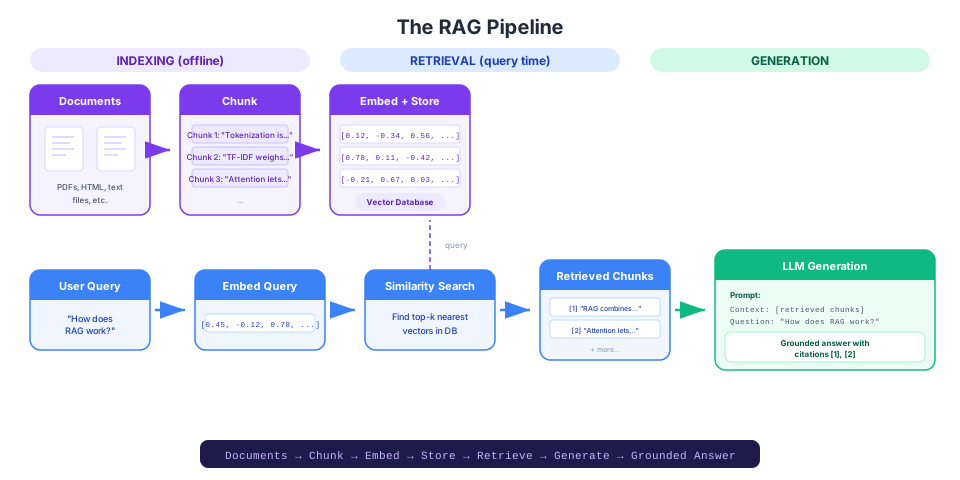
Figure 1:The RAG pipeline: documents are chunked, embedded, and stored in a vector database. At query time, the user’s question is embedded, similar chunks are retrieved, and both the question and retrieved context are passed to the LLM for grounded generation.
A Brief History of RAG
RAG didn’t appear out of nowhere. It sits at the intersection of two fields that have been developing for decades: information retrieval and language generation. Let’s trace the path that led to the modern RAG paradigm.
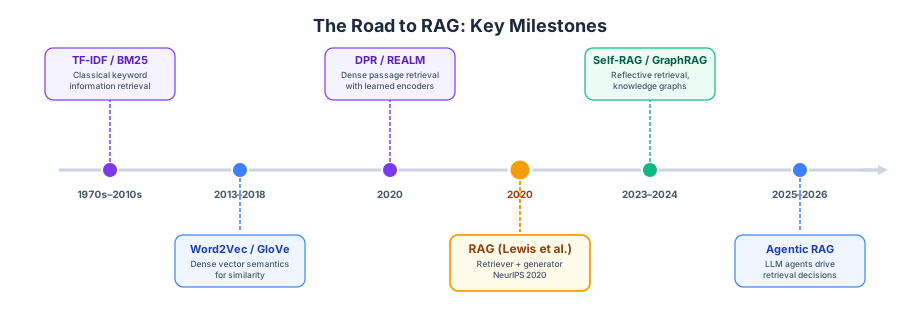
Figure 2:From classical information retrieval to modern agentic RAG — a timeline of key milestones.
Classical Information Retrieval
The story starts with a problem you’ve actually already solved. Back in Week 3, we built TF-IDF representations and measured document similarity with cosine distance. That’s classical information retrieval — the field concerned with finding relevant documents given a query.
The workhorse algorithm of classical IR is BM25 (Best Matching 25), a refinement of TF-IDF that accounts for document length and term saturation. If you’ve ever used Elasticsearch, Solr, or a traditional search engine, you’ve used BM25. It’s fast, interpretable, and requires no training — just a tokenizer and an index.
But BM25 has a fundamental limitation: it matches on exact terms. If you search for “car” but the document says “automobile,” BM25 won’t find it. The user has to guess which words the document author chose. This is called the vocabulary mismatch problem.
Dense Retrieval: Embeddings for Search
In Week 3, we also learned about word embeddings — dense vector representations where semantically similar words land near each other in vector space. The obvious question is: can we use embeddings for retrieval instead of keyword matching?
The answer came in 2020 with Dense Passage Retrieval (DPR) from Facebook AI Research (Karpukhin et al.). DPR uses two separate BERT-based encoders — one for queries and one for documents — to embed both into the same vector space. Retrieval becomes a nearest-neighbor search: find the document embeddings closest to the query embedding.
Dense retrieval solves the vocabulary mismatch problem. “Car” and “automobile” end up near each other in embedding space, so a query about one will retrieve documents about the other. The trade-off is that dense retrieval can miss exact keyword matches that BM25 would catch — which is why modern systems often combine both (we’ll see this in Part 02).
The 2020 Moment: RAG Is Born
The term “Retrieval-Augmented Generation” was coined in a landmark 2020 paper by Patrick Lewis and colleagues at Meta AI (then Facebook AI Research), presented at NeurIPS. Their key insight was elegant: combine a pretrained retriever with a pretrained generator and fine-tune them together.
The original RAG model paired a DPR retriever with a BART sequence-to-sequence generator. Given a question, the retriever fetched relevant Wikipedia passages, and the generator produced an answer conditioned on both the question and the retrieved passages. This architecture achieved state-of-the-art results on open-domain question answering — outperforming both pure retrieval systems and pure generative models.
Why was this such a big deal? Because it gave language models access to an updateable, citable knowledge store without retraining. Want the model to know about something new? Just add it to the document index. Want to verify an answer? Check the retrieved passages.
The Four Generations of RAG
Since the original 2020 paper, RAG has evolved rapidly. The community broadly recognizes four generations:
| Generation | Key Idea | Limitations |
|---|---|---|
| Naive RAG | Simple index → retrieve → generate pipeline | Irrelevant retrieval, lost-in-the-middle, noisy context |
| Advanced RAG | Better chunking, hybrid search, reranking, query rewriting | Still a fixed pipeline — can’t adapt to query complexity |
| Modular RAG | Each component is an independent, swappable module | Requires engineering effort to configure |
| Agentic RAG | An LLM agent decides when, what, and how to retrieve | Most flexible, but hardest to debug |
We’ll build a solid Naive RAG system in today’s lab, upgrade it with Advanced RAG techniques in Part 02, and preview the agentic approach that connects to the agent architectures you’ll study in Weeks 12–13.
The RAG Pipeline
Every RAG system, from the simplest to the most sophisticated, has the same three stages. Let’s walk through each one.
Stage 1: Indexing
Before you can retrieve anything, you need to prepare your documents. Indexing has three steps:
Chunk — Split documents into smaller pieces. A 50-page PDF is too large to pass as context; we need focused passages. Chunk size is one of the most important design decisions in a RAG system (more on this in Part 02).
Embed — Convert each chunk into a dense vector using an embedding model. This is the same concept from Week 3 — but instead of embedding single words, we embed entire passages. Models like
sentence-transformers/all-MiniLM-L6-v2or OpenAI’stext-embedding-3-smallare purpose-built for this.Store — Save the vectors (and the original text) in a vector database optimized for similarity search. When we query later, the vector DB will efficiently find the nearest neighbors.
Stage 2: Retrieval
When a user asks a question:
Embed the query using the same embedding model used during indexing
Search the vector database for the top-k most similar chunks (typically k=3 to 10)
Return the matching chunks along with their similarity scores
This is essentially the semantic search you saw in Week 3 — but now it’s operating over a curated document collection, not just individual words.
Stage 3: Generation
Finally, we combine everything into a prompt for the LLM:
Construct a prompt that includes the user’s question and the retrieved chunks as context
Generate a response that answers the question based on the provided context
Cite the sources — a well-designed RAG system attributes claims to specific retrieved passages
The key shift from plain LLM usage: instead of asking the model to answer from memory, we’re asking it to answer from the documents we provided. The model becomes a reading comprehension system rather than a knowledge recall system.
Vector Databases and Embedding Models
Let’s make this concrete with code. We’ll build a tiny RAG system right here — just enough to see each component in action.
What Is a Vector Database?
A vector database is a storage system optimized for high-dimensional vectors and similarity search. Unlike a traditional SQL database (which finds rows matching exact conditions), a vector database finds the vectors closest to a query vector.
Think of it this way:
| Traditional Database | Vector Database | |
|---|---|---|
| Stores | Rows with columns | Vectors with metadata |
| Query | WHERE name = 'RAG' | “Find vectors nearest to this query vector” |
| Match type | Exact | Approximate similarity |
| Best for | Structured data lookups | Semantic search, recommendations |
Several vector databases are available, each with different trade-offs:
ChromaDB — Open-source, runs locally, great for prototyping. This is what we’ll use.
FAISS — Facebook’s similarity search library. Very fast, but lower-level (no metadata storage).
Pinecone — Managed cloud service. Easy to scale, but requires an account and API key.
Weaviate — Open-source, supports hybrid search (vectors + keyword) natively.
Embedding Models
To populate a vector database, we need an embedding model that converts text into vectors. These are the same bi-encoder models from the sentence-transformers family that we previewed in Week 3.
The key property: texts with similar meaning get similar vectors, regardless of the exact words used. “The cat sat on the mat” and “A feline rested on a rug” should produce vectors that are close together. We measure this with cosine similarity, the same metric we used in Week 3.
from sentence_transformers import SentenceTransformer

# Load a lightweight embedding model (384 dimensions)
embed_model = SentenceTransformer("all-MiniLM-L6-v2")

# Embed two semantically similar sentences
sentences = [
    "The cat sat on the mat.",
    "A feline rested on a rug.",
    "The stock market crashed yesterday.",
]

embeddings = embed_model.encode(sentences)
print(f"Embedding shape: {embeddings.shape}")
print(f"Each sentence → a {embeddings.shape[1]}-dimensional vector")Warning: You are sending unauthenticated requests to the HF Hub. Please set a HF_TOKEN to enable higher rate limits and faster downloads.
BertModel LOAD REPORT from: sentence-transformers/all-MiniLM-L6-v2
Key                     | Status     |  |
------------------------+------------+--+-
embeddings.position_ids | UNEXPECTED |  |

Notes:
- UNEXPECTED	:can be ignored when loading from different task/architecture; not ok if you expect identical arch.
Embedding shape: (3, 384)
Each sentence → a 384-dimensional vector
from sentence_transformers.util import cos_sim

# Check similarity between all pairs
similarities = cos_sim(embeddings, embeddings)
for i, s1 in enumerate(sentences):
    for j, s2 in enumerate(sentences):
        if i < j:
            print(f"Similarity({i+1}, {j+1}): {similarities[i][j]:.3f}")
            print(f"  '{s1[:40]}...' vs '{s2[:40]}...'")
Similarity(1, 2): 0.553
'The cat sat on the mat....' vs 'A feline rested on a rug....'
Similarity(1, 3): 0.111
'The cat sat on the mat....' vs 'The stock market crashed yesterday....'
Similarity(2, 3): 0.074
'A feline rested on a rug....' vs 'The stock market crashed yesterday....'
As expected, the two sentences about cats are much more similar to each other than either is to the sentence about the stock market. This is the foundation of semantic search.
Hands-On: A Minimal Vector Store with ChromaDB
Now let’s put it all together. We’ll create a ChromaDB collection, add some documents, and query it.
import chromadb

# Create an in-memory ChromaDB client (no persistence needed for this demo)
client = chromadb.Client()

# Create a collection — ChromaDB uses its own default embedding model,
# but we'll provide our own embeddings for transparency
collection = client.create_collection(
    name="course_demo",
    metadata={"hnsw:space": "cosine"},  # Use cosine similarity
)

# Our "documents" — imagine these are chunks from a textbook
documents = [
    "Tokenization is the process of breaking text into smaller units called tokens.",
    "TF-IDF weighs term importance by combining term frequency with inverse document frequency.",
    "The attention mechanism allows each position in a sequence to attend to all other positions.",
    "Named entity recognition identifies and classifies entities like people, organizations, and locations.",
    "Retrieval-augmented generation combines document retrieval with language model generation.",
    "Gradient descent is an optimization algorithm that iteratively updates model parameters.",
]

# Embed and add documents
doc_embeddings = embed_model.encode(documents).tolist()
collection.add(
    ids=[f"doc_{i}" for i in range(len(documents))],
    documents=documents,
    embeddings=doc_embeddings,
)
print(f"Added {collection.count()} documents to the collection.")
Added 6 documents to the collection.
# Now query: "What is retrieval-augmented generation?"
query = "What is retrieval-augmented generation?"
query_embedding = embed_model.encode([query]).tolist()

results = collection.query(
    query_embeddings=query_embedding,
    n_results=3,
)

print(f"Query: '{query}'\n")
for i, (doc, dist) in enumerate(
    zip(results["documents"][0], results["distances"][0])
):
    # ChromaDB returns cosine distance (lower = more similar)
    print(f"  [{i+1}] (similarity: {1 - dist:.3f}) {doc}")
Query: 'What is retrieval-augmented generation?'
[1] (similarity: 0.686) Retrieval-augmented generation combines document retrieval with language model generation.
[2] (similarity: 0.340) The attention mechanism allows each position in a sequence to attend to all other positions.
[3] (similarity: 0.255) Gradient descent is an optimization algorithm that iteratively updates model parameters.
The result about “Retrieval-augmented generation combines document retrieval with language model generation” should rank first — even though the document uses different phrasing than the query. The embedding model captures the semantic match.
Let’s try a second query to see retrieval in action on a different topic:
query2 = "What is the attention mechanism in transformers?"
results2 = collection.query(
    query_embeddings=embed_model.encode([query2]).tolist(),
    n_results=3,
)

print(f"Query: '{query2}'\n")
for i, (doc, dist) in enumerate(
    zip(results2["documents"][0], results2["distances"][0])
):
    print(f"  [{i+1}] (similarity: {1 - dist:.3f}) {doc}")
Query: 'What is the attention mechanism in transformers?'
[1] (similarity: 0.600) The attention mechanism allows each position in a sequence to attend to all other positions.
[2] (similarity: 0.165) Gradient descent is an optimization algorithm that iteratively updates model parameters.
[3] (similarity: 0.159) Tokenization is the process of breaking text into smaller units called tokens.
Each query retrieves the most relevant document. That’s the power of dense retrieval: meaning matters, not just keywords.
From Retrieval to Generation
We now have everything we need to close the loop. Let’s take the retrieved documents and use them to generate a grounded answer:
# Build the RAG prompt
retrieved_context = "\n".join(
    f"[{i+1}] {doc}" for i, doc in enumerate(results["documents"][0])
)

rag_agent = Agent(
    get_model("claude-sonnet-4-6"),
    instructions=(
        "Answer the user's question based ONLY on the provided context. "
        "Cite your sources using [1], [2], etc. "
        "If the context doesn't contain enough information, say so."
    ),
)

rag_prompt = f"""Context:
{retrieved_context}

Question: What is retrieval-augmented generation?"""

result = await rag_agent.run(rag_prompt)
print(result.output)
Based on the provided context, retrieval-augmented generation is a approach that **combines document retrieval with language model generation** [1].
The context doesn't provide further details beyond this definition, so I cannot elaborate more on its specific mechanisms or implementation.
That’s a complete RAG pipeline in about 30 lines of code. The model’s answer is grounded in the documents we retrieved, and it can cite them. Compare that to the hallucination-prone response we got at the top of this lecture.
RAG vs. Long Context Windows
Here’s a question you might be asking: modern LLMs like Claude and Gemini support context windows of 1–2 million tokens. If we can just paste our entire document collection into the prompt, why bother with retrieval at all?
It’s a fair question — and the answer is nuanced.
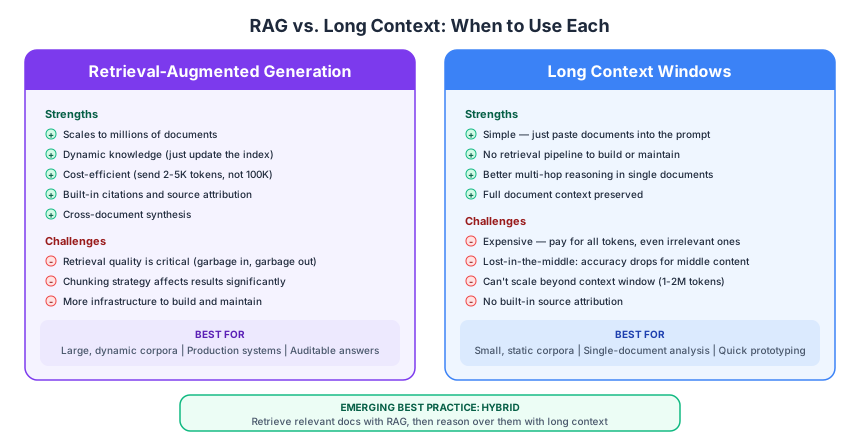
Figure 3:RAG vs. long context: each approach has strengths. The emerging best practice combines both — retrieve relevant documents, then reason over them with a large context window.
When Long Context Wins
Long context windows are genuinely useful when:
Your corpus is small and static — If all your documents fit in under ~100K tokens, just include them all. No chunking, no embedding, no retrieval tuning needed.
You need multi-hop reasoning across a single long document — LLMs with large context windows can draw connections between information scattered throughout a document.
Conversational tasks — Chat applications where the full conversation history provides important context.
When RAG Wins
RAG is the better choice when:
Your corpus is large — Millions of documents can’t fit in any context window. RAG scales to arbitrary corpus sizes because it only retrieves what’s relevant.
Your knowledge changes frequently — New documents? Just add them to the index. No re-prompting or re-processing needed.
Cost matters — Sending 100K tokens per query is expensive. RAG typically sends 2–5K tokens of retrieved context, a 20-50x reduction.
You need citations — RAG naturally provides source attribution because you know exactly which documents were retrieved.
Cross-document synthesis — Answering questions that require combining information from multiple sources.
The Lost-in-the-Middle Effect
There’s a subtler issue with long context. Research has consistently shown that LLMs suffer from a lost-in-the-middle effect: information placed in the middle of a long context is less likely to be used than information at the beginning or end. A July 2025 study by Chroma tested 18 models (including GPT-4.1, Claude 4, and Gemini 2.5) and found consistent performance degradation as context length increased.
Counterintuitively, shorter, more precise context often produces better answers than dumping in everything you have.
The Emerging Pattern: Retrieve Then Reason
The winning approach in 2025–26 isn’t “RAG or long context” — it’s both. Use RAG to identify the most relevant documents (narrowing from millions to a handful), then use the LLM’s large context window to reason across those retrieved documents. This combines RAG’s precision with long-context reasoning.
Wrap-Up
Key Takeaways
What’s Next
In Part 02, we’ll build a production-quality RAG pipeline from the ground up. You’ll learn how different chunking strategies (fixed-size, recursive, semantic) affect retrieval quality, why hybrid search (combining BM25 keyword matching with dense vectors) outperforms either approach alone, and how cross-encoder reranking can dramatically improve precision. We’ll also explore query transformation techniques like HyDE that can boost retrieval even further.