Evaluation Fundamentals
CAP-6640: Computational Understanding of Natural Language
Spencer Lyon
Prerequisites
PydanticAI agents with structured outputs (L09.02)
RAG pipelines and manual evaluation (L10.03)
Familiarity with Pydantic
BaseModelandField
Outcomes
Explain why evaluating LLM outputs is fundamentally harder than evaluating classifiers
Describe what standard benchmarks (MMLU, HumanEval, MT-Bench) and classical metrics (BLEU, ROUGE, BERTScore) measure — and their limitations
Build evaluation Datasets with Cases and deterministic Evaluators using
pydantic-evalsWrite a custom Evaluator and interpret an EvaluationReport
References
How Do You Know If Your LLM Is Any Good?
Imagine you’re building a summarization feature for a news app. You feed an article into your LLM and get back two summaries:
Summary A: “The Federal Reserve raised interest rates by 0.25% on Wednesday, citing persistent inflation. Markets fell sharply in response.”
Summary B: “The Fed did something with rates. Stocks moved.”
Most humans would agree that Summary A is better — it’s more specific, more informative, and more faithful to the source. But how do we turn that intuition into a number?
In Week 4, we had it easy. A sentiment classifier outputs "positive" or "negative", and we compare against a gold label. We get precision, recall, F1 score — clean, unambiguous numbers. But free-text generation doesn’t have a single correct answer. There are many good summaries of the same article, and “good” depends on who’s reading it and why.
This is the evaluation problem, and it’s one of the hardest challenges in modern NLP. Today we’ll explore why it’s hard, survey the tools the field has developed to cope, and then get hands-on with pydantic-evals — a framework that lets us define, run, and report on evaluations with the same rigor we bring to software testing.
Why Evaluation Is Hard
Let’s start with the uncomfortable truth: there is no perfect metric for language generation. Here’s why.
Open-Ended Outputs
A text classification model picks from a fixed set of labels. A translation model produces one of perhaps a few acceptable translations. But ask an LLM to summarize an article, and there could be thousands of perfectly valid summaries — different lengths, different emphases, different phrasings. Any metric that requires an exact reference answer is fundamentally limited.
Subjectivity
“Good” depends on context. A summary for a financial analyst needs precise numbers. A summary for a social media post needs punch. A summary for a legal team needs completeness. The same output could score well on one rubric and poorly on another.
Distribution Shift
A model that scores 90% on a benchmark might fail on your specific data. hallucination rates that look acceptable on general-knowledge tests can be devastating when your RAG system is answering questions about company policy documents. The gap between “benchmark performance” and “works for my use case” is often enormous.
Goodhart’s Law
Here’s the deepest problem: when a measure becomes a target, it ceases to be a good measure. If we optimize an LLM to maximize BLEU score, it learns to game n-gram overlap without actually producing better text. This is why the field keeps inventing new metrics — and why no single metric has won.
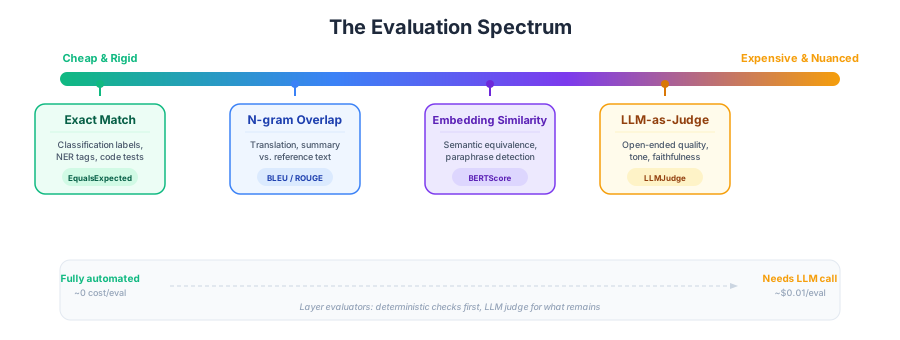
Figure 1:The evaluation spectrum: from cheap and rigid (exact match) to expensive and nuanced (human judgment). Each approach trades off automation cost against the richness of what it can measure.
The key insight from this spectrum is that there’s no free lunch. Cheap metrics miss nuance. Rich metrics are expensive. The art of evaluation is choosing the right tool — or combination of tools — for your specific application. And that’s exactly what pydantic-evals helps us systematize.
The Evaluation Landscape
Before we build our own evaluations, let’s survey what the field has developed. We won’t code these today — instead, we’ll understand what they measure and when they’re useful, so you can reach for them when appropriate.
Standard Benchmarks
Benchmarks attempt to measure a model’s general capabilities using standardized test sets. Think of them as the SAT for LLMs.
MMLU (Massive Multitask Language Understanding) (Hendrycks et al., 2021) tests knowledge across 57 academic subjects — from abstract algebra to world religions. It’s multiple-choice, so scoring is straightforward (exact match). MMLU tells you whether a model has broad knowledge, but it says nothing about whether it can write a good email or summarize a document faithfully.
HumanEval (Chen et al., 2021) is a coding benchmark: 164 Python programming problems where the model must generate functionally correct code. It tests code generation specifically — a model that aces HumanEval might still produce terrible prose.
MT-Bench (Zheng et al., 2023) uses multi-turn conversations judged by GPT-4 (an early example of LLM-as-judge, which we’ll explore in Part 02). It measures conversational ability — coherence, helpfulness, and accuracy across follow-up questions.
The critical limitation of all benchmarks is data contamination: if the benchmark questions appeared in the model’s training data, the scores are meaningless. And there’s Goodhart’s Law again — once a benchmark becomes the industry standard, models get optimized specifically for it, and scores inflate faster than actual capabilities improve.
Task-Specific Metrics
For specific NLP tasks, the field has developed metrics that measure the overlap between a model’s output and a reference text.
BLEU (Papineni et al., 2002) measures precision of n-gram overlap between a generated translation and a reference translation. If the generated text contains many of the same 1-grams, 2-grams, 3-grams, and 4-grams as the reference, BLEU is high. It was designed for machine translation and remains widely used there, though it’s purely surface-level — it can’t tell if a paraphrase is semantically equivalent. Python: sacrebleu.
ROUGE (Lin, 2004) is BLEU’s complement — it measures recall of n-gram overlap. ROUGE asks: “Of all the n-grams in the reference, how many appear in the generated text?” This makes it natural for summarization, where we want to ensure key content is preserved. ROUGE-L uses longest common subsequence rather than fixed n-grams. Python: rouge-score.
BERTScore (Zhang et al., 2020) moves beyond surface-level overlap. It computes cosine similarity between BERT embeddings of the generated and reference tokens. This means it can recognize that “automobile” and “car” are essentially the same, even though they share no n-grams. BERTScore captures semantic similarity, not just lexical overlap. Python: bert-score.
Here’s the key insight that connects to the rest of today’s lecture: all of these metrics require a reference text. They answer the question “How similar is the output to the gold standard?” But for many LLM applications — chatbots, creative writing, open-ended analysis — there is no gold standard. We need a different approach.
Introducing pydantic-evals
Here’s where we shift from theory to practice. We’ve seen that the evaluation landscape is complex — but in our day-to-day work, we need a framework for defining what “good” means for our specific application and then measuring it systematically.
pydantic-evals is PydanticAI’s evaluation framework (uv add pydantic-evals), and if you’ve used pytest, the mental model will feel familiar:
| pytest | pydantic-evals | Purpose |
|---|---|---|
| test function | Case | One input → expected output pair |
| test suite | Dataset | Collection of Cases + shared Evaluators |
| assertion | Evaluator | Checks one property of the output |
| test report | EvaluationReport | Results with per-case details + aggregates |
The key idea: instead of writing ad-hoc assert statements scattered across notebooks (like we did in the Week 10 lab), we define our evaluation declaratively — what are the test cases, and what properties should the outputs have? Then we run them all at once and get a structured report.
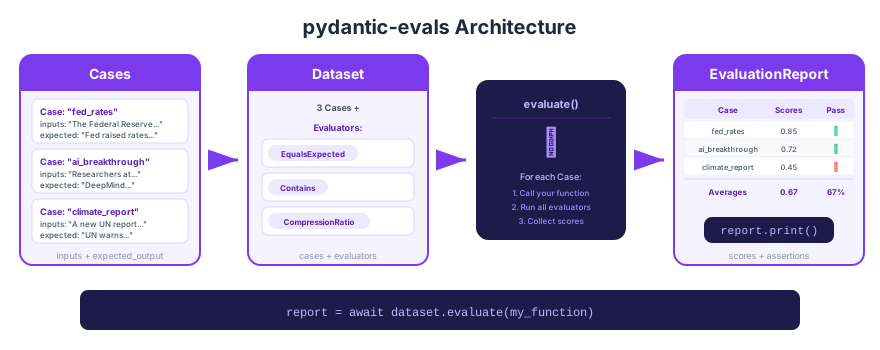
Figure 2:The pydantic-evals workflow: define Cases with inputs and expected outputs, collect them into a Dataset with Evaluators, run evaluate() against your function, and inspect the resulting report.
First Example: Getting Our Feet Wet
Let’s start simple — evaluating a text transformation function — to learn the mechanics before tackling anything LLM-related.
from pydantic_evals import Case, Dataset
from pydantic_evals.evaluators import EqualsExpected, Contains
# A simple function we want to evaluate
def clean_text(text: str) -> str:
"""Lowercase, strip whitespace, remove trailing punctuation."""
return text.strip().lower().rstrip(".,!?;:")# Define our test cases
dataset = Dataset(
name="clean_text_tests",
cases=[
Case(
name="basic_lowercase",
inputs=" Hello World! ",
expected_output="hello world",
),
Case(
name="trailing_punctuation",
inputs="End of sentence.",
expected_output="end of sentence",
),
Case(
name="already_clean",
inputs="no changes needed",
expected_output="no changes needed",
),
Case(
name="mixed_issues",
inputs=" LOUD Message!!! ",
expected_output="loud message",
),
],
evaluators=[
EqualsExpected(), # Does the output exactly match expected?
Contains(value="message", case_sensitive=False), # Spot check
],
)# Run the evaluation
report = await dataset.evaluate(clean_text)
report.print(include_input=True, include_output=True, include_durations=False)Notice what just happened:
Each
Casedefined an input and the expected outputEqualsExpected()checked for exact string equalityContains()checked whether the output contains “message” (only relevant for some cases)The report shows pass/fail for each evaluator on each case
This is the fundamental pattern. Now let’s apply it to something more interesting.
Evaluating Text Summarization
The real power of pydantic-evals shows up when we move beyond exact matching. Let’s evaluate a simple summarization function — and watch what happens when EqualsExpected inevitably falls short.
# A deliberately simple "summarizer" — just takes the first sentence
def simple_summarize(text: str) -> str:
    """Extract the first sentence as a crude summary."""
    # Split on period followed by space (crude but illustrative)
    sentences = text.split(". ")
    return sentences[0] + ("." if not sentences[0].endswith(".") else "")
# Our test articles and what we'd like the summary to contain
articles = [
{
"name": "fed_rates",
"input": (
"The Federal Reserve raised interest rates by 0.25% on Wednesday. "
"Chair Powell cited persistent inflation as the primary driver. "
"Markets fell sharply in response, with the S&P 500 dropping 2.1%. "
"Analysts expect one more rate hike before the end of the year."
),
"expected": (
"The Federal Reserve raised interest rates by 0.25% on Wednesday."
),
"key_terms": ["Federal Reserve", "interest rates", "0.25%"],
},
{
"name": "ai_breakthrough",
"input": (
"Researchers at DeepMind published a new architecture that achieves "
"state-of-the-art results on protein folding. The model uses a novel "
"attention mechanism that processes amino acid sequences more efficiently. "
"The results were published in Nature and have been independently verified."
),
"expected": (
"DeepMind researchers published a new architecture achieving "
"state-of-the-art protein folding results."
),
"key_terms": ["DeepMind", "protein folding"],
},
{
"name": "climate_report",
"input": (
"A new UN report warns that global temperatures could rise by 2.5°C "
"above pre-industrial levels by 2050. The report calls for immediate "
"action to reduce carbon emissions. Several nations have pledged new "
"commitments at the latest climate summit."
),
"expected": (
"A UN report warns global temperatures could rise 2.5°C by 2050, "
"calling for immediate emission reductions."
),
"key_terms": ["UN", "temperatures", "2050"],
},
]# Build a Dataset with exact match + keyword checks
summary_cases = []
for article in articles:
case_evaluators = [
Contains(value=term, case_sensitive=False)
for term in article["key_terms"]
]
summary_cases.append(
Case(
name=article["name"],
inputs=article["input"],
expected_output=article["expected"],
evaluators=case_evaluators, # Per-case evaluators
)
)
summary_dataset = Dataset(
name="summarization_eval",
cases=summary_cases,
evaluators=[EqualsExpected()], # Dataset-wide evaluator
)report = await summary_dataset.evaluate(simple_summarize)
report.print(include_input=False, include_output=True, include_durations=False)Look at the results. EqualsExpected passes for fed_rates (our first-sentence extractor happens to match), but fails on the other two — the expected summaries were reworded, so exact match doesn’t work even though the content is correct. Meanwhile, the Contains evaluators give us more useful signal: does the summary at least mention the key entities and facts?
This is the fundamental tension in LLM evaluation: exact match is too strict for most generation tasks, but we still need automated checks. The solution is to layer evaluators — deterministic checks for what we can verify mechanically, and (as we’ll see in Part 02) LLM-based judges for subjective quality.
Writing a Custom Evaluator
The built-in evaluators cover common patterns, but real applications need custom logic. Let’s write an evaluator that checks whether a summary is actually shorter than its input — a basic sanity check for any summarizer.
from dataclasses import dataclass

from pydantic_evals.evaluators import Evaluator, EvaluatorContext


@dataclass
class CompressionRatio(Evaluator[str, str]):
    """Check that the summary is significantly shorter than the input."""

    min_ratio: float = 0.3  # Summary should be at most 30% of input length
    max_ratio: float = 0.8  # But not suspiciously short (< 30% might mean truncation)

    def evaluate(self, ctx: EvaluatorContext[str, str]) -> dict[str, float | bool]:
        input_len = len(ctx.inputs.split())
        output_len = len(ctx.output.split())

        if input_len == 0:
            return {"compression_ratio": 0.0, "length_ok": False}

        ratio = output_len / input_len
        in_range = self.min_ratio <= ratio <= self.max_ratio

        return {
            "compression_ratio": round(ratio, 3),
            "length_ok": in_range,
        }
Let’s unpack what’s happening:
We subclass
Evaluator[str, str]— the type parameters are[InputType, OutputType]The
evaluatemethod receives anEvaluatorContextwith.inputs,.output, and.expected_outputWe can return a
dictwith multiple named scores — both numeric (float) and pass/fail (bool)The
@dataclassdecorator gives us configurable parameters likemin_ratio— note that evaluators use Python dataclasses, not PydanticBaseModel(which we reserve for LLM structured outputs)
# Rebuild the dataset with our custom evaluator added
summary_dataset_v2 = Dataset(
    name="summarization_eval_v2",
    cases=summary_cases,
    evaluators=[
        EqualsExpected(),
        CompressionRatio(min_ratio=0.1, max_ratio=0.5),
    ],
)

report_v2 = await summary_dataset_v2.evaluate(simple_summarize)
report_v2.print(include_output=True, include_durations=False)Now we’re getting richer signal. For each summary, we see:
Whether it exactly matches the reference (probably not)
Whether it contains the key terms we care about
The compression ratio — is it actually shorter than the input?
Whether the compression is in a reasonable range
This layered approach — combining exact checks, keyword checks, and custom metrics — is how real evaluation pipelines work. Each evaluator catches a different class of failure.
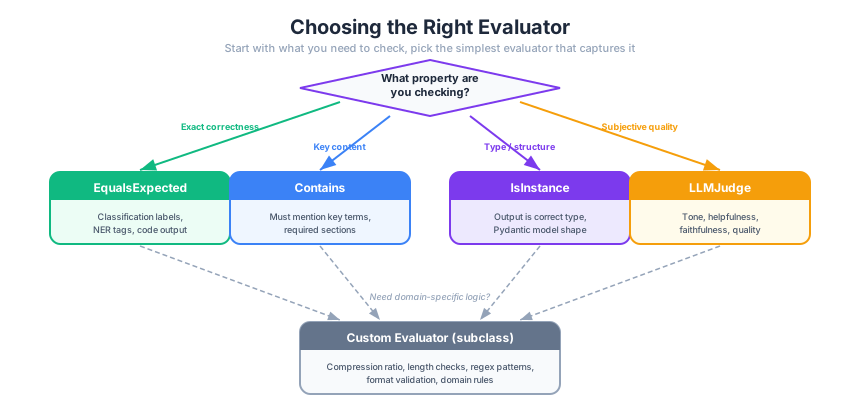
Figure 3:Choosing the right evaluator: start with what you need to verify, then pick the simplest evaluator that captures it. Use deterministic evaluators for verifiable properties; save LLM-based evaluation for subjective qualities.
Wrap-Up
Key Takeaways
What’s Next
In Part 02, we’ll tackle the question we left open: how do you evaluate subjective quality without a reference text? We’ll meet LLMJudge — an evaluator that uses an LLM to assess another LLM’s output — and build RAGAS-style metrics (faithfulness, answer relevance, context quality) to evaluate the RAG pipelines we built in Week 10.