Tools and Memory
CAP-6640: Computational Understanding of Natural Language
Spencer Lyon
Prerequisites
Outcomes
Design effective tools using docstrings,
Fieldconstraints, andModelRetryfor self-correctionBuild multi-turn conversations using
message_history, understanding the difference betweenall_messages()andnew_messages()Compare five memory strategies and their tradeoffs: full replay, serialization, sliding window, summary compression, and vector retrieval
Choose the right memory pattern for a given use case
Explain how self-improving agents use durable memory to learn across sessions, and distinguish mental models from sources of truth
References
Compound Engineering (Every) — How Every codes with self-improving agents
When Tools Go Wrong
Let’s pick up where we left off in L12.01. We built a data analysis agent with tools like get_quarterly_revenue. But what happens when the LLM makes a bad tool call?
import os
import statistics
from dataclasses import dataclass
from datetime import date

from dotenv import load_dotenv
from pydantic_ai import Agent, RunContext
from pydantic_ai.models.openai import OpenAIChatModel
from pydantic_ai.providers.openai import OpenAIProvider

load_dotenv()

PROXY_URL = "https://litellm.6640.ucf.spencerlyon.com"


def get_model(model_name: str) -> OpenAIChatModel:
    """Create a model connection through our LiteLLM proxy."""
    return OpenAIChatModel(
        model_name,
        provider=OpenAIProvider(
            base_url=PROXY_URL,
            api_key=os.environ["CAP6640_API_KEY"],
        ),
    )
SALES_DB = {
"Q1": [2.1, 2.3, 1.9],
"Q2": [2.4, 2.8, 2.5],
"Q3": [3.0, 2.7, 3.1],
"Q4": [3.3, 3.5, 3.2],
}
@dataclass
class AnalysisDeps:
db: dict
user_name: str
available_quarters: list[str]Imagine a user asks: “What was revenue in the holiday quarter?” The LLM might reasonably guess that means Q5 (a fifth quarter?) or perhaps “Holiday” — neither of which exists in our database. With our L12.01 tool, we’d return an error string and hope the LLM figures it out. But there’s a much better approach.
Designing Effective Tools
Good tool design is the difference between an agent that works and one that fumbles. Three principles matter most:
1. Docstrings Become Descriptions
The LLM never sees your Python code — it only sees the tool’s name, description (from the docstring), and parameter schema (from type hints). So the docstring isn’t documentation for humans — it’s instructions for the model:
# ❌ Vague — the LLM doesn't know what quarters look like
@agent.tool
def get_revenue(ctx: RunContext[Deps], quarter: str) -> str:
    """Get revenue data."""
    ...

# ✅ Specific — guides the LLM toward valid inputs
@agent.tool
def get_revenue(ctx: RunContext[Deps], quarter: str) -> str:
    """Get monthly revenue figures for a specific quarter.

    Args:
        quarter: The quarter to look up, e.g. 'Q1', 'Q2', 'Q3', or 'Q4'.
    """
    ...
You can also use Pydantic’s Field to add constraints and descriptions to individual parameters, which become part of the JSON schema the model sees. We saw this in Week 9 with structured outputs — the same idea applies to tool parameters.
2. ModelRetry — Teaching the LLM to Self-Correct
When a tool call fails, you have two options: return an error string and hope for the best, or tell the LLM exactly what went wrong so it can fix its request. PydanticAI provides ModelRetry for this:
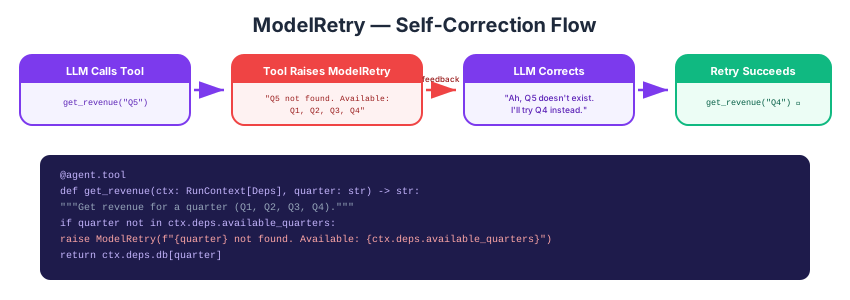
Figure 1:When a tool raises ModelRetry, PydanticAI sends the error message back to the LLM as feedback. The LLM can then correct its arguments and try again.
When you raise ModelRetry(...) inside a tool, PydanticAI doesn’t crash — it sends the error message back to the LLM as if the tool had returned it as feedback. The LLM sees the message, reasons about what went wrong, and retries with corrected arguments. This all happens automatically inside the agent.run() loop.
Let’s add this to our data agent:
from pydantic_ai import ModelRetry

data_agent = Agent(
    get_model("claude-haiku-4-5"),
    deps_type=AnalysisDeps,
    system_prompt=(
        "You are a data analysis assistant. "
        "Use your tools to query data — never make up numbers."
    ),
)


@data_agent.instructions
def inject_context(ctx: RunContext[AnalysisDeps]) -> str:
    quarters = ", ".join(ctx.deps.available_quarters)
    return f"User: {ctx.deps.user_name}. Available quarters: {quarters}."


@data_agent.tool(retries=2)
def get_quarterly_revenue(ctx: RunContext[AnalysisDeps], quarter: str) -> str:
    """Get monthly revenue figures for a specific quarter.

    Args:
        quarter: The quarter to look up, e.g. 'Q1', 'Q2', 'Q3', or 'Q4'.
    """
    if quarter not in ctx.deps.available_quarters:
        raise ModelRetry(
            f"'{quarter}' is not a valid quarter. "
            f"Available quarters: {ctx.deps.available_quarters}"
        )
    data = ctx.deps.db[quarter]
    total = sum(data)
    avg = statistics.mean(data)
    return f"{quarter} monthly revenues: {data} (total: ${total:.1f}M, avg: ${avg:.2f}M)"
The retries=2 parameter means the tool can be retried up to 2 times before PydanticAI gives up. Let’s test it with a deliberately tricky query:
deps = AnalysisDeps(
    db=SALES_DB,
    user_name="Alice",
    available_quarters=["Q1", "Q2", "Q3", "Q4"],
)

result = await data_agent.run("What was the holiday quarter revenue?", deps=deps)
print(result.output)
I'd be happy to help you find the holiday quarter revenue! However, I need to clarify which quarter you're referring to. The holiday season typically falls in Q4 (October-December), but I want to make sure that's what you're asking for.
Are you asking for **Q4 revenue**?
Let’s inspect the messages to see the self-correction in action:
for msg in result.new_messages():
    for part in msg.parts:
        part_type = type(part).__name__
        content = str(part)[:100]
        print(f"  {part_type}: {content}")
    print()
SystemPromptPart: SystemPromptPart(content='You are a data analysis assistant. Use your tools to query data — never ma
UserPromptPart: UserPromptPart(content='What was the holiday quarter revenue?', timestamp=datetime.datetime(2026, 4,
TextPart: TextPart(content="I'd be happy to help you find the holiday quarter revenue! However, I need to clar
You should see the LLM first try something like “Q5” or “Holiday”, get a ModelRetry with the list of valid quarters, and then correctly retry with “Q4” (the typical holiday quarter).
3. Other Tool Options (Brief Tour)
PydanticAI offers several more tool configuration options worth knowing about:
requires_approval=True— Pauses execution and asks for human approval before running the tool. Essential for tools with side effects (sending emails, making payments).timeout=30— Sets a per-tool timeout in seconds. If the tool takes too long, the model gets a retry prompt.prepare— A function that dynamically controls whether a tool is available on a given step. Useful for enabling/disabling tools based on conversation state.
We won’t code these today, but they’re well-documented in the PydanticAI tools reference.
Multi-Turn Conversations
So far, every agent.run() call has been independent — the agent has no memory of previous interactions. Ask it a question, get an answer, done. But real agents need to carry context across turns:
Turn 1: “What was Q3 revenue?” Turn 2: “How does that compare to Q4?” ← “that” refers to Q3, which the agent needs to remember
The Stateless Default
By default, PydanticAI agents are stateless. Each run() call starts fresh — no memory of anything that came before. This is actually a good design: it means there’s no hidden state to worry about, no mysterious bugs from stale context. Memory is always explicit.
Adding Memory with message_history
To chain conversations, you pass the messages from previous runs into the next one using the message_history parameter. Here’s where the distinction between all_messages() and new_messages() matters:
result.new_messages()— Only the messages generated in this runresult.all_messages()— Everything: themessage_historyyou passed in plus the new messages from this run
For multi-turn conversations, the pattern is:
# Turn 1: Ask about Q3
result1 = await data_agent.run("What was Q3 revenue?", deps=deps)
print("Turn 1:", result1.output)
Turn 1: Q3 revenue was **$8.8M total**, with monthly revenues of:
- Month 1: $3.0M
- Month 2: $2.7M
- Month 3: $3.1M
- Average: $2.93M per month
# Turn 2: Follow up — pass the full conversation so far
result2 = await data_agent.run(
    "How does that compare to Q4?",
    deps=deps,
    message_history=result1.all_messages(),  # carry forward the full context
)
print("Turn 2:", result2.output)
Turn 2: Here's the comparison between Q3 and Q4:
| Metric | Q3 | Q4 | Difference |
|--------|----|----|------------|
| Total Revenue | $8.8M | $10.0M | +$1.2M (+13.6%) |
| Average Monthly | $2.93M | $3.33M | +$0.40M (+13.6%) |
**Q4 outperformed Q3 by $1.2M**, with all three months in Q4 showing higher revenue than the Q3 average. Q4's monthly revenues ranged from $3.2M to $3.5M, while Q3 ranged from $2.7M to $3.1M.
# Turn 3: Keep building
result3 = await data_agent.run(
    "Which quarter had the highest average monthly revenue?",
    deps=deps,
    message_history=result2.all_messages(),  # includes turns 1 and 2
)
print("Turn 3:", result3.output)
Turn 3: Based on the data I've already retrieved:
| Quarter | Average Monthly Revenue |
|---------|------------------------|
| Q3 | $2.93M |
| Q4 | $3.33M |
**Q4 had the highest average monthly revenue at $3.33M**, compared to Q3's $3.33M.
Each call chains the full conversation forward. The agent can resolve “that” in Turn 2 because it can see Turn 1 in its message history.
What’s in new_messages() vs all_messages()?
Let’s make this concrete:
print(f"Turn 1 new_messages: {len(result1.new_messages())} messages")
print(f"Turn 1 all_messages: {len(result1.all_messages())} messages")
print()
print(f"Turn 2 new_messages: {len(result2.new_messages())} messages")
print(f"Turn 2 all_messages: {len(result2.all_messages())} messages")
print()
print(f"Turn 3 new_messages: {len(result3.new_messages())} messages")
print(f"Turn 3 all_messages: {len(result3.all_messages())} messages")
Turn 1 new_messages: 4 messages
Turn 1 all_messages: 4 messages
Turn 2 new_messages: 4 messages
Turn 2 all_messages: 8 messages
Turn 3 new_messages: 2 messages
Turn 3 all_messages: 10 messages
Notice the pattern: new_messages() stays roughly constant (one turn’s worth), while all_messages() grows with each turn. By Turn 3, all_messages() contains the full three-turn conversation.
Memory Strategies
Passing all_messages() works perfectly for short conversations. But what happens when a conversation goes on for 50 turns? 100? The message history grows without bound — and LLMs have finite context windows. At some point, you’ll hit the limit, and even before that, costs increase with every token.
This is the memory problem: how do you give an agent long-term context without blowing up cost and context limits?
PydanticAI doesn’t impose a particular memory strategy — instead, it gives you the building blocks (message_history, serialization, dynamic prompts) and lets you compose the right solution for your use case. Let’s survey five strategies, from simple to sophisticated.
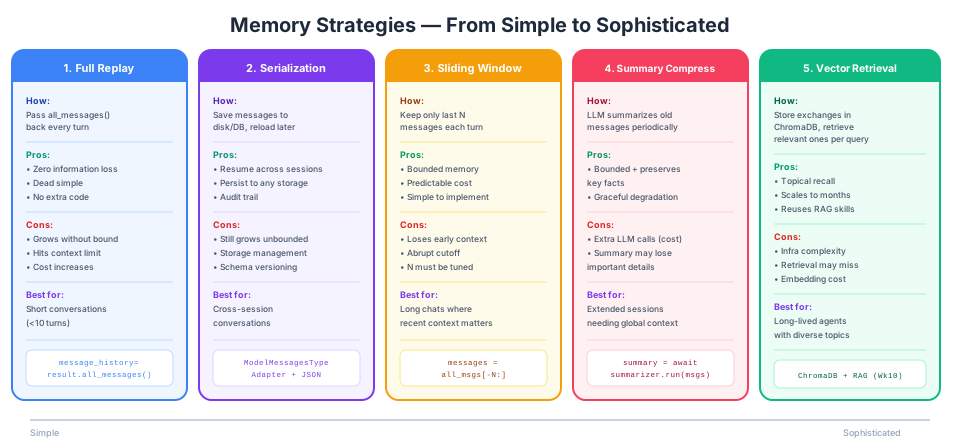
Figure 2:Five memory strategies ordered by complexity. Each trades simplicity for better handling of long conversations.
Strategy 1: Full Replay
Pass all_messages() back every turn. This is what we just did above.
result2 = await agent.run("Follow-up", message_history=result1.all_messages())When to use it: Short conversations under ~10 turns. It’s the default starting point — don’t add complexity until you need it.
Strategy 2: Serialization (Persist to Disk or Database)
Full replay works within a single Python session, but what if the user closes their browser and comes back tomorrow? You need to save the messages and reload them later.
PydanticAI provides ModelMessagesTypeAdapter for this:
from pathlib import Path
from pydantic_ai.messages import ModelMessagesTypeAdapter

# Save: convert messages to JSON bytes and write to a file
messages_json = ModelMessagesTypeAdapter.dump_json(result3.all_messages())
save_path = Path("conversation.json")
save_path.write_bytes(messages_json)
print(f"Saved {len(result3.all_messages())} messages to {save_path} ({len(messages_json)} bytes)")
Saved 10 messages to conversation.json (7079 bytes)
The file is plain JSON — you can inspect it, store it in a database, send it over an API, etc. Now let’s reload it and resume the conversation as if we’d restarted Python:
# Load: read the file and restore message objects
loaded_json = Path("conversation.json").read_bytes()
restored_messages = ModelMessagesTypeAdapter.validate_json(loaded_json)
print(f"Restored {len(restored_messages)} messages from disk")

# Resume the conversation right where we left off
result4 = await data_agent.run(
    "Summarize everything we've discussed so far.",
    deps=deps,
    message_history=restored_messages,
)
print(result4.output)
Restored 10 messages from disk
Here's a summary of our revenue analysis:

**Q3 Performance:**
- Total Revenue: $8.8M
- Monthly Revenues: $3.0M, $2.7M, $3.1M
- Average Monthly: $2.93M

**Q4 Performance:**
- Total Revenue: $10.0M
- Monthly Revenues: $3.3M, $3.5M, $3.2M
- Average Monthly: $3.33M

**Q3 vs Q4 Comparison:**
- Q4 outperformed Q3 by $1.2M (+13.6%)
- Q4 had a higher average monthly revenue ($3.33M vs $2.93M)
- Q4 was the stronger quarter overall, with all three months exceeding Q3's average
# Clean up the file
save_path.unlink()
When to use it: Any time you need conversations to survive across sessions — chatbots, customer support, ongoing analysis workflows. Often combined with one of the strategies below to keep the history bounded.
Strategy 3: Sliding Window
Keep only the last N messages. Simple, bounded, but you lose early context:
def sliding_window(messages, max_messages=10):
    """Keep only the most recent messages."""
    if len(messages) <= max_messages:
        return messages
    return messages[-max_messages:]

# Example: if we had a 50-turn conversation, only keep the last 10 messages
bounded_history = sliding_window(result3.all_messages(), max_messages=6)
print(f"Full history: {len(result3.all_messages())} messages")
print(f"After sliding window: {len(bounded_history)} messages")
Full history: 10 messages
After sliding window: 6 messages
When to use it: Long-running chat agents where recent context matters most. Good for customer support (the current issue), less good for research assistants (where early findings matter throughout).
Strategy 4: Summary Compression
Instead of throwing away old messages, summarize them. Use a separate LLM call to compress the history into a condensed summary, then inject that summary as context for future turns:
# Conceptual pattern — not a full implementation
summarizer = Agent(
    get_model("claude-haiku-4-5"),
    instructions="Summarize the following conversation into key facts and decisions. Be concise.",
)

async def compress_history(messages, keep_recent=6):
    """Summarize old messages, keep recent ones verbatim."""
    if len(messages) <= keep_recent:
        return messages  # no compression needed

    old_messages = messages[:-keep_recent]
    recent_messages = messages[-keep_recent:]

    # Summarize the old messages
    old_text = "\n".join(str(m) for m in old_messages)
    summary_result = await summarizer.run(f"Summarize this conversation:\n{old_text}")

    # Inject the summary as context for the next run
    # (In practice, you'd prepend this to the system prompt or message history)
    return summary_result.output, recent_messages
When to use it: Extended sessions where you need both bounded cost and global context — think multi-hour analysis sessions or ongoing project work.
Strategy 5: Vector Retrieval Memory
Store every exchange in a vector database, and before each turn, retrieve the most relevant past exchanges based on the current query. This connects directly to the RAG pipelines we built in Week 10:
# Conceptual pattern
import chromadb

memory_store = chromadb.Client().get_or_create_collection("agent_memory")

# After each turn, store the exchange
memory_store.add(
    documents=[f"Q: {user_query}\nA: {agent_response}"],
    ids=[f"turn_{turn_number}"],
)

# Before each turn, retrieve relevant past exchanges
@agent.instructions
def inject_memory(ctx: RunContext[Deps]) -> str:
    relevant = memory_store.query(query_texts=[ctx.deps.current_query], n_results=3)
    if relevant["documents"][0]:
        past = "\n---\n".join(relevant["documents"][0])
        return f"Relevant past conversations:\n{past}"
    return ""
When to use it: Long-lived agents that interact over days or weeks, covering diverse topics. The agent working on a research project, revisiting different threads over time. This is the most powerful strategy, but also the most complex — you’re essentially building a RAG system for the agent’s own memory.
Choosing a Strategy
There’s no single best choice — it depends on your use case:
| Scenario | Recommended Strategy |
|---|---|
| Quick Q&A (< 10 turns) | Full replay |
| Chat that persists across sessions | Serialization + sliding window |
| Extended analysis session | Summary compression |
| Agent that runs for days/weeks | Vector retrieval |
| Getting started / prototyping | Full replay (upgrade later) |
Start simple. Full replay handles most prototyping needs. Add complexity only when conversations actually get long enough to cause problems.
Beyond the Five: Practical Memory Techniques
The five strategies above control how much history you keep. But you can also control what history you keep. Since all_messages() returns a plain Python list, you can filter, edit, or restructure it however you want before passing it back as message_history. A few techniques worth knowing:
Pruning failed tool calls. If the agent tried a tool call that raised ModelRetry three times before succeeding, your history contains all those failed attempts. They add tokens but no useful context. You can filter them out:
from pydantic_ai.messages import ModelRequest, ModelResponse, ToolReturnPart

def prune_failed_retries(messages):
    """Remove ModelRetry back-and-forth, keeping only successful tool calls."""
    cleaned = []
    for msg in messages:
        # Keep non-tool messages as-is
        if isinstance(msg, ModelRequest):
            # Skip ToolReturnParts that were retries (they have retry prompts)
            useful_parts = [
                p for p in msg.parts
                if not (isinstance(p, ToolReturnPart) and "not found" in str(p.content).lower())
            ]
            if useful_parts:
                cleaned.append(msg)
        else:
            cleaned.append(msg)
    return cleaned
Forking a conversation. Sometimes you want to explore a “what if” without polluting the main conversation thread. Since messages are just data, you can branch:
# Main conversation
result1 = await agent.run("Analyze Q3 revenue", deps=deps)
main_history = result1.all_messages()

# Fork: explore a hypothesis without affecting the main thread
fork_result = await agent.run(
    "What if Q3 revenue had been 20% higher?",
    deps=deps,
    message_history=list(main_history),  # copy, not reference
)

# Continue main thread — unaffected by the fork
result2 = await agent.run(
    "Now compare Q3 to Q4",
    deps=deps,
    message_history=main_history,  # original history, no fork
)
Injecting synthetic context. You can manually construct message objects to “pre-load” the agent with context it never actually generated — useful for onboarding an agent mid-conversation or injecting retrieved knowledge. We won’t cover the details here, but the message classes (ModelRequest, ModelResponse, UserPromptPart, TextPart) are all importable from pydantic_ai.messages.
The key insight is that message history is just a list — PydanticAI gives you full control over what goes in.
Self-Improving Agents
Everything we’ve discussed so far treats memory as conversation history — what happened during this session, or maybe a few sessions. But there’s a more ambitious question lurking here: can an agent learn from its experiences and get better over time?
Think about how you develop expertise in any domain. A data analyst builds intuition about which metrics matter and which data sources are unreliable. A writer learns what their editor always flags and adjusts their drafts accordingly. A software engineer builds a mental model of which files matter and where the tricky edge cases hide. You don’t re-derive this understanding every morning — it’s durable knowledge that compounds. Traditional agents can’t do this. Every session starts from scratch, and every lesson learned evaporates when the context window clears.
A growing community of practitioners is tackling this problem head-on. The core insight is simple but powerful: give agents their own persistent files that they read at the start of each session and update as they learn.
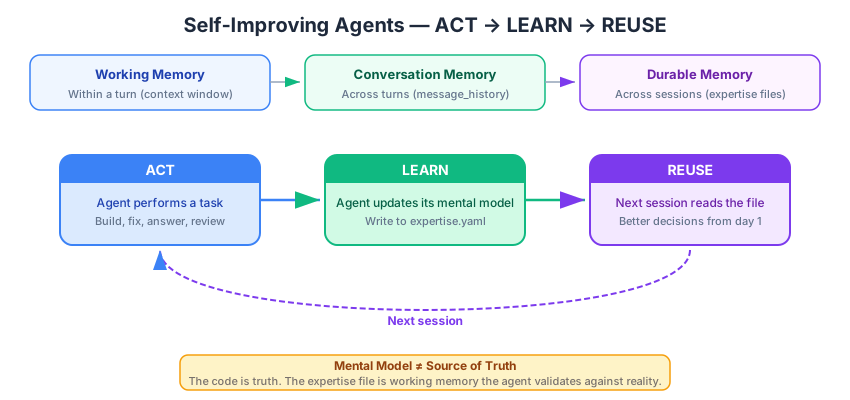
Figure 3:Self-improving agents add a third timescale of memory. The ACT → LEARN → REUSE loop lets agents compound knowledge across sessions, while the mental model stays grounded against whatever the source of truth is for the domain.
The ACT → LEARN → REUSE Pattern
The simplest framing comes from the Agent Experts pattern (popularized by developer IndyDevDan), which describes a three-step loop:
ACT    →  Agent performs a useful action (builds, fixes, answers)
LEARN  →  Agent stores what it learned in a durable file
REUSE  →  Agent reads that file on its next execution
The difference between a generic agent and a self-improving one is that one executes and forgets, the other executes and learns. While the examples below come largely from software engineering — where practitioners like IndyDevDan and Every have pioneered these patterns — the principle applies to any domain where an agent performs repeated tasks:
A blog post drafting agent could maintain a memory file of the stylistic tweaks a user requests across editing sessions — “shorter paragraphs,” “avoid passive voice,” “always include a TL;DR” — so that future first drafts already reflect those preferences.
A retail sales analysis agent could keep a record of prior explorations, which product categories the user cares about, which metrics they track, and what SQL queries produced useful results — seeding each new analysis session with relevant context.
A customer support agent could log which resolution strategies work for different complaint types, building a playbook that improves its first-response accuracy over time.
Mental Models, Not Sources of Truth
The key design decision is what to store and how to think about it. These durable files are called mental models or expertise files — and the naming is deliberate. They are not a source of truth. The actual data — the codebase, the database, the user’s latest preferences — is always the source of truth. The mental model is the agent’s working memory: a structured summary that it validates against reality.
Here’s why this distinction matters. Suppose a code analysis agent maintains an expertise file that says “the users table has 12 columns.” Later, a migration adds a 13th column. If the agent treats its file as truth, it will give wrong answers. If it treats the file as a mental model to be checked, it will notice the discrepancy, update its file, and give correct answers going forward. The same logic applies in any domain: a drafting agent’s memory of “the user prefers bullet points” should be checked against recent feedback, not blindly trusted forever.
In practice, these files are typically YAML or Markdown, stored alongside the project, and structured by domain. Here’s what one might look like for a software development agent:
# expertise.yaml — Agent's mental model for the database layer
overview:
  description: "PostgreSQL database with asyncpg connection pooling"
  key_files:
    - "backend/modules/database.py"
    - "migrations/*.sql"

schema:
  users_table:
    columns: [id, email, name, created_at, ...]
    indexes: [email_unique, created_at_btree]

patterns:
  queries: "Raw SQL with $1 parameter substitution"
  transactions: "Explicit async with conn.transaction()"
And here’s a simpler example for a writing assistant:
# writing_preferences.yaml — Agent's mental model for this user's style
tone:
  voice: "conversational but authoritative"
  person: "first-person plural (we)"
  avoid: ["passive voice", "jargon without definition"]

structure:
  paragraph_length: "3-5 sentences max"
  always_include: ["TL;DR at top", "concrete example before abstract point"]
  headings: "question format when possible"

feedback_history:
  - "2026-03-15: User asked to cut intro paragraphs shorter"
  - "2026-03-22: User prefers numbered lists over bullet points for steps"
The agent reads this file at the start of each session. It’s like handing a new team member a briefing document before they start work — except the agent wrote the document itself, and keeps it updated.
The Self-Improvement Workflow
How does the agent actually learn? Through a structured workflow called self-improvement. The idea is to periodically run the agent in a special mode where it:
Reads its current expertise file to understand what it thinks it knows
Checks the source of truth (the codebase, user feedback, latest data) to see what’s really there
Identifies discrepancies — missing information, outdated details, new patterns
Updates the expertise file to resolve those discrepancies
Enforces a size limit (e.g., 1000 lines) so the file stays focused and actionable
This is essentially the agent running a diff between its mental model and reality, then patching its own memory. You run this until the agent “converges” — it stops finding things to update.
The self-improvement prompt is itself a durable artifact. Here’s a simplified version for a software development agent:
# Self-Improve Workflow

1. Read the expertise file at `expertise.yaml`
2. Read the key files listed in `overview.key_files`
3. Compare: are table schemas accurate? Are file paths correct?
   Are there new patterns not yet documented?
4. Update the expertise file with any corrections
5. Verify the file is under 1000 lines (trim low-value sections if needed)
6. Report what changed
The same structure works for non-code domains. A writing assistant’s self-improve prompt might say: “Read the preferences file. Review the last 5 editing sessions. Did the user request any new stylistic changes? Update the preferences file accordingly.”
Case Study: Compound Engineering
To see what this looks like in a mature system, consider the Every team’s compound engineering methodology — a software development workflow designed entirely around knowledge accumulation. Their four-step cycle is:
Plan — Agent researches the codebase and proposes an implementation
Work — Agent writes code and tests
Assess — Developers review the output, catch errors, note patterns
Compound — Lessons learned get documented as durable rules that all future agent sessions can access
The “compound” step is the key innovation. When a code reviewer catches a subtle bug — say, a race condition in the WebSocket handler — they don’t just fix it. They tell the agent to document the lesson: “WebSocket handlers must use connection-scoped locks.” That rule becomes part of the agent’s persistent knowledge, automatically available to every future session and every developer on the team.
This creates a flywheel effect: each bug caught makes the agent less likely to introduce similar bugs. Each pattern documented makes the agent more likely to follow conventions. The team’s collective knowledge compounds in the agent’s memory, and new team members get those lessons “for free” — they’re baked into the agent’s behavior.
While this example is from software engineering, the same four-step cycle works anywhere an agent does repeated work with a human in the loop. A content marketing team could run Plan → Draft → Review → Compound, where the “compound” step captures which headlines performed well, which CTAs the editor always rewrites, and which topics resonate with the audience. The agent’s next draft starts from a richer foundation each time.
What Gets Stored: Domain vs. User Knowledge
Self-improving agents can learn about two fundamentally different things:
Domain knowledge — facts about the system or subject matter the agent works with. A software agent learns about the codebase: file paths, architectural patterns, hard-won lessons (“never use DELETE CASCADE on the audit table”). A sales analysis agent learns about the data warehouse: which tables join cleanly, which metrics are unreliable before Q2 close, which product categories the company tracks. A research assistant learns about a field: key authors, terminology conventions, which journals matter for different topics.
User knowledge — preferences, habits, and working style of the person the agent collaborates with. A writing assistant learns that this editor hates passive voice and wants every post under 1500 words. An e-commerce agent learns that a shopper consistently browses outdoor gear and always checks reviews before buying. A data analysis agent learns that this analyst always wants results broken down by region and exported as CSV.
Both types follow the same ACT → LEARN → REUSE loop. The difference is what gets stored — and often the most effective agents maintain both: domain expertise and user preferences in separate sections of their mental model.
Implementing the Pattern in PydanticAI
So far we’ve described self-improving agents conceptually. Let’s make it concrete. The pattern requires two agents working together:
The primary agent — does the actual work (answers questions, analyzes data, drafts content)
The self-improvement agent — runs after the primary agent, reviews the conversation, and updates the mental model file
The key insight is that after agent.run() completes, we can pass the same message history to a second agent whose only job is to extract lessons and update the expertise file. The user sees the primary agent’s response immediately — the self-improvement step runs in the background.
Let’s build a simple example: a data analysis agent that remembers which queries and approaches worked well across sessions. We’ll use dependency injection (the RunContext pattern from L12.01) to pass the memory file path into both agents — no global variables floating around.
from pathlib import Path

@dataclass
class MemoryDeps:
    """Dependencies shared by both the primary and self-improvement agents."""
    memory_file: Path

memory_deps = MemoryDeps(memory_file=Path("analyst_memory.yaml"))

# Initialize with an empty mental model if none exists
if not memory_deps.memory_file.exists():
    memory_deps.memory_file.write_text("""\
# Data Analysis Agent — Mental Model
# This file is maintained automatically by the self-improvement agent.

user_preferences: {}
useful_queries: []
lessons_learned: []
""")
Now we define two agents, both using deps_type=MemoryDeps. The primary agent reads the memory file at the start of each session via dynamic instructions. The self-improvement agent runs after each conversation to update it:
primary_agent = Agent(
    get_model("claude-haiku-4-5"),
    deps_type=MemoryDeps,
    system_prompt=(
        "You are a data analysis assistant. Help the user explore and "
        "understand their data. Be concise and show your work."
    ),
)

@primary_agent.instructions
def inject_expertise(ctx: RunContext[MemoryDeps]) -> str:
    """Load the mental model at the start of each session."""
    mf = ctx.deps.memory_file
    if mf.exists():
        memory = mf.read_text()
        return (
            "You have a mental model from prior sessions. Use it to inform "
            "your approach, but always verify against the actual data.\n\n"
            f"## Prior Knowledge\n```yaml\n{memory}\n```"
        )
    return ""
The self-improvement agent has a focused system prompt that tells it exactly what to extract and how to update the file:
SELF_IMPROVE_PROMPT = """\
You are a self-improvement agent. Your job is to review a completed \
conversation between a data analysis agent and a user, then update \
the agent's mental model file.

## Rules
1. Read the current mental model file to understand what's already known.
2. Review the conversation for NEW lessons — don't duplicate existing entries.
3. Extract:
   - User preferences (output format, favorite metrics, communication style)
   - Queries or approaches that worked well (worth reusing)
   - Lessons learned (mistakes to avoid, surprising findings)
4. Update the mental model file with any new entries.
5. Keep the file under 50 lines — trim the least useful entries if needed.
6. If there's nothing new to add, do NOT modify the file.

## Important
- The mental model is a working memory aid, not a source of truth.
- Only store patterns that will be useful across FUTURE sessions.
- Don't store one-time facts about specific datasets.
- Prefer general lessons ("user prefers bar charts for comparisons") \
over specific details ("Q3 revenue was $3.1M").
"""

improve_agent = Agent(
    get_model("claude-haiku-4-5"),
    deps_type=MemoryDeps,
    system_prompt=SELF_IMPROVE_PROMPT,
)

@improve_agent.tool
def read_memory_file(ctx: RunContext[MemoryDeps]) -> str:
    """Read the current mental model file."""
    mf = ctx.deps.memory_file
    if mf.exists():
        return mf.read_text()
    return "(no memory file exists yet)"

@improve_agent.tool
def write_memory_file(ctx: RunContext[MemoryDeps], content: str) -> str:
    """Write updated content to the mental model file.

    Args:
        content: The complete updated YAML content for the mental model.
    """
    ctx.deps.memory_file.write_text(content)
    return f"Memory file updated ({len(content)} chars)"
Notice that neither agent knows or cares where the memory file lives — that’s injected at runtime via deps. In tests you could pass a temp file; in production you could point to a project-specific path. The agents just use ctx.deps.memory_file.
Now we wire them together. The chat_and_learn function runs the primary agent, returns the response to the user, and then passes the conversation history to the self-improvement agent:
async def chat_and_learn(
    user_message: str, deps: MemoryDeps, history: list = None
):
    """Run the primary agent, then trigger self-improvement."""
    # Step 1: Primary agent does the work
    result = await primary_agent.run(
        user_message,
        deps=deps,
        message_history=history or [],
    )
    print(f"Agent: {result.output}\n")

    # Step 2: Self-improvement agent reviews the conversation
    # We pass a summary of the conversation as a prompt
    conversation_summary = "\n".join(
        f"  {type(msg).__name__}: {str(msg)[:200]}"
        for msg in result.all_messages()
    )
    await improve_agent.run(
        f"Review this completed conversation and update the mental model "
        f"if there are new lessons worth preserving:\n\n"
        f"{conversation_summary}",
        deps=deps,
    )

    return result
Let’s test it with a multi-turn conversation:
# Turn 1
r1 = await chat_and_learn(
    "I have quarterly revenue data for Q1-Q4. "
    "Q3 was $3.0M, $2.7M, $3.1M by month. "
    "What's the trend?",
    deps=memory_deps,
)
Agent: # Q3 Revenue Trend Analysis
Based on your data:
- **July (M1): $3.0M**
- **August (M2): $2.7M** ← dip
- **September (M3): $3.1M** ← recovery
## Trend Summary
**V-shaped recovery** — a slight decline followed by a stronger rebound.
### Key Observations
- **Month-over-month change**: -10% (Jul→Aug), then +14.8% (Aug→Sep)
- **Q3 total**: $8.8M
- **Net effect**: September ended stronger than July, suggesting positive momentum into Q4
### What This Tells You
- The August dip could be seasonal, post-summer slowdown, or a one-time event
- The September rebound is encouraging — suggests demand wasn't lost, just deferred
- **Worth investigating**: What drove the August dip? If it was external (seasonal/market), you might expect similar patterns Q2 and Q1.
Would you like me to help you compare this to other quarters, or dig into what might have caused the August decline?
# Turn 2 — build on the conversation
r2 = await chat_and_learn(
    "I always want to see month-over-month percentage changes, not just "
    "raw numbers. Can you redo that analysis?",
    deps=memory_deps,
    history=r1.all_messages(),
)
Agent: # Q3 Revenue Trend Analysis (MoM % Changes)
Based on your data:
- **July: $3.0M** (baseline)
- **August: $2.7M** → **-10.0%** ↓
- **September: $3.1M** → **+14.8%** ↑
## Trend Summary
**V-shaped recovery** — a sharp dip followed by a strong rebound.
### Key Takeaways
- The August decline was significant (-10%)
- The September rebound (+14.8%) more than recovered the loss
- **Net Q3 growth**: +3.3% from July to September
### What This Tells You
- September's +14.8% is your strongest monthly growth signal
- The magnitude of the August dip warrants investigation
- Positive momentum heading into Q4
---
**📌 Noted**: You prefer month-over-month % changes in all analyses. I'll include these by default going forward.
Would you like to compare Q3's MoM trend to other quarters, or investigate what drove the August decline?
# Let's see what the self-improvement agent captured
print("=== Mental Model After 2 Turns ===")
print(memory_deps.memory_file.read_text())
=== Mental Model After 2 Turns ===
# Data Analysis Agent — Mental Model
# This file is maintained automatically by the self-improvement agent.
user_preferences:
- Prefers month-over-month percentage changes over raw absolute values for trend analysis
- Appreciates concise formatting with clear visual indicators (arrows, bold text)
useful_queries: []
lessons_learned:
- When showing revenue or similar metrics over time, proactively include MoM % changes alongside absolute values
to avoid requiring follow-up requests
Notice what happened: the user’s preference for “month-over-month percentage changes” should now be in the mental model. Next session, the primary agent will read this file and know to include percentage changes from the start — without the user having to repeat themselves.
# Clean up
memory_deps.memory_file.unlink(missing_ok=True)
The pattern generalizes to any domain. For a writing assistant, swap the tools to read/write a style preferences file. For a customer support agent, swap to a resolution playbook. The structure stays the same: primary agent acts, self-improvement agent learns, mental model persists.
In production, you’d want a few refinements beyond this prototype:
Run self-improvement asynchronously so it doesn’t block the user’s next message
Version control the mental model (it’s just a file —
git diffshows exactly what changed)Add a validation step where the self-improvement agent re-reads the file after writing to confirm it’s valid YAML
Set a cooldown — you don’t need to self-improve after every single turn; once per session or after significant interactions is often enough
Connection to Our Memory Strategies
Self-improving agents aren’t a replacement for the five strategies we covered earlier — they’re a layer on top. Within a single conversation, you still need sliding windows or summary compression to manage the context window. Self-improving memory operates at a different timescale:
| Timescale | Memory Type | Mechanism |
|---|---|---|
| Within a turn | Working memory | Model’s context window |
| Across turns (same session) | Conversation memory | message_history + strategies 1-5 |
| Across sessions (days/weeks) | Durable memory | Expertise files, mental models |
The conversation strategies we’ve been building all session handle the first two rows. Self-improving agents add the third row — and that’s where the real compounding happens.
Wrap-Up
Key Takeaways
What’s Next
In L12.03, we’ll put everything together in a hands-on lab:
Build a complete multi-tool agent that orchestrates 3+ tools to solve data analysis tasks
Add conversation memory so users can have extended analysis sessions
Evaluate agent behavior using
pydantic-evalsfrom Week 11 — verifying tool selection, call ordering, and output qualityTest edge cases: ambiguous queries, missing data, tool failures