Agent Fundamentals
CAP-6640: Computational Understanding of Natural Language
Spencer Lyon
Prerequisites
Outcomes
Distinguish between a chatbot and an agent by identifying the perceive → decide → act loop
Explain how PydanticAI implements the agent loop as a graph of nodes
Observe an agent’s execution step-by-step using
agent.iter()Configure agent identity using
instructionsvssystem_promptand dynamic decoratorsInject external state into agents and tools using
RunContextand dependency injection
References
Yao et al. (2022), ReAct: Synergizing Reasoning and Acting in Language Models
What Separates a Chatbot from an Agent?
Imagine you’re building a data analysis assistant for your company. A user types:
“What was last quarter’s revenue trend compared to the previous quarter?”
A chatbot — even one powered by a state-of-the-art LLM — can only work with what’s in its prompt. It doesn’t have access to your company’s database, so the best it can do is apologize:
“I’m sorry, I don’t have access to your financial data to answer that question.”
Now imagine an agent receives the same question. It thinks: “I need to query the sales database for Q3 and Q4 revenue.” It acts: it calls a query_database tool. It observes the results: {Q3: $2.1M, Q4: $2.4M}. Then it responds:
“Revenue grew 14% from Q3 (2.4M), continuing the upward trend from the previous quarter.”
The difference is not intelligence — both use the same underlying LLM. The difference is that the agent can take actions in the world. It can query databases, call APIs, run calculations, and use the results to inform its response.
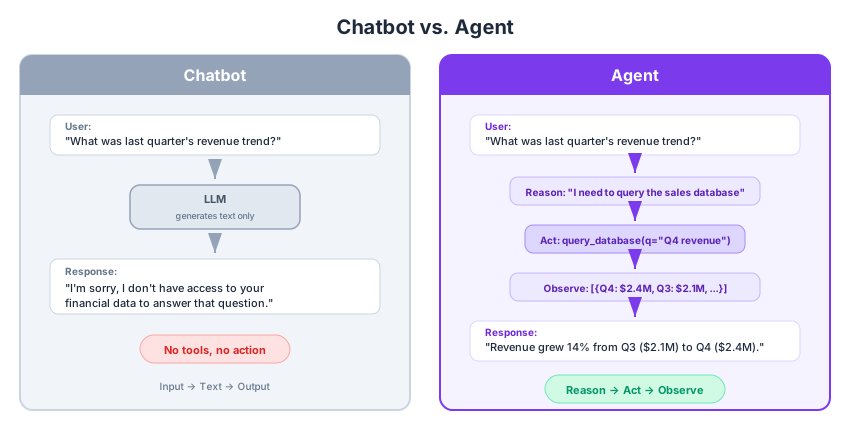
Figure 1:A chatbot generates text from text. An agent reasons about what action to take, executes it, observes the result, and synthesizes an answer.
So What Is an Agent?
We can distill this to a simple definition:
An agent is an LLM, with access to tools, running in a loop.
That’s it. Three ingredients:
An LLM — The reasoning engine. It decides what to do, interprets results, and formulates responses. We’ve been using these since Week 8.
Tools — Functions the LLM can call to interact with the outside world: databases, APIs, calculators, search engines. We introduced function calling in Week 9.
A loop — The LLM calls a tool, observes the result, decides what to do next, and repeats until the task is complete. This is the new ingredient. In Week 9 we did single-turn tool use — one call, one response. An agent loops.
From these three building blocks, higher-level capabilities emerge. Reasoning and planning come from the LLM. Action comes from tools. Memory (agent) — which we’ll cover in L12.02 — comes from persisting conversation state across loop iterations.
A Brief History: From ReAct to Modern Agent Loops
In 2022, Yao et al. published the ReAct paper, which formalized the idea of interleaving reasoning traces with actions. The original approach had the model explicitly write structured outputs like:
Thought: I need to find last quarter's revenue.
Action: query_database(table="sales", period="Q4")
Observation: [{revenue: 2400000, ...}]
Thought: Now I can compare with Q3...
This was a breakthrough — it showed that coupling reasoning with action dramatically improved task completion. But here’s the thing: you don’t need to implement ReAct manually anymore. Modern LLMs have internalized chain-of-thought reasoning, and frameworks like PydanticAI handle the action-observation loop as infrastructure. The pattern that ReAct named — reason, act, observe, repeat — is now just how agents work.
Let’s see exactly how PydanticAI implements this.
The Agent Loop
Here’s the key insight: agent.run() already runs the full loop. When you call agent.run(), PydanticAI doesn’t just make one LLM call — it loops internally, executing tool calls and feeding results back to the model until it produces a final answer. We’ve actually been using this since Week 9! The difference is that back then our agents typically made just one tool call. Now we’ll build agents that loop multiple times.
PydanticAI’s Graph Architecture
Under the hood, PydanticAI models every agent.run() call as a graph of three node types that execute in sequence:
UserPromptNode— Assembles the full message: your user prompt, system prompts, instructions, and any tool results from previous iterations.ModelRequestNode— Sends the assembled messages to the LLM and receives aModelResponse. This is where the actual API call happens.CallToolsNode— Inspects the model’s response. Two outcomes:Tool calls requested? Execute them, collect the results, and loop back to
ModelRequestNodewith the tool outputs appended.Final answer? Wrap it in
End(FinalResult(...))and return to the caller.
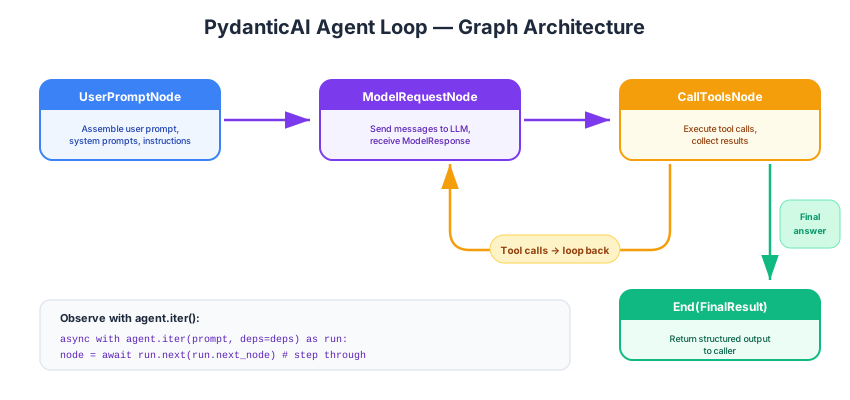
Figure 2:PydanticAI’s agent loop as a graph. The cycle between ModelRequestNode and CallToolsNode repeats until the model produces a final answer.
This is the modern incarnation of the ReAct pattern: the model reasons (in ModelRequestNode), acts (in CallToolsNode), observes (tool results fed back), and repeats. But the framework handles all the orchestration — you just define your agent and tools.
Building Our First Agent
Let’s build a data analysis agent step by step. We’ll start simple and progressively add capabilities throughout this week’s lectures.
First, our standard setup — connecting to the course LiteLLM proxy, just as we’ve done since Week 9:
import os

from dotenv import load_dotenv
from pydantic_ai import Agent
from pydantic_ai.models.openai import OpenAIChatModel
from pydantic_ai.providers.openai import OpenAIProvider

load_dotenv()

PROXY_URL = "https://litellm.6640.ucf.spencerlyon.com"


def get_model(model_name: str) -> OpenAIChatModel:
    """Create a model connection through our LiteLLM proxy."""
    return OpenAIChatModel(
        model_name,
        provider=OpenAIProvider(
            base_url=PROXY_URL,
            api_key=os.environ["CAP6640_API_KEY"],
        ),
    )
# A minimal agent — no tools yet, just an LLM with instructions
analyst = Agent(
get_model("claude-haiku-4-5"),
instructions="You are a data analysis assistant. Be concise and precise with numbers.",
)
result = await analyst.run("What's the mean of [10, 20, 30, 40, 50]?")
print(result.output)The mean is **30**.
(10 + 20 + 30 + 40 + 50) ÷ 5 = 150 ÷ 5 = 30
This works, but the agent is just doing math in its head — no different from a chatbot. Let’s give it a tool:
import statistics

analyst_with_tools = Agent(
    get_model("claude-haiku-4-5"),
    instructions="You are a data analysis assistant. Use your tools for all calculations.",
)

@analyst_with_tools.tool_plain
def compute_stats(numbers: list[float]) -> str:
    """Compute basic statistics (mean, median, stdev) for a list of numbers."""
    return (
        f"mean={statistics.mean(numbers):.2f}, "
        f"median={statistics.median(numbers):.2f}, "
        f"stdev={statistics.stdev(numbers):.2f}"
    )

result = await analyst_with_tools.run(
    "Compute the statistics for these monthly revenues: [2.1, 2.3, 1.9, 2.4, 2.8, 2.5]"
)
print(result.output)
Here are the statistics for your monthly revenues:
- **Mean (Average)**: $2.33 million
- **Median**: $2.35 million
- **Standard Deviation**: $0.31 million
This shows that your monthly revenues average around $2.33 million, with the middle value at $2.35 million. The standard deviation of $0.31 million indicates moderate variability in your revenues across these six months.
Now the agent acts — when we called agent.run(), PydanticAI internally looped: the LLM decided to call compute_stats, PydanticAI executed it, fed the result back, and the LLM produced its final answer. All of that happened inside agent.run().
What’s in the Result?
The result object from agent.run() carries more than just .output. It holds the complete record of what happened during the run:
# The final answer (what we've been printing)
print("Output:", result.output)
print()

# The full message history — this is where we see the agent's steps
for msg in result.new_messages():
    print(f"{type(msg).__name__}:")
    for part in msg.parts:
        print(f"  {type(part).__name__}: {str(part)[:120]}")
    print()
Output: Here are the statistics for your monthly revenues:
- **Mean (Average)**: $2.33 million
- **Median**: $2.35 million
- **Standard Deviation**: $0.31 million
This shows that your monthly revenues average around $2.33 million, with the middle value at $2.35 million. The standard deviation of $0.31 million indicates moderate variability in your revenues across these six months.
ModelRequest:
UserPromptPart: UserPromptPart(content='Compute the statistics for these monthly revenues: [2.1, 2.3, 1.9, 2.4, 2.8, 2.5]', timestamp=da
ModelResponse:
ToolCallPart: ToolCallPart(tool_name='compute_stats', args='{"numbers": [2.1, 2.3, 1.9, 2.4, 2.8, 2.5]}', tool_call_id='toolu_01MASe3b
ModelRequest:
ToolReturnPart: ToolReturnPart(tool_name='compute_stats', content='mean=2.33, median=2.35, stdev=0.31', tool_call_id='toolu_01MASe3bSYRB
ModelResponse:
TextPart: TextPart(content='Here are the statistics for your monthly revenues:\n\n- **Mean (Average)**: $2.33 million\n- **Median*
Look at the output carefully. You’ll see the full trace of what agent.run() did internally:
A
ModelRequestcontaining aUserPromptPart— our original questionA
ModelResponsecontaining aToolCallPart— the LLM decided to callcompute_statsA
ModelRequestcontaining aToolReturnPart— the tool’s result fed back to the LLMA
ModelResponsecontaining aTextPart— the LLM’s final answer
This is the loop in action: request → tool call → tool return → final response. Every agent.run() call produces this message history, so you can always inspect what happened after the fact.
Two methods give you access to these messages:
result.all_messages()— the complete history, including messages from prior runs (useful for multi-turn conversations, which we’ll cover in L12.02)result.new_messages()— only the messages from this run
Observing the Loop Live with agent.iter()
Inspecting result.new_messages() shows you what happened after the run completes. But sometimes you want to watch the loop as it happens — for debugging, logging, or building custom UIs. That’s what agent.iter() is for.
agent.run() and agent.iter() execute the exact same loop — the difference is that iter() lets you step through it node by node:
Observing the Loop with agent.iter()
agent.run() and agent.iter() execute the exact same loop — the difference is that iter() lets you step through it node by node, which is invaluable for understanding and debugging agent behavior:
from pydantic_graph import End

async with analyst_with_tools.iter(
    "What are the statistics for [100, 200, 150, 300, 250]?"
) as agent_run:
    node = agent_run.next_node  # starting node
    all_nodes = []

    while not isinstance(node, End):
        all_nodes.append(node)
        print(f"  Node: {type(node).__name__}")
        node = await agent_run.next(node)

    # The End node contains our final result
    all_nodes.append(node)
    print(f"  Node: End")
    print(f"\nTotal nodes visited: {len(all_nodes)}")
    print(f"Final output: {node.data.output}")
Node: UserPromptNode
Node: ModelRequestNode
  Node: CallToolsNode
  Node: ModelRequestNode
  Node: CallToolsNode
  Node: End

Total nodes visited: 6
Final output: Here are the statistics for [100, 200, 150, 300, 250]:

- **Mean**: 200.00
- **Median**: 200.00
- **Standard Deviation**: 79.06

The data set has a mean and median that are both equal to 200, which indicates a fairly symmetric distribution. The standard deviation of 79.06 shows a moderate spread of values around the mean.
You should see the sequence: UserPromptNode → ModelRequestNode → CallToolsNode → (loop back) → ModelRequestNode → CallToolsNode → End. The agent called the tool, got results, and then produced its final answer.
Shaping Agent Identity
Every agent needs to know who it is and how to behave. PydanticAI gives you two mechanisms for this, and understanding the difference between them is important.
instructions vs system_prompt
Both set text that appears in the system role of the LLM conversation, but they differ in a critical way:
system_prompt | instructions | |
|---|---|---|
| Persistence | Persists with message_history across turns | Re-evaluated fresh on every run() call |
| Use case | Permanent agent identity | Per-run context (date, user, current state) |
| Static | Agent(..., system_prompt="...") | Agent(..., instructions="...") |
| Dynamic | @agent.system_prompt decorator | @agent.instructions decorator |
Think of it this way: system_prompt defines who the agent is. instructions tell it what’s happening right now.
A system_prompt is a static string — perfect for permanent identity that doesn’t change between calls:
analyst_v2 = Agent(
    get_model("claude-haiku-4-5"),
    # Persistent identity — this string never changes
    system_prompt="You are a senior data analyst at DataCorp. You always cite specific numbers and provide actionable insights.",
)

result = await analyst_v2.run("How should I present the quarterly results to leadership?")
print(result.output)
# Quarterly Results Presentation Strategy
I'd be happy to help, but I need some specifics to give you actionable guidance. Here's what would help me provide targeted advice:
**Critical Context:**
- What are your **key metrics** this quarter? (revenue, growth %, margins, customer acquisition, etc.)
- How did you **perform vs. target** and **vs. last year**? (specific variance percentages)
- What's your **audience**? (C-suite, board, specific department heads?)
## General Framework I'd Recommend:
**1. Lead with the headline (first 30 seconds)**
- State your primary metric and variance in one sentence
- *Example: "We achieved $12.3M revenue, 8% above target but 3% below YoY due to Q2 seasonal softness"*
**2. Context before detail**
- Show 3-quarter trend, not just this quarter
- Benchmark against competitors or industry if possible
**3. Acknowledge the story**
- What drove wins? What created shortfalls?
- Use 2-3 specific examples with numbers
**4. Forward-looking recommendations**
- Don't just report—propose 2-3 actions based on the data
**What numbers should I reference?** Share your actual results and I can help you structure the narrative around them.
But what about per-run context like today’s date or the current user? You might be tempted to use an f-string:
# ⚠️ BUG: This f-string is evaluated ONCE when the Agent is created,
# not on each run() call. The date will be frozen forever.
agent = Agent(..., instructions=f"Today's date is {date.today()}.")
For instructions to actually re-evaluate on every run() call, you need to use a callable — either a function or the @agent.instructions decorator. This is the key reason the decorator pattern exists.
Dynamic Instructions with Decorators
The @agent.instructions decorator registers a function that PydanticAI calls fresh on every run(). It can also accept RunContext to access injected dependencies:
from datetime import date
from pydantic_ai import Agent, RunContext
from dataclasses import dataclass

@dataclass
class AnalysisDeps:
    user_name: str
    available_tables: list[str]

dynamic_analyst = Agent(
    get_model("claude-haiku-4-5"),
    deps_type=AnalysisDeps,
    # Static identity — persists across conversation turns
    system_prompt="You are a data analysis assistant.",
)

@dynamic_analyst.instructions
def add_context(ctx: RunContext[AnalysisDeps]) -> str:
    """Called fresh on every run() — date, user, and tables are always current."""
    tables = ", ".join(ctx.deps.available_tables)
    return (
        f"The user's name is {ctx.deps.user_name}. "
        f"Today is {date.today()}. "
        f"Available database tables: {tables}."
    )

result = await dynamic_analyst.run(
    "What tables can I query?",
    deps=AnalysisDeps(user_name="Alice", available_tables=["sales", "customers", "products"]),
)
print(result.output)
# Available Tables
You can query the following tables in the database:
1. **sales** - Transaction and sales data
2. **customers** - Customer information
3. **products** - Product catalog and details
Feel free to ask me to help you analyze data from any of these tables! I can help you write queries, explore the data, or answer specific questions about your sales, customers, or products.
Notice how the @dynamic_analyst.instructions decorator receives a RunContext — which gives it access to the dependencies we injected. This brings us to the final concept for today.
Giving Agents Access to the Outside World
Our agents need to talk to databases, APIs, and other external systems. The simplest approach would be to hardcode those connections directly inside each tool function. But that creates a problem: what if you want to run the same agent against a test database during development and a production database in deployment? What if different users should have access to different data?
The solution is straightforward: package up all the external “stuff” your agent needs into a dataclass, and pass it in when you call run(). PydanticAI calls this pattern RunContext — your tools receive this context object and pull out whatever they need at runtime, rather than having it baked in.
This idea goes by the name dependency injection in software engineering. If the term is new to you, don’t worry — the concept is simple: instead of a function reaching out to grab what it needs (hardcoding), you hand it what it needs (injecting). PydanticAI handles the plumbing.
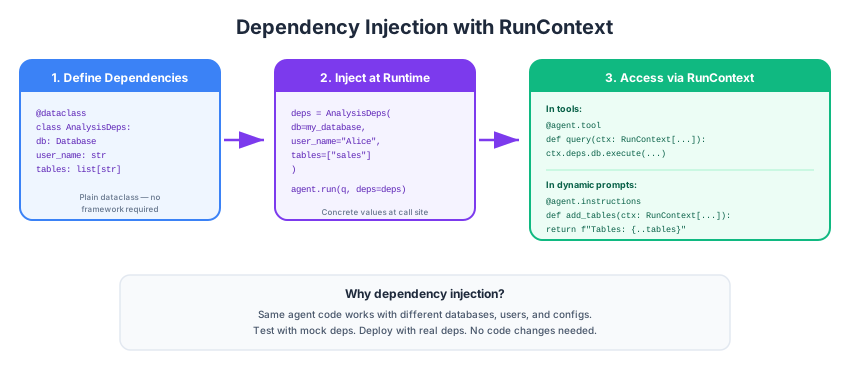
Figure 3:The dependency injection flow: define a deps dataclass, inject concrete values at runtime, access them in tools and prompts via RunContext.
The Pattern in Three Steps
Step 1: Define your dependencies as a dataclass.
from dataclasses import dataclass

# Simulated database for our examples
SALES_DB = {
    "Q1": [2.1, 2.3, 1.9],
    "Q2": [2.4, 2.8, 2.5],
    "Q3": [3.0, 2.7, 3.1],
    "Q4": [3.3, 3.5, 3.2],
}

@dataclass
class AnalysisDeps:
    """External state the agent needs access to."""
    db: dict                  # our "database"
    user_name: str            # who's asking
    available_quarters: list[str]  # what data they can access
Step 2: Create the agent with deps_type and define tools that use RunContext.
import statistics
from pydantic_ai import Agent, RunContext

data_agent = Agent(
    get_model("claude-haiku-4-5"),
    deps_type=AnalysisDeps,
    system_prompt=(
        "You are a data analysis assistant. "
        "Use your tools to query data — never make up numbers. "
        "Be concise and cite specific figures."
    ),
)

@data_agent.instructions
def inject_context(ctx: RunContext[AnalysisDeps]) -> str:
    quarters = ", ".join(ctx.deps.available_quarters)
    return f"User: {ctx.deps.user_name}. Available quarters: {quarters}."

@data_agent.tool
def get_quarterly_revenue(ctx: RunContext[AnalysisDeps], quarter: str) -> str:
    """Get monthly revenue figures for a specific quarter (e.g., 'Q1', 'Q2')."""
    if quarter not in ctx.deps.available_quarters:
        return f"Error: {quarter} is not available. Available: {ctx.deps.available_quarters}"
    data = ctx.deps.db.get(quarter)
    if data is None:
        return f"No data found for {quarter}"
    total = sum(data)
    avg = statistics.mean(data)
    return f"{quarter} monthly revenues: {data} (total: ${total:.1f}M, avg: ${avg:.2f}M)"

@data_agent.tool
def compare_quarters(ctx: RunContext[AnalysisDeps], q1: str, q2: str) -> str:
    """Compare revenue between two quarters, computing growth rate."""
    for q in [q1, q2]:
        if q not in ctx.deps.available_quarters:
            return f"Error: {q} not available."
    data1 = ctx.deps.db.get(q1, [])
    data2 = ctx.deps.db.get(q2, [])
    total1, total2 = sum(data1), sum(data2)
    growth = ((total2 - total1) / total1 * 100) if total1 else 0
    return f"{q1}: ${total1:.1f}M → {q2}: ${total2:.1f}M (growth: {growth:+.1f}%)"
Step 3: Inject concrete dependencies at runtime.
# Create deps — this is where real database connections, API keys, etc. would go
deps = AnalysisDeps(
    db=SALES_DB,
    user_name="Alice",
    available_quarters=["Q1", "Q2", "Q3", "Q4"],
)

result = await data_agent.run(
    "Compare Q2 and Q4 revenue. Which quarter performed better and by how much?",
    deps=deps,
)
print(result.output)
**Q4 performed better than Q2.**
- Q2 revenue: $7.7M
- Q4 revenue: $10.0M
- Growth: **+29.9%** (Q4 outperformed Q2 by approximately $2.3M)
Why This Matters: One Tool, Many Situations
The key insight is that tools pull their runtime information from ctx.deps, so you write one tool that works in every situation. Consider an agent that can send emails. Without RunContext, you might end up writing two versions:
# ❌ Hardcoded — now you need separate tools for different environments
@agent.tool_plain
def send_email(to: str, body: str) -> str:
    """Send an email via the production mail server."""
    real_smtp_client.send(to, body)  # hardcoded!
    return "Sent"

@agent.tool_plain
def send_email_test(to: str, body: str) -> str:
    """Fake version that just prints instead of sending."""
    print(f"[TEST] Would send to {to}: {body}")
    return "Logged"
Two tools that do almost the same thing — and the LLM has to choose between them. With RunContext, you write it once:
# ✅ One tool — behavior depends on what you pass in at runtime
@agent.tool
def send_email(ctx: RunContext[AppDeps], to: str, body: str) -> str:
    """Send an email notification."""
    ctx.deps.email_client.send(to, body)
    return "Sent"
Now the tool’s behavior depends entirely on what email_client you hand it when you call run():
# During development: pass in a fake client that just prints
dev_deps = AppDeps(email_client=FakeEmailClient())

# In production: pass in the real thing
prod_deps = AppDeps(email_client=SmtpClient(host="mail.company.com"))

# Same agent, same tool, different behavior
await agent.run("Send a welcome email to alice@example.com", deps=dev_deps)
await agent.run("Send a welcome email to alice@example.com", deps=prod_deps)
The LLM sees exactly one tool called send_email — it doesn’t know or care whether emails actually go out or just get printed. You get flexible, reusable tools without any duplication.
Wrap-Up
Key Takeaways
What’s Next
In L12.02, we’ll go deeper on tools and memory:
Tool design best practices: How docstrings become tool descriptions, error signaling with
ModelRetry, human-in-the-loop gating withrequires_approvalMemory systems: Conversation history with
message_history, serialization for persistence, sliding windows, summary compression, and vector memory connecting back to our ChromaDB work from Week 10Self-improving agents: Mental-model files that agents read and update across runs — the ACT → LEARN → REUSE pattern