Patterns of Agentic Systems
CAP-6640: Computational Understanding of Natural Language
Spencer Lyon
Prerequisites
Agent fundamentals: tools, loop,
RunContext(L12.01)Multi-turn memory with
message_history(L12.02)LLMJudgeevaluators frompydantic-evals(L11.02)
Outcomes
Distinguish workflows from agents and explain when each is appropriate
Name Anthropic’s five workflow patterns (prompt chaining, routing, parallelization, orchestrator-workers, evaluator-optimizer) and identify them in real systems
Use Andrew Ng’s four agentic patterns (Reflection, Tool Use, Planning, Multi-Agent) as a complementary lens on agent design
Compare handoff and agent-as-tool as multi-agent coordination patterns
Recognize common multi-agent failure modes and propose mitigations
References
Schluntz & Zhang, Anthropic (Dec 2024), Building Effective Agents
Anthropic (2025), How we built our multi-agent research system
MinusX (2025), Decoding Claude Code
Andrew Ng (2024), Agentic Design Patterns series
Cemri et al. (2025), Why Do Multi-Agent LLM Systems Fail?
One Agent Is Rarely Enough
Last week we built a single agent: an LLM with tools, running in a loop. That’s a powerful primitive — but it’s rarely the whole system you actually ship.
Think back to our data analysis agent from L12.01. It could answer a question like “Compare Q2 and Q4 revenue” in one run. But what if the task is bigger?
“Analyze this quarter’s earnings reports for all 15 companies in our portfolio. For each: extract the key metrics, summarize the management commentary, flag anything unusual, and then rank them by outlook.”
You could hand that to one agent with fifty tools and a very long prompt. In practice, three things would go wrong:
The agent gets lost. Fifty tools is too many; the model picks the wrong one.
The run is slow. Fifteen companies processed sequentially is a long wait.
You can’t debug it. When something goes wrong, the whole loop is one opaque trace.
There’s a better answer, and it’s the subject of this week. For some parts of this task, we don’t need an agent at all — a workflow (fixed code that calls LLMs at specific steps) is simpler and more reliable. For the adaptive parts, we want multiple agents that specialize and cooperate.
Before we even get to agents, though, one uncomfortable reminder: the simplest answer is often no LLM at all. An LLM call is the most expensive, slowest, and least predictable operation you can put in a pipeline. Most of the work in a real system should be plain Python. Reach for an LLM where a human would actually need to reason — classification, extraction from messy text, summarization, judgment calls. Everywhere else, regular code is faster, cheaper, and easier to debug. We’ll keep coming back to this.
Today we’ll learn two taxonomies that the field has converged on for thinking about this, we’ll see two case studies of real production systems that made opposite architectural choices for principled reasons, and we’ll end with a sobering look at why multi-agent systems are harder than they look.
Workflows vs. Agents: The Anthropic Framing
In December 2024, Anthropic published Building Effective Agents — a short essay that has become the canonical reference for how to think about agentic system design. The first thing it does is draw a line:
Workflows are systems where LLMs and tools are orchestrated through predefined code paths.
Agents are systems where LLMs dynamically direct their own processes and tool usage.
Both are legitimate; both are useful. The insight is that most people reach for “agent” when “workflow” would be simpler and more reliable.
Here’s the litmus test:
If a human can write down the steps in advance, you probably want a workflow.
If the sequence of steps depends on what the LLM decides along the way, you want an agent.
A workflow is predictable and cheap. An agent is flexible and expensive — it trades latency, tokens, and debuggability for the ability to adapt. Anthropic’s advice is worth memorizing:
“Find the simplest solution possible, and only increase complexity when demonstrably needed.”
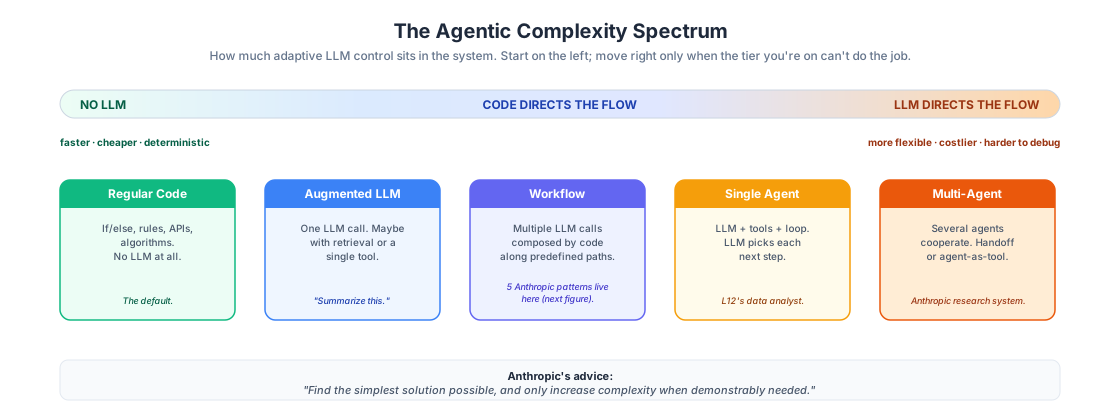
Figure 1:The agentic complexity spectrum, ordered by how much control the LLM (rather than your code) has over the flow. Each tier is strictly more powerful — and strictly more expensive — than the one to its left. The five Anthropic workflow patterns we cover next all sit inside the Workflow tier; they’re shapes of composition, not additional points on this axis.
The Five Workflow Patterns
Anthropic identifies five workflow patterns that show up again and again in production systems. Let’s tour them with one-line “what” / “when” / “for-instance” descriptions — we won’t implement all of them, but you should recognize them when you see them.
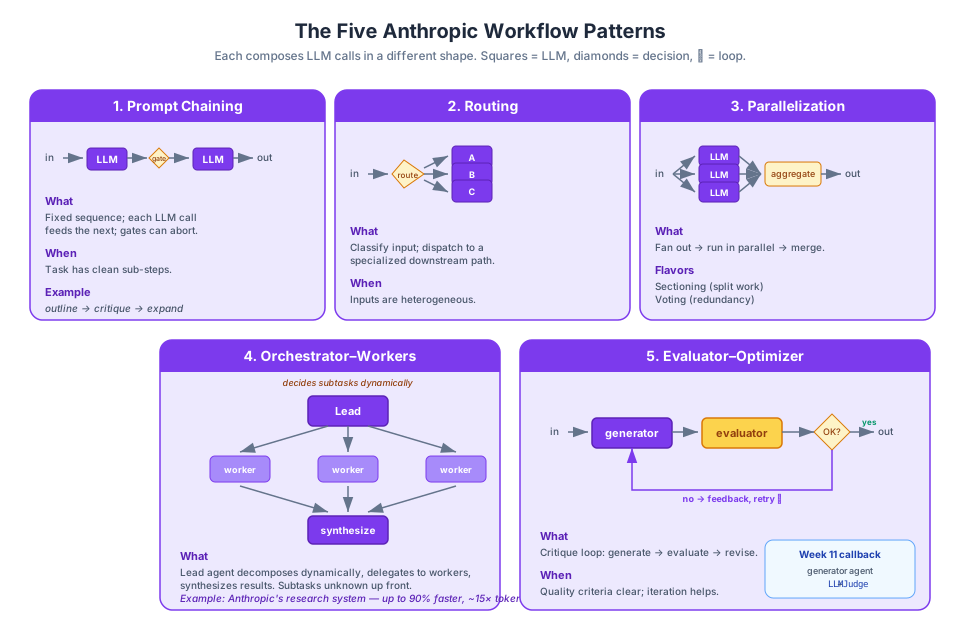
Figure 2:Anthropic’s five workflow patterns. Each composes LLM calls in a different shape. Arrows are data flow; diamonds are LLM decisions; the ⟳ marker denotes a loop.
1. Prompt chaining. Decompose the task into a fixed sequence of steps, each step an LLM call on the previous one’s output. Optionally add programmatic gates between steps (e.g., “does this output validate?”) that short-circuit on failure. Use when: the task has clean sequential sub-problems. Example: draft an outline → critique the outline → expand into prose.
2. Routing. Classify the input and dispatch it to a specialized downstream path (different prompt, different model, different tool). Use when: inputs are heterogeneous and benefit from separated handling. Example: a customer-support router that sends refund questions to one agent and technical questions to another.
3. Parallelization. Run multiple LLM calls simultaneously, then aggregate. Two flavors: sectioning (decompose into independent subtasks — e.g., translate each page separately) and voting (run the same task multiple times, take majority or best — e.g., three safety checks with different prompts).
4. Orchestrator-workers. A central LLM dynamically decomposes the task, delegates subtasks to worker LLMs, and synthesizes their results. Unlike parallelization, the subtasks aren’t known in advance — the orchestrator decides them at runtime. Use when: task decomposition depends on the input. Example: a code-change agent that plans which files to edit based on the request.
5. Evaluator-optimizer. Pair a generator LLM with an evaluator LLM in a loop: the generator produces an output, the evaluator critiques it, and the generator revises. Exit when the evaluator is satisfied. Use when: you have clear quality criteria and iteration measurably improves the result. Example: literary translation where a bilingual critic gives feedback on nuance.
You might notice something about that last one. An evaluator-optimizer loop is exactly a generator agent plus an LLMJudge evaluator from L11.02. We already built the pieces — now we’re composing them into a pattern.
A Short Demo: Prompt Chaining
Let’s see the simplest pattern — prompt chaining — in code. No agent loop here, just three sequential LLM calls with a gate between the first two.
import os
import textwrap
from dotenv import load_dotenv
from pydantic_ai import Agent, UsageLimits
from pydantic_ai.models.openai import OpenAIChatModel
from pydantic_ai.providers.openai import OpenAIProvider

load_dotenv()

PROXY_URL = "https://litellm.6640.ucf.spencerlyon.com"


def get_model(model_name: str) -> OpenAIChatModel:
    """Create a model connection through our LiteLLM proxy."""
    return OpenAIChatModel(
        model_name,
        provider=OpenAIProvider(
            base_url=PROXY_URL,
            api_key=os.environ["CAP6640_API_KEY"],
        ),
    )


def print_wrapped(text: str, width: int = 90) -> None:
    """Print `text` wrapped at `width` columns, preserving paragraph breaks."""
    paragraphs = text.split("\n\n")
    print("\n\n".join(textwrap.fill(p, width=width) for p in paragraphs))
outliner = Agent(
get_model("claude-haiku-4-5"),
instructions="You produce a crisp 3-bullet outline for a short blog post. Output only the bullets.",
)
critic = Agent(
get_model("claude-haiku-4-5"),
instructions=(
"You check whether an outline is specific enough to write from. "
"Respond with exactly 'OK' if it is, or a one-sentence critique otherwise."
),
)
writer = Agent(
get_model("claude-haiku-4-5"),
instructions="You expand a 3-bullet outline into a 2-paragraph blog post. Be concrete.",
)
ONE_CALL = UsageLimits(request_limit=1) # assert each step is exactly one LLM call
async def chain(topic: str) -> str:
# Step 1: draft an outline
outline = (await outliner.run(f"Topic: {topic}", usage_limits=ONE_CALL)).output
# Gate: programmatic check on the outline
verdict = (await critic.run(outline, usage_limits=ONE_CALL)).output.strip()
if verdict != "OK":
return f"Rejected at gate. Critic said: {verdict}"
# Step 2: expand into prose
post = (await writer.run(outline, usage_limits=ONE_CALL)).output
return post
post = await chain("Why vector databases are not a silver bullet for RAG")
print_wrapped(post)# The Hidden Challenges of Vector Database-Powered RAG Systems
Vector databases have become the default solution for retrieval-augmented generation, yet
they introduce a deceptive fragility into the pipeline. The core problem is that
embeddings are inherently lossy—they compress rich document meaning into numerical
vectors, inevitably losing nuance in translation. When a user asks about "car
maintenance," the vector database might retrieve documents about "automobile repair" or
"vehicle servicing," but if the embedding space doesn't capture the semantic overlap
perfectly, relevant chunks get ranked below irrelevant ones. This retrieval failure
cascades directly into the LLM, which then hallucinates plausible-sounding but incorrect
answers because it was never given the right context to begin with. A 1,000-token context
window becomes useless if the vector search returns 800 tokens of off-topic information.
Beyond retrieval accuracy, the operational reality of maintaining vector databases is far
costlier than most teams anticipate. Running a production RAG system means continuously
embedding new documents, managing storage infrastructure, monitoring embedding model
performance, and dealing with the insidious problem of data staleness—yesterday's
embeddings don't adapt to today's updated documents. The real insight, however, is that
vector database quality is almost irrelevant if earlier pipeline decisions are flawed.
Chunking a 50-page document into 100-token segments without overlap loses critical
context; selecting an embedding model trained on scientific papers to index customer
support logs creates a fundamental mismatch; crafting vague prompts that don't instruct
the LLM how to use retrieval results wastes all preceding effort. A sophisticated vector
database cannot compensate for poor document preprocessing or weak prompt
engineering—excellence in RAG requires excellence across all stages.
Notice what we did not do here. There is no agent.run() calling itself in a loop. There is no LLM deciding “what should I do next?” The pipeline is defined in Python; the LLMs are just the muscle at each step. That’s a workflow.
The UsageLimits(request_limit=1) we pass to each call is how we make that contract explicit: if any of these agents ever tried to do more than one round-trip — because someone later added a tool, or the output failed validation and triggered a retry — PydanticAI would raise UsageLimitExceeded instead of silently turning our workflow into a miniature agent. In a workflow, the code decides when an LLM runs; this is how we enforce it.
Any time you find yourself tempted to reach for a heavyweight framework, ask first: “Could I just write this as a few function calls?” Often you can.
Two Case Studies, Two Architectures
Before we move on, let’s look at two real production systems shipped by the same engineering organization. They made opposite architectural choices, and both were right. The contrast is the most useful thing you can carry out of this lecture.
Case study 1: Anthropic’s multi-agent research system
In June 2025, Anthropic published How we built our multi-agent research system. It’s a production case study of the orchestrator-workers pattern:
A lead agent receives the user’s research question and decides on a research plan.
The lead agent spawns 3–5 subagents in parallel, each with a narrower sub-question and its own tool access.
Each subagent uses 3+ tools in parallel (different search queries, different sources).
The lead agent synthesizes the subagents’ findings into a final answer.
No graph framework, no fancy protocol — just an agent that can call sub-agents as tools. We’ll build up this agent-as-tool pattern in the next section and use it in L13.03’s lab.
The numbers are impressive and sobering:
Up to 90% reduction in research time for complex queries, compared to a single agent doing the work serially.
In Anthropic’s internal eval, the multi-agent system outperformed the single-agent baseline by 90.2% on breadth-first research queries.
Token usage explained roughly 80% of the performance variance. The multi-agent system spends ~15× more tokens than a chat session. Their blunt framing: “multi-agent systems are effective because they spend enough tokens to solve the problem.”
One more detail from the post matters for the next case study: this works because research sub-tasks are largely independent. Each subagent can chase its own lead without needing to know what the others are finding until the synthesis step.
Case study 2: Claude Code
A few months earlier, the same company shipped Claude Code — their AI coding assistant. You might assume it uses the same multi-agent architecture. It doesn’t. MinusX’s architectural analysis documented the design:
A single main thread. The primary agent stays in charge of the conversation from start to finish.
Subagents capped at max depth 1. The main agent can spawn a subagent for a focused task, but subagents can’t spawn their own subagents. No deep hierarchies.
~13 general tools, not dozens of specialized ones.[1] File ops (Read, Write, Edit), search (Grep, Glob, WebSearch, WebFetch), execution (Bash), and delegation (Task). That’s the whole toolkit.
Smart model routing. Heavy reasoning goes to the large model; simple sub-tasks get routed to a cheaper, faster model.
Why single-thread when multi-agent was 90% faster for research? Because coding tasks have tight dependencies between steps. When subagent A adds a function, subagent B can’t simultaneously refactor a different file without risking conflicts. The parallelism that made research cheap makes coding chaotic. The Anthropic team chose the architecture that matched the task, not the one that looked more impressive in a diagram.
The principle
Same engineering organization. Same foundation model. Opposite architecture. Both ship to production. Match the shape of the system to the shape of the task.
Sub-tasks independent → orchestrator-workers wins. Pay the token bill; get the speedup.
Sub-tasks coupled → single-thread wins. Give the agent good tools and get out of its way.
When you’re designing your own agentic system, that question — are the sub-tasks independent, or coupled? — is worth more than picking the right framework.
Ng’s Four Patterns: A Complementary Lens
Anthropic’s taxonomy tells you how to compose LLM calls — the shape of the control flow. A complementary taxonomy from Andrew Ng focuses on what the agent does inside the loop.
Ng’s four agentic design patterns:
1. Reflection. The agent critiques its own output and revises. (If you squint, this is evaluator-optimizer with the generator and evaluator being the same agent on a second pass.)
2. Tool Use. The agent can call external functions. This is what we spent all of Week 12 on.
3. Planning. The agent decomposes a complex goal into sub-steps before executing. We’ll see concrete planner implementations (Plan-and-Execute, ReWOO) in L13.02.
4. Multi-Agent Collaboration. Specialist agents with distinct roles cooperate to solve a problem larger than any one of them could handle alone.
The two taxonomies are not competitors; they’re different lenses on the same systems:
| Anthropic’s lens (control flow) | Ng’s lens (capabilities) |
|---|---|
| How are LLM calls composed? | What does each agent do? |
| The five workflow patterns (+ handoff vs. agent-as-tool) | Reflection, Tool Use, Planning, Multi-Agent |
When you design a system, use both. The Anthropic framing keeps you honest about whether you need an agent at all. The Ng framing reminds you that inside any agent, there are building blocks — tool use, planning, reflection — that you can mix and match.
Multi-Agent Coordination: Handoff vs. Agent-as-Tool
When you do need multiple agents, you have to decide how they pass work to each other. Two patterns dominate, and they differ in who stays in charge.
Agent-as-tool (PydanticAI, Anthropic subagents). A parent agent has a tool whose implementation is “call this other agent and wait for its answer.” Control stays with the parent; the child returns a value, and the parent decides what to do with it. We’ll put this together in L13.03’s lab.
Handoff (OpenAI Agents SDK). The currently-active agent says “the user’s question isn’t really for me — please transfer them to the refunds specialist.” Control transfers; the new agent is now the active one, and the original agent steps out of the conversation.
They look similar on the surface. The difference matters in practice:
| Agent-as-tool | Handoff | |
|---|---|---|
| Who’s in charge after the call? | Parent agent | The new (receiving) agent |
| Return type | A value (function-call semantics) | Conversational control |
| Good for | Delegation with synthesis (research, writing) | Routing within conversations (support triage) |
| Canonical framework | PydanticAI, Anthropic subagents | OpenAI Agents SDK |
| Metaphor | A manager asks a specialist a question | A receptionist forwards your call |
Both are valid, and the right choice depends on whether the original agent has more work to do after the sub-task is done. Synthesis tasks want agent-as-tool. Triage-and-forget tasks want handoff.
Why Multi-Agent Is Hard
So far this lecture has been optimistic. Workflows are clean. The 5 patterns are teachable. Orchestrator-workers scaled to a 90% speedup. Let me close with the hard truth.
In April 2025, a UC Berkeley team led by Mert Cemri published Why Do Multi-Agent LLM Systems Fail? — an empirical study of 5 popular multi-agent frameworks on over 200 tasks. Their headline:
Across state-of-the-art multi-agent LLM systems, the correctness rate was only 25%.
One in four. With frontier models. Not because the models aren’t smart — because the system design introduces bugs that single-agent systems simply don’t have.
They call their taxonomy MAST (Multi-Agent System failure Taxonomy) — 14 failure modes grouped into three stages of agent interaction. We won’t rehearse all 14, but these are worth knowing by name:
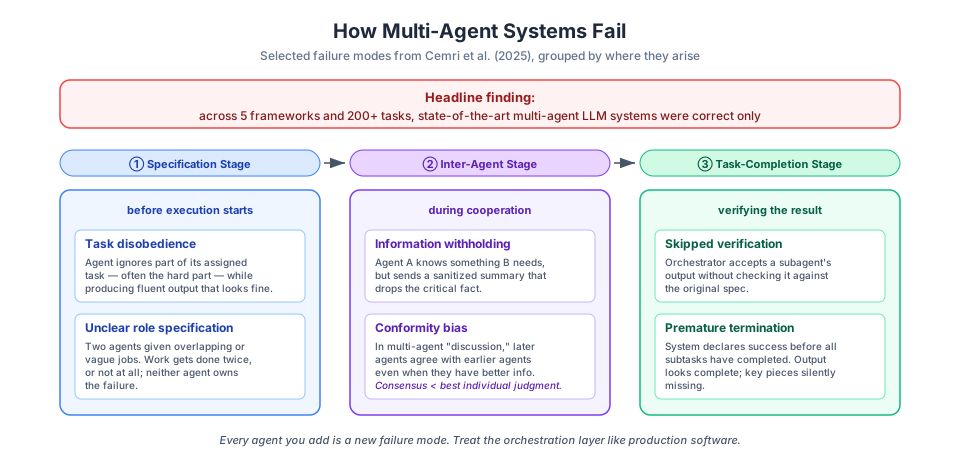
Figure 3:Selected failure modes from Cemri et al.'s MAST taxonomy, grouped by where they occur in a multi-agent run.
Task disobedience (specification stage). An agent ignores part of its assigned task — often the hardest part. A summarization subagent produces a fluent summary that silently drops 2 of the 5 bullet points it was asked to cover.
Information withholding (inter-agent stage). Agent A knows something Agent B needs, but when B asks, A reports a sanitized summary that drops the key fact. This one is especially insidious because both agents look like they’re cooperating.
Conformity bias (inter-agent stage). When several agents discuss, later agents agree with earlier agents even when they have better information. The “discussion” produces a consensus that’s worse than any single agent’s independent judgment.
Skipped verification (task-completion stage). The orchestrator accepts a subagent’s output without checking it against the original spec. Errors compound as results flow up.
You’ll notice that single-agent systems can’t have most of these problems — there’s no “Agent A” withholding information from “Agent B” when there’s only one agent. Every time you add an agent, you add a failure mode. The Cemri paper is not an argument against multi-agent systems; it’s an argument for treating the orchestration layer like production software. Which means:
Be explicit about specs. Each agent needs a sharp, testable description of what it’s supposed to return.
Verify at the handoff. Every boundary between agents is a place where things quietly go wrong. Check outputs against expectations.
Trace everything. When something goes wrong in a 5-agent run, you need to reconstruct what happened. (We’ll set this up with Pydantic Logfire in L13.02.)
Prefer simpler patterns. If a workflow works, ship the workflow. Add agents when you measure the benefit.
Wrap-Up
Key Takeaways
What’s Next
In L13.02 we’ll zoom out and survey the current agent-framework landscape — PydanticAI (the one we’ll keep using), LangGraph, CrewAI, the OpenAI Agents SDK, the Microsoft Agent Framework, and n8n — so you can tell when to reach for which. We’ll then look at two emerging protocols, MCP and A2A, that let agents talk to tools and to each other across framework boundaries. Finally we’ll add Pydantic Logfire to our PydanticAI setup so we can trace multi-agent runs instead of guessing at what happened.
Then in L13.03 we’ll tie it all together in a lab, building a multi-agent workflow end to end — and instrumenting it so the Cemri failure modes above don’t catch us off guard.
The “13 tools” figure comes from the MinusX writeup in early 2025. Claude Code has grown since then — the current count is closer to 30. The additions — cron scheduling, background
Taskprimitives, team/worktree management, notebook editing, plan-mode controls, MCP resource access — broaden what Claude Code does as an application rather than change how its agent loop works. The “few general tools, not dozens of specialists” design principle still holds; the growth reflects feature surface, not architectural drift.