The Hugging Face Ecosystem
CAP-6640: Computational Understanding of Natural Language
Spencer Lyon
Prerequisites
L07.01: Transformer model variants — encoder-only, decoder-only, and encoder-decoder architectures
L02.01/L03.02: Tokenization concepts including subword tokenization (BPE, WordPiece)
Outcomes
Use Hugging Face
pipeline()to perform common NLP tasks with pretrained modelsExplain the three-step process inside a pipeline: tokenize, model forward pass, post-processing
Load and use
AutoTokenizerandAutoModelclasses to work with transformer models at a lower levelLoad and preprocess NLP datasets using the Hugging Face
datasetslibrary
References
From Theory to Practice
In Part 01, we studied the three transformer families: encoder-only models like RoBERTa, decoder-only models like GPT, and encoder-decoder models like T5. We understand what they are and why they’re suited for different tasks.
But knowing the theory and actually using these models are two different things. Training a transformer from scratch requires massive datasets, specialized hardware, and weeks of compute. Fortunately, we don’t have to. The Hugging Face ecosystem gives us access to hundreds of thousands of pretrained models — ready to use in a few lines of Python.
Hugging Face provides three core libraries that we’ll use throughout the rest of this course:
| Library | Purpose | Analogy to What You Know |
|---|---|---|
transformers | Load and use pretrained models | Like loading en_core_web_sm in SpaCy, but for transformers |
tokenizers | Fast tokenization (built into transformers) | Like SpaCy’s tokenizer, but using subword methods (BPE, WordPiece) |
datasets | Load and process NLP datasets | Like sklearn.datasets, but with streaming and Hub integration |
Let’s see how these work in practice.
import torch
from transformers import pipeline, AutoTokenizer, AutoModelForSequenceClassification
from datasets import load_dataset
Pipelines: NLP in Three Lines of Code
The fastest way to use a pretrained transformer is through pipelines. A pipeline wraps up tokenization, model inference, and post-processing into a single function call. Let’s start with sentiment analysis:
classifier = pipeline("sentiment-analysis")
result = classifier("I absolutely love this NLP course!")
print(result)
No model was supplied, defaulted to distilbert/distilbert-base-uncased-finetuned-sst-2-english and revision 714eb0f.
Using a pipeline without specifying a model name and revision in production is not recommended.
Warning: You are sending unauthenticated requests to the HF Hub. Please set a HF_TOKEN to enable higher rate limits and faster downloads.
[{'label': 'POSITIVE', 'score': 0.9998782873153687}]
That’s it — three lines to go from raw text to a prediction. The pipeline() function automatically downloaded a pretrained model (DistilBERT fine-tuned on SST-2), tokenized our input, ran it through the model, and decoded the output into a human-readable label.
Available Tasks
Hugging Face provides pipelines for many common NLP tasks. Here are the ones that map directly to the model variants we studied in Part 01:
| Pipeline Task | Typical Architecture | Example Use Case |
|---|---|---|
"sentiment-analysis" / "text-classification" | Encoder-only | Classify reviews, detect spam |
"ner" / "token-classification" | Encoder-only | Extract people, places, organizations |
"question-answering" | Encoder-only | Find answers in a passage |
"text-generation" | Decoder-only | Continue a prompt, creative writing |
"summarization" | Encoder-decoder | Condense articles |
"translation_xx_to_yy" | Encoder-decoder | Translate between languages |
Notice the pattern? Understanding tasks use encoder-only models. Generation tasks use decoder-only. Transformation tasks use encoder-decoder. This is exactly the framework from Part 01.
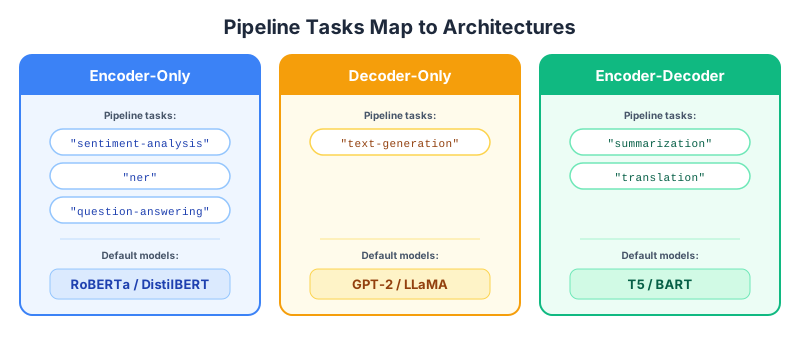
Figure 1:Pipeline task names map directly to the three transformer architecture families from Part 01.
Pipelines in Action
Let’s try a few more:
# Named Entity Recognition — an encoder-only task
ner = pipeline("ner", aggregation_strategy="simple")

entities = ner("Spencer Lyon teaches NLP at the University of Central Florida in Orlando.")
for entity in entities:
    print(f"  {entity['word']:35s} → {entity['entity_group']:5s} (score: {entity['score']:.3f})")
No model was supplied, defaulted to dbmdz/bert-large-cased-finetuned-conll03-english and revision 4c53496.
Using a pipeline without specifying a model name and revision in production is not recommended.
BertForTokenClassification LOAD REPORT from: dbmdz/bert-large-cased-finetuned-conll03-english
Key                      | Status     |  |
-------------------------+------------+--+-
bert.pooler.dense.weight | UNEXPECTED |  |
bert.pooler.dense.bias   | UNEXPECTED |  |

Notes:
- UNEXPECTED	:can be ignored when loading from different task/architecture; not ok if you expect identical arch.
  Spencer Lyon                        → PER   (score: 1.000)
  NL                                  → MISC  (score: 0.725)
  University of Central Florida       → ORG   (score: 0.996)
  Orlando                             → LOC   (score: 0.995)
# Text Generation — a decoder-only task
generator = pipeline("text-generation", model="gpt2")

result = generator(
    "Natural language processing is",
    max_new_tokens=20,
    do_sample=False,  # Greedy decoding for reproducibility
)
print(result[0]["generated_text"])GPT2LMHeadModel LOAD REPORT from: gpt2
Key | Status | |
---------------------+------------+--+-
h.{0...11}.attn.bias | UNEXPECTED | |
Notes:
- UNEXPECTED :can be ignored when loading from different task/architecture; not ok if you expect identical arch.
The following generation flags are not valid and may be ignored: ['temperature']. Set `TRANSFORMERS_VERBOSITY=info` for more details.
Passing `generation_config` together with generation-related arguments=({'do_sample', 'max_new_tokens'}) is deprecated and will be removed in future versions. Please pass either a `generation_config` object OR all generation parameters explicitly, but not both.
Setting `pad_token_id` to `eos_token_id`:50256 for open-end generation.
Both `max_new_tokens` (=20) and `max_length`(=50) seem to have been set. `max_new_tokens` will take precedence. Please refer to the documentation for more information. (https://huggingface.co/docs/transformers/main/en/main_classes/text_generation)
Natural language processing is a very important part of the language learning process.

The first step is to understand the language
Notice that we specified model="gpt2" for the text generation pipeline. Every pipeline has a default model, but you can point it at any compatible model on the Hub. This is how you swap between models — same API, different model.
Behind the Pipeline
Pipelines are convenient, but to really understand what’s happening — and to customize behavior for your own applications — you need to know what’s going on under the hood. Every pipeline performs three steps:
Tokenize — Convert raw text into token IDs the model understands
Forward pass — Run the token IDs through the model to get raw predictions (logits)
Post-process — Convert logits into human-readable outputs (labels, probabilities)
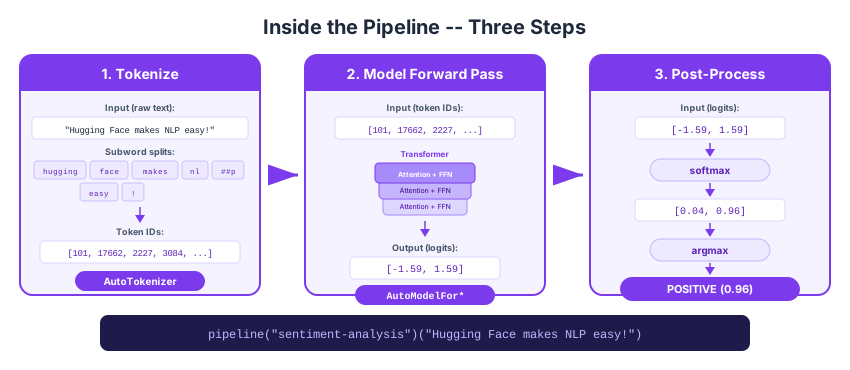
Figure 2:Every Hugging Face pipeline performs three steps: tokenize, forward pass, and post-process.
Let’s do each step manually.
Step 1: Tokenize
In Week 2, we learned about tokenization with SpaCy — splitting text into words. In Week 3, we learned about subword tokenization methods like BPE and WordPiece that handle rare words by splitting them into meaningful pieces.
Hugging Face tokenizers do exactly this subword tokenization, but each model comes with its own specific vocabulary learned during pretraining. You must always use the tokenizer that matches your model — they’re paired together.
model_name = "distilbert-base-uncased-finetuned-sst-2-english"
tokenizer = AutoTokenizer.from_pretrained(model_name)

text = "Hugging Face makes NLP easy!"
encoded = tokenizer(text, return_tensors="pt")

print(f"Input text:     {text!r}")
print(f"Tokens:         {tokenizer.convert_ids_to_tokens(encoded['input_ids'][0])}")
print(f"Token IDs:      {encoded['input_ids'].tolist()}")
print(f"Attention mask: {encoded['attention_mask'].tolist()}")Input text: 'Hugging Face makes NLP easy!'
Tokens: ['[CLS]', 'hugging', 'face', 'makes', 'nl', '##p', 'easy', '!', '[SEP]']
Token IDs: [[101, 17662, 2227, 3084, 17953, 2361, 3733, 999, 102]]
Attention mask: [[1, 1, 1, 1, 1, 1, 1, 1, 1]]
A few things to notice:
Special tokens:
[CLS]at the start and[SEP]at the end — these are BERT-specific tokens that mark the beginning and end of a sequenceSubword splitting: “NLP” became
["nl", "##p"]— the##prefix means “continuation of the previous token” (this is WordPiece tokenization)Lowercased: The model name says
uncased, so the tokenizer lowercases everythingAttention mask: All 1s here (every token is real, no padding)
Compare this with SpaCy’s tokenizer from Week 2: SpaCy splits on whitespace and punctuation rules, producing word-level tokens. The HF tokenizer uses a learned subword vocabulary, so it can handle rare or unseen words by breaking them into pieces.
Step 2: Model Forward Pass
Now we feed the tokenized input to the model:
model = AutoModelForSequenceClassification.from_pretrained(model_name)

with torch.no_grad():
    outputs = model(**encoded)

print(f"Output type: {type(outputs)}")
print(f"Logits:      {outputs.logits}")
print(f"Logit shape: {outputs.logits.shape}")Output type: <class 'transformers.modeling_outputs.SequenceClassifierOutput'>
Logits: tensor([[-3.2378, 3.4118]])
Logit shape: torch.Size([1, 2])
The model returns logits — raw, unnormalized scores for each class. This model was fine-tuned for binary sentiment classification, so we get two logits (negative and positive).
Notice that we used AutoModelForSequenceClassification — not just AutoModel. This is important: AutoModel returns raw hidden states, but AutoModelFor* classes add a task-specific head on top. Here’s how the naming works:
| Class | What It Returns | Use For |
|---|---|---|
AutoModel | Hidden states (contextual embeddings) | Feature extraction, custom architectures |
AutoModelForSequenceClassification | Class logits | Text classification, sentiment |
AutoModelForTokenClassification | Per-token logits | NER, POS tagging |
AutoModelForQuestionAnswering | Start/end logits | Extractive QA |
AutoModelForCausalLM | Next-token logits | Text generation |
The AutoModel name is key: the Auto prefix means Hugging Face will automatically select the correct architecture (BERT, GPT-2, T5, etc.) based on the model name. You write the same code regardless of which model you load.
Step 3: Post-process
Finally, convert logits to predictions:
import torch.nn.functional as F

probs = F.softmax(outputs.logits, dim=-1)
predicted_class = torch.argmax(probs, dim=-1).item()
label = model.config.id2label[predicted_class]

print(f"Probabilities: {probs.tolist()}")
print(f"Predicted:     {label} ({probs[0][predicted_class]:.4f})")
Probabilities: [[0.001292899250984192, 0.9987070560455322]]
Predicted: POSITIVE (0.9987)
We just manually replicated what pipeline("sentiment-analysis") does automatically. The pipeline is a convenience wrapper — but understanding these three steps lets you customize any part of the process.
The Datasets Library
The final piece of the Hugging Face ecosystem is the datasets library. It provides a unified interface for loading, processing, and streaming NLP datasets — both from the Hugging Face Hub and from local files.
Loading a Dataset
dataset = load_dataset("stanfordnlp/imdb", split="train")
print(f"Type:     {type(dataset)}")
print(f"Size:     {len(dataset):,} examples")
print(f"Features: {dataset.features}")
print(f"\nFirst example:")
print(f"  Label: {dataset[0]['label']} ({dataset.features['label'].int2str(dataset[0]['label'])})")
print(f" Text: {dataset[0]['text'][:100]}...")Type: <class 'datasets.arrow_dataset.Dataset'>
Size: 25,000 examples
Features: {'text': Value('string'), 'label': ClassLabel(names=['neg', 'pos'])}
First example:
Label: 0 (neg)
Text: I rented I AM CURIOUS-YELLOW from my video store because of all the controversy that surrounded it w...
The load_dataset function downloads and caches the data. The split parameter selects which split to load ("train", "test", or a slice like "train[:100]"). The dataset is stored in an efficient Arrow format — even large datasets load quickly and use minimal memory.
Processing with map()
The most powerful feature of the datasets library is the map() method, which applies a function to every example (or batch of examples) in the dataset. This is how you preprocess data for training — for example, tokenizing text:
tokenizer = AutoTokenizer.from_pretrained("distilbert-base-uncased")

def tokenize_fn(examples):
    return tokenizer(examples["text"], truncation=True, max_length=128)

# Tokenize in batches for speed
tokenized = dataset.select(range(100)).map(tokenize_fn, batched=True)

print(f"Original columns:  {dataset.column_names}")
print(f"Tokenized columns: {tokenized.column_names}")
print(f"\nFirst example token count: {len(tokenized[0]['input_ids'])}")Original columns: ['text', 'label']
Tokenized columns: ['text', 'label', 'input_ids', 'token_type_ids', 'attention_mask']
First example token count: 128
After mapping, the dataset has new columns (input_ids, attention_mask) alongside the original ones. This tokenized dataset is ready to be fed into a model for training or evaluation.
The map() method is lazy-friendly and efficient: it can process data in batches, cache results to disk, and even work with datasets that don’t fit in memory (via streaming mode with load_dataset(..., streaming=True)).
Wrap-Up
Key Takeaways
What’s Next
In Part 03, we’ll put all of this into practice with a Model Safari lab. You’ll use Hugging Face pipelines to tackle multiple NLP tasks — classification, NER, summarization, and question answering — and compare how encoder-only, decoder-only, and encoder-decoder models perform on the same inputs. The goal is to build intuition for which model family to reach for and why, grounded in hands-on experimentation.